Godzilla (Japan)
0 6 0
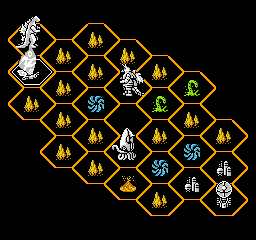
Godzilla (Japan) is a classic NES game that puts players in the middle of a tense battle against one of the most famous monsters in film history. The pixelated visuals and simple sound effects recall the era of 8-bit arcade games, where each move matters and patience can make all the difference. As an NES title, it provides a straightforward experience that encourages careful planning amid chaos.
Step Into the World of Godzilla
In this game, you control a city under attack from Godzilla, whose towering form dominates the screen. The graphics are minimal but effective, with blocky skyscrapers and a pixel art Godzilla that appears large and menacing, creating a sense of impending destruction. The sound design features basic beeps and boops that heighten the feeling of a monster attack, adding to the urgency as you try to manage the chaos.
The setting is a grid-based city where positioning and timing are crucial. The limited color palette and sprite design reflect the hardware’s constraints, giving it a nostalgic charm that fans of retro games will appreciate. The gameplay moves at a measured pace, requiring players to plan their actions carefully while adapting to Godzilla’s unpredictable movements and destructive patterns.
How the Gameplay Hooks You
The game focuses on managing a city in real time, balancing defensive actions with strategic planning. Each decision influences the city’s stability and Godzilla’s behavior, creating a cycle of anticipation and reaction. Your goal is to prevent destruction while managing limited resources and space, making each encounter feel meaningful and intense.
The key is timing—whether deploying defenses or repositioning—since Godzilla’s attacks can escalate quickly. Staying alert and adjusting your strategy on the fly can lead to a sense of achievement when you manage to hold off the monster’s destruction. Short, focused play sessions work well for quick attempts or longer ones where you refine your approach over time.
Pro Tips for Godzilla
Work on timing your defensive moves to avoid taking unnecessary damage. Sometimes patience pays off more than rushing in. Watch how Godzilla moves to anticipate his next attack. Use the environment to your advantage when possible, positioning yourself carefully. Keep calm and think through your actions; a steady approach can turn the tide. And learn from each attempt to improve your response times and strategies.
- Try to predict Godzilla’s attack patterns instead of reacting blindly.
- Protect key parts of the city early on before spreading out your defenses.
- Save your resources for critical moments rather than reacting to minor threats.
- Pay attention to how your actions influence Godzilla’s behavior for smarter planning.
- Stay patient and avoid reckless moves, especially when things get tight.
Frequently Asked Questions
Does the game get repetitive after a while?
The mechanics stay simple, but each encounter brings new challenges as attack patterns change, keeping things interesting even after multiple plays.
Can I play this game offline or on mobile devices?
Yes, since it runs directly in your browser, you can play it offline and on any device with a compatible browser, making it easy to enjoy whenever you like.
Is the atmosphere suitable for young players or casual gamers?
The game’s straightforward style and pixel art make it accessible, though its focus on pattern recognition and timing might require some patience, especially for younger players.
Godzilla on the NES offers a strategic challenge wrapped in nostalgic pixel art. Its simple yet tense gameplay, combined with memorable monster attacks, makes it a solid choice for fans of classic arcade strategy games.
Related games: you can also try Chuugoku Janshi Story – Tonpuu (Japan) and Aladdin 4 (1996) (Unl), or browse all other games in the NES category.
How to Play Godzilla (Japan)?
Manage the city to prevent destruction by Godzilla by timing defenses and repositioning carefully. Watch his movement patterns and respond quickly to keep the city intact.
Game Controls
Arrow keys act as the D-pad; Enter is Start; on-screen mapped keys handle the action buttons.
You may be interested in:
-
![Zombie Hunter (Japan) [En by KingMike v1.01]](https://www.playf2p.com/wp-content/uploads/zombie-hunter-japan-en-by-kingmike-v1-01-200x120.png) NES
♥ 2
Zombie Hunter (Japan) [En by KingMike v1.01]
NES
♥ 2
Zombie Hunter (Japan) [En by KingMike v1.01] -
 NES
♥ 1
Zombie Hunter (Japan)
NES
♥ 1
Zombie Hunter (Japan) -
 NES
♥ 1
Zoids Mokushiroku (Japan)
NES
♥ 1
Zoids Mokushiroku (Japan) -
 NES
♥ 2
Zoids 2 – Zenebas no Gyakushuu (Japan)
NES
♥ 2
Zoids 2 – Zenebas no Gyakushuu (Japan) -
 NES
♥ 1
Zoids – Chuuou Tairiku no Tatakai (Japan)
NES
♥ 1
Zoids – Chuuou Tairiku no Tatakai (Japan) -
 NES
♥ 11
Zippy Race (Japan)
NES
♥ 11
Zippy Race (Japan) -
 NES
♥ 1
Zhen Ben Xi You Ji (Asia) (Unl)
NES
♥ 1
Zhen Ben Xi You Ji (Asia) (Unl) -
 NES
♥ 1
Zenbei!! Pro Basket (Japan)
NES
♥ 1
Zenbei!! Pro Basket (Japan)
Comments (0)
No comments yet. Be the first to comment!