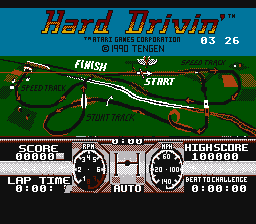
Hard Drivin’ (Prototype)
0 4 3
Hard Drivin’ (Prototype) is a classic NES game emulated in the browser, offering a simple driving challenge that fans of racing games will enjoy. It captures the feel of old-school arcade racing, with fast-paced action that calls for good driving and quick reactions. Fans of vintage racing titles and straightforward gameplay will find plenty to like here.
Getting Into Hard Drivin’
The game centers on racing against the clock or maneuvering through courses with tight turns and obstacles. The focus is on controlling a vehicle precisely, aiming for speed while avoiding crashes. Different modes like time trials and race challenges give players a few ways to test their skills. Usually, you select a course or challenge and then concentrate on staying in control and pushing through each segment quickly.
Since the game is simple, it doesn’t have complicated stories or menus. Instead, it’s about jumping right into the action. Success depends on getting comfortable with the handling and learning each course’s layout. The difficulty increases with sharper turns and faster speeds, so practice helps improve performance. Its straightforward design makes it suitable for quick play sessions or longer periods of focused racing.
Standout Features
Visually, Hard Drivin’ stays true to the NES style, with blocky yet recognizable vehicle sprites and colorful tracks. The simplicity makes it easy to see what’s happening on the screen. The courses are designed with clear turns and obstacles, encouraging players to develop good timing and control. Though the graphics are modest compared to today’s standards, they evoke a nostalgic feeling that fans of retro games will appreciate.
Progress depends on beating time records or completing challenges with specific conditions. The replay value is high because mastering each track requires learning the layout and refining your driving. With different modes available, players can keep challenging themselves, aiming for faster times or better navigation. Quick gameplay sessions and a focus on skill make it appealing for those who want to improve their reflexes through practice.
Strategy and Tips
Starting out? Focus on smooth steering and avoid overcorrecting, which can cause crashes. Practice each course to memorize turns and obstacles for quicker finishes.
- Watch your speed; sometimes slowing down a little makes tricky sections easier to handle.
- Use gentle, controlled movements instead of sharp turns to stay stable.
- Learn each course’s layout in advance to plan when to brake and turn.
- Don’t rush; patience helps you finish sections more cleanly and with fewer mistakes.
- Adjust your approach depending on the mode—races might need more aggressive driving, while time trials benefit from careful precision.
- Replay your best runs to see where you can improve and develop consistent techniques.
Quick Questions
How do I start a race in Hard Drivin’?
Pick the mode from the main menu, then select your course or challenge to start right away.
What’s a common mistake beginners make?
Overcorrecting steering or rushing through turns often causes crashes and lost time. Slowing down and practicing smooth control makes a difference.
Can I play Hard Drivin’ on mobile or touch devices?
This version runs directly in your browser, so it works on many devices, but it’s best played with a keyboard or controller rather than touch screens.
Hard Drivin’ offers a straightforward, skill-based racing experience rooted in the NES era. Focusing on control and timing, it’s a challenge that rewards practice and patience. See how well your reactions hold up against this classic arcade-style game.
Related games: you can also try Deep Dungeon 3 – Yuushi heno Tabi (Japan) and Cosmo Police Galivan (Japan) [En by Jair v1.0], or browse all other games in the NES category.
How to Play Hard Drivin’ (Prototype)?
Drive through courses, avoiding obstacles and sharp turns to beat time records or complete challenges by controlling speed and steering smoothly.
Game Controls
Arrow keys act as the D-pad; Enter is Start; on-screen mapped keys handle the action buttons.
You may be interested in:
-
![Zombie Hunter (Japan) [En by KingMike v1.01]](https://www.playf2p.com/wp-content/uploads/zombie-hunter-japan-en-by-kingmike-v1-01-200x120.png) NES
♥ 2
Zombie Hunter (Japan) [En by KingMike v1.01]
NES
♥ 2
Zombie Hunter (Japan) [En by KingMike v1.01] -
 NES
♥ 1
Zombie Hunter (Japan)
NES
♥ 1
Zombie Hunter (Japan) -
 NES
♥ 1
Zoids Mokushiroku (Japan)
NES
♥ 1
Zoids Mokushiroku (Japan) -
 NES
♥ 2
Zoids 2 – Zenebas no Gyakushuu (Japan)
NES
♥ 2
Zoids 2 – Zenebas no Gyakushuu (Japan) -
 NES
♥ 1
Zoids – Chuuou Tairiku no Tatakai (Japan)
NES
♥ 1
Zoids – Chuuou Tairiku no Tatakai (Japan) -
 NES
♥ 11
Zippy Race (Japan)
NES
♥ 11
Zippy Race (Japan) -
 NES
♥ 1
Zhen Ben Xi You Ji (Asia) (Unl)
NES
♥ 1
Zhen Ben Xi You Ji (Asia) (Unl) -
 NES
♥ 1
Zenbei!! Pro Basket (Japan)
NES
♥ 1
Zenbei!! Pro Basket (Japan)
Comments (0)
No comments yet. Be the first to comment!