Hiryuu no Ken Special – Fighting Wars (Japan)
0 1 0
Hiryuu no Ken Special – Fighting Wars (Japan) is a classic NES fighting game that captures the intensity of arcade-style combat with straightforward mechanics and pixelated charm. Its simple but engaging gameplay invites players into a competitive arena where timing and strategy determine victory. As a piece of 8-bit history, it offers a nostalgic glimpse into the fighting game genre’s early days, running smoothly in your browser without any need for downloads or installations.
Step Into the World of Hiryuu no Ken Special – Fighting Wars
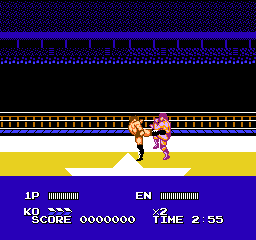
This NES classic takes players to a no-frills battleground where fighters face off in one-on-one duels. The visuals are characterized by pixel art that emphasizes clarity and movement, capturing the essence of early 90s fighting games. Sound design is minimal but punchy, with simple sound effects reinforcing each punch and kick, adding a layer of visceral feedback. The atmosphere is straightforward—focused on the thrill of combat without elaborate storylines or flashy extras, emphasizing pure fighting mechanics. The game’s palette and sprite work reflect its era, providing a nostalgic yet accessible experience for fans of vintage gaming.
How the Gameplay Hooks You
The game’s loop revolves around quick matches that reward precise timing and strategic use of attacks. Each fight progresses rapidly, encouraging players to learn patterns and exploit openings while avoiding counterattacks. Its pacing ensures that matches are intense and short, making it ideal for quick sessions or casual play. Progression is straightforward—win fights, improve your skills, and aim for higher scores or better rankings. The design encourages experimentation with different fighters or tactics, keeping the experience fresh even after multiple playthroughs.
Pro Tips for Hiryuu no Ken Special – Fighting Wars
Getting the most out of the game requires understanding its rhythm and mechanics. Here are some tips to sharpen your skills:
- Focus on timing your punches and kicks to land while defending against your opponent’s attacks.
- Pay attention to the fighting pattern of your opponent; learn their moves to counter effectively.
- Use quick, light attacks to chip away at your opponent before launching a heavier combo.
- Keep an eye on your stamina or energy bar, if present, to avoid overexerting yourself.
- Practice a balanced approach of offense and defense rather than relying solely on one strategy.
- Adjust your tactics based on the opponent’s fighting style—adaptability is key.
Frequently Asked Questions
Question?
Does the game support multiplayer mode?
Yes, Hiryuu no Ken Special – Fighting Wars allows for two-player matches, making it suitable for local head-to-head competitions.
Question?
Is the game suitable for short play sessions or longer battles?
Its fast-paced matches are perfect for quick sessions, but you can also dive into longer tournaments if you prefer more extensive battles.
Question?
Is the game in Japanese, and does that affect gameplay?
This release is in Japanese, which mainly affects menus and text prompts. The core fighting mechanics are visual and straightforward, so language barriers are minimal for gameplay.
The experience in Hiryuu no Ken Special – Fighting Wars is simple yet satisfying, emphasizing skill and timing over complex mechanics. It offers an authentic taste of NES fighting action, all playable free in your browser. Whether you’re a seasoned retro gamer or just exploring vintage titles, this game can provide quick bouts of competitive fun that fit neatly into any gaming session.
Related games: you can also try [Aladdin] Dizzy the Adventurer (USA) (Unl) and Buzz & Waldog (USA) (Unl) (Proto), or browse all other games in the NES category.
How to Play Hiryuu no Ken Special – Fighting Wars (Japan)?
Fight against an opponent by timing punches and kicks, aiming to deplete their health bar before they do the same to you. Win matches by exploiting openings and balancing offense with defense.
Game Controls
Arrow keys control movement; attack and jump buttons are mapped to keyboard keys.
You may be interested in:
-
![Zombie Hunter (Japan) [En by KingMike v1.01]](https://www.playf2p.com/wp-content/uploads/zombie-hunter-japan-en-by-kingmike-v1-01-200x120.png) NES
♥ 2
Zombie Hunter (Japan) [En by KingMike v1.01]
NES
♥ 2
Zombie Hunter (Japan) [En by KingMike v1.01] -
 NES
♥ 1
Zombie Hunter (Japan)
NES
♥ 1
Zombie Hunter (Japan) -
 NES
♥ 1
Zoids Mokushiroku (Japan)
NES
♥ 1
Zoids Mokushiroku (Japan) -
 NES
♥ 2
Zoids 2 – Zenebas no Gyakushuu (Japan)
NES
♥ 2
Zoids 2 – Zenebas no Gyakushuu (Japan) -
 NES
♥ 1
Zoids – Chuuou Tairiku no Tatakai (Japan)
NES
♥ 1
Zoids – Chuuou Tairiku no Tatakai (Japan) -
 NES
♥ 11
Zippy Race (Japan)
NES
♥ 11
Zippy Race (Japan) -
 NES
♥ 1
Zhen Ben Xi You Ji (Asia) (Unl)
NES
♥ 1
Zhen Ben Xi You Ji (Asia) (Unl) -
 NES
♥ 1
Zenbei!! Pro Basket (Japan)
NES
♥ 1
Zenbei!! Pro Basket (Japan)
Comments (0)
No comments yet. Be the first to comment!