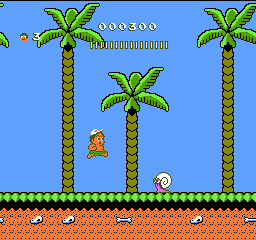
Hudson’s Adventure Island Part II (Europe)
0 7 1
Getting Into Hudson’s Adventure Island Part II
Hudson’s Adventure Island Part II is a classic NES platformer that challenges players to navigate colorful, obstacle-filled levels. As a sequel to the original, it keeps the simple gameplay of running, jumping, and collecting items, but introduces new mechanics and level design to keep things interesting. The game is designed for short play sessions, with players aiming to beat levels or improve their scores each time.
The main loop involves controlling the protagonist as he moves through side-scrolling stages filled with enemies, hazards, and power-ups. Timing jumps carefully helps avoid dangers, while collecting items boosts your score or offers temporary advantages. Each level presents its own set of challenges, rewarding players who learn the timing and layout. It’s accessible for beginners but offers enough challenge to keep experienced players trying for better times and higher scores.
Standout Features
The visuals reflect the NES era, with bright pixel-art graphics that clearly show platforms, enemies, and items. Sprite animations are simple but effective, conveying motion and danger without cluttering the screen. The level design encourages exploration, with hidden paths and secret areas for players paying attention. Completing each level gives a satisfying sense of achievement, and the game’s difficulty increases gradually, encouraging players to improve with each run.
Replay value comes from trying to beat personal bests and the increasing challenge. The short levels make it easy to pick up and try again, and the variety of enemies and obstacles keeps each attempt feeling fresh. While it doesn’t have complex branching paths or unlockables, mastering timing and memorizing level layouts offers a rewarding challenge. Its straightforward, pick-up-and-play style makes it perfect for quick sessions or casual attempts.
Strategy and Tips
Getting started is simple—learn enemy and hazard patterns early on. Practice your timing to avoid falls and hits, especially in tight spots. Collect items whenever possible, as they boost your score or grant temporary invincibility. Keep an eye out for hidden shortcuts or safe spots to regroup. Patience and careful observation are key to making steady progress through the levels.
- Focus on collecting power-ups, but don’t risk losing progress just for a higher score.
- Learn enemy movement patterns so you can anticipate and avoid damage.
- Use safe platforms to plan your next move instead of rushing blindly.
- Try to complete levels efficiently to improve your time and score.
- Some hazards can be avoided by jumping over or around them rather than through.
Quick Questions
How do I get started if I’ve never played before?
Just press start and begin from the first level. The controls are simple and suitable for new players.
What’s a common mistake beginners make?
Many rush through levels without paying attention to enemy patterns or hazards, which can lead to unnecessary mistakes.
Can I play Hudson’s Adventure Island Part II on mobile or touch devices?
This browser version runs directly in your browser, so it works on mobile devices with a browser that supports NES emulation. Touch controls are available but may take some getting used to compared to a keyboard or controller.
Hudson’s Adventure Island Part II offers a straightforward, nostalgic platforming experience that’s fun in quick bursts or longer sessions. Its simplicity and challenge make it a good choice for fans of classic NES games, all playable directly in your browser without extra downloads.
Related games: you can also try Elysion (Japan) [En by Tenshigami v0.91] and Aladdin II (Unl), or browse all other games in the NES category.
How to Play Hudson’s Adventure Island Part II (Europe)?
Run, jump, and avoid enemies to reach the end of each level while collecting items to boost your score. Learn enemy patterns and timing to improve your runs and discover hidden shortcuts.
Game Controls
Arrow keys control movement; jump and action buttons are mapped to keyboard keys.
You may be interested in:
-
![Zombie Hunter (Japan) [En by KingMike v1.01]](https://www.playf2p.com/wp-content/uploads/zombie-hunter-japan-en-by-kingmike-v1-01-200x120.png) NES
♥ 2
Zombie Hunter (Japan) [En by KingMike v1.01]
NES
♥ 2
Zombie Hunter (Japan) [En by KingMike v1.01] -
 NES
♥ 1
Zombie Hunter (Japan)
NES
♥ 1
Zombie Hunter (Japan) -
 NES
♥ 1
Zoids Mokushiroku (Japan)
NES
♥ 1
Zoids Mokushiroku (Japan) -
 NES
♥ 2
Zoids 2 – Zenebas no Gyakushuu (Japan)
NES
♥ 2
Zoids 2 – Zenebas no Gyakushuu (Japan) -
 NES
♥ 1
Zoids – Chuuou Tairiku no Tatakai (Japan)
NES
♥ 1
Zoids – Chuuou Tairiku no Tatakai (Japan) -
 NES
♥ 11
Zippy Race (Japan)
NES
♥ 11
Zippy Race (Japan) -
 NES
♥ 1
Zhen Ben Xi You Ji (Asia) (Unl)
NES
♥ 1
Zhen Ben Xi You Ji (Asia) (Unl) -
 NES
♥ 1
Zenbei!! Pro Basket (Japan)
NES
♥ 1
Zenbei!! Pro Basket (Japan)
Comments (0)
No comments yet. Be the first to comment!