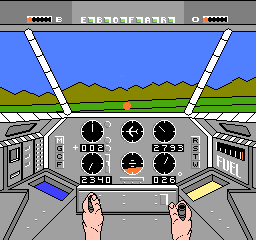
Infiltrator (USA)
0 2 0
Infiltrator (USA) is a classic NES game that drops players into a tense, covert mission filled with military espionage and stealth. This action-packed game blends simulation with flight combat, asking players to navigate enemy territory from the point of view of a skilled infiltrator. Its pixel art graphics and chiptune soundtrack evoke the gritty mood of Cold War spy stories and provide a challenge that tests reflexes and strategic thinking. As a vintage NES title, it offers a nostalgic look at the era’s style of action and adventure gaming, and you can play it directly in your browser without any hassle.
Step Into the World of Infiltrator
The visuals are very true to NES graphics, with a top-down view that emphasizes tactical movement. The limited color palette and blocky sprites create a stark, militaristic vibe, pulling players into a world of secret missions and danger. The sound design features rhythmic beeps and synthesized melodies that heighten the feeling of tension during covert operations. Every pixel and note underscores the high-stakes nature of infiltration missions, giving the game a gritty, no-nonsense feel.
Levels are maze-like, filled with guards, obstacles, and hidden passages. Your goal is to infiltrate enemy facilities, avoid detection, and complete objectives. The interface and sound cues help reinforce the sneaking feeling as you move through hostile territory. The visuals challenge players to memorize patrol routes and environmental hazards, making for a tense experience that rewards careful planning and quick reflexes. It’s a style of gameplay common among NES action titles from the era, emphasizing patience and precision.
How the Gameplay Hooks You
The main idea is to move through levels quietly, avoiding enemies and completing tasks like gathering intel or disabling security. The pace is quick, with short bursts of intense activity that require fast decisions but also moments of cautious planning. Progress depends on successfully finishing missions, which often means adapting to changing enemy patrols and environmental hazards. The difficulty gradually ramps up, making each success feel earned and pushing you forward with a sense of achievement.
The game combines action with strategic thinking, as you decide when to hide, when to move, and how to use your tools wisely. Since avoiding detection is more important than fighting, it encourages careful timing and precise movements. Its straightforward but tough design makes it a good choice for quick play sessions—challenging enough to stay engaging without dragging on.
Pro Tips for Infiltrator
Getting to know enemy patrol routes can really help you move smoothly through levels.
- Use cover and safe zones to wait before making your move.
- Listen for sound cues that signal enemy alertness or movement.
- Plan your path carefully—rushing increases the chance of getting caught.
- Take advantage of tools or stealth features to disable guards or cameras.
- Memorize level layouts on your first run to improve your timing on later attempts.
Frequently Asked Questions
Does Infiltrator get repetitive after a while?
While the core mechanics stay the same, different levels and patrol patterns keep things fresh. Short play sessions often help keep the experience engaging.
Can I expect a long campaign or many levels?
As a classic NES game, it has a small number of levels designed for quick, tough runs rather than a big adventure. Each stage offers a focused challenge.
Is Infiltrator good for quick sessions or playing on different devices?
Absolutely. Its simple design and browser-based format make it easy to jump in for a few minutes. It works well on various devices since no downloads are needed and it runs directly in your browser.
Related games: you can also try Don Doko Don (Japan) and Gremlins 2 – The New Batch (Europe), or browse all other games in the NES category.
How to Play Infiltrator (USA)?
Navigate through enemy territory quietly, avoid guards, and complete covert objectives by moving carefully and timing your actions to avoid detection.
Game Controls
Arrow keys control movement; other keys handle actions and interactions.
You may be interested in:
-
![Zombie Hunter (Japan) [En by KingMike v1.01]](https://www.playf2p.com/wp-content/uploads/zombie-hunter-japan-en-by-kingmike-v1-01-200x120.png) NES
♥ 2
Zombie Hunter (Japan) [En by KingMike v1.01]
NES
♥ 2
Zombie Hunter (Japan) [En by KingMike v1.01] -
 NES
♥ 1
Zombie Hunter (Japan)
NES
♥ 1
Zombie Hunter (Japan) -
 NES
♥ 1
Zoids Mokushiroku (Japan)
NES
♥ 1
Zoids Mokushiroku (Japan) -
 NES
♥ 2
Zoids 2 – Zenebas no Gyakushuu (Japan)
NES
♥ 2
Zoids 2 – Zenebas no Gyakushuu (Japan) -
 NES
♥ 1
Zoids – Chuuou Tairiku no Tatakai (Japan)
NES
♥ 1
Zoids – Chuuou Tairiku no Tatakai (Japan) -
 NES
♥ 11
Zippy Race (Japan)
NES
♥ 11
Zippy Race (Japan) -
 NES
♥ 1
Zhen Ben Xi You Ji (Asia) (Unl)
NES
♥ 1
Zhen Ben Xi You Ji (Asia) (Unl) -
 NES
♥ 1
Zenbei!! Pro Basket (Japan)
NES
♥ 1
Zenbei!! Pro Basket (Japan)
Comments (0)
No comments yet. Be the first to comment!