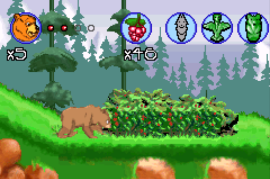
2 in 1 – Brother Bear & Disney Princess (E)(Independent)
0 9 2
2 in 1 – Brother Bear & Disney Princess (E)(Independent) is a classic Game Boy Advance game that combines two adventures into one cartridge. It gives players the chance to experience the stories of Disney’s princesses alongside the heartfelt tale of Brother Bear. Designed for fans of platformers and adventure games, it offers simple, charming gameplay that captures the feel of early 2000s handheld titles.
2 in 1 – Brother Bear & Disney Princess: Gameplay Overview
The game has two separate modes, each based on one of the stories. In the Brother Bear part, players control a character exploring forests, solving puzzles, and avoiding obstacles to move through the story. The Disney Princess mode is a side-scrolling platformer where players help a princess complete challenges like jumping puzzles and fighting enemies.
Both modes keep controls easy and focus on a clear progression. You finish levels by reaching the end without losing all your lives, gathering items that can unlock new paths or give bonuses. The gameplay relies on timing, recognizing patterns, and exploring, making it accessible to younger players but still offering enough challenge for more experienced gamers.
Modes, Levels and Progression
The game is made up of multiple levels across both stories, each with different environments and challenges. Brother Bear levels take place in natural settings like forests and mountains, emphasizing exploration and puzzles. The Disney Princess levels focus on platforming and navigating obstacles, often set in castles or gardens.
Progression unlocks new levels in each mode and sometimes adds small changes to keep things fresh. While there’s no complex leveling system, finishing levels unlocks the next in order, encouraging players to move through both stories. The game offers enough content with a handful of levels per mode, enough for casual play and replaying for better scores or to complete everything.
Winning Strategies
Pay attention to timing your jumps to avoid falling or losing lives.
- Learn enemy patterns early; patience can help more than rushing.
- Collect all items you find to boost your score and unlock bonuses.
- Use the environment to your advantage, especially in puzzle sections.
- Practice tough parts repeatedly to get better reactions.
- If one mode gets frustrating, switch to the other to stay motivated.
Common Questions About 2 in 1 – Brother Bear & Disney Princess
How does the difficulty change across levels?
The game gets a bit harder as you go, with early levels serving as tutorials and later ones introducing more complex puzzles and faster enemies. Still, it stays accessible for its intended age range.
Are there different game modes besides story levels?
This game mainly focuses on story-based levels for each character. There aren’t separate modes like time trials or mini-games, but each story has multiple levels that get tougher as you go.
Can I replay levels to improve scores or find secrets?
Absolutely. Replaying levels is encouraged to boost your scores, find hidden items, and get higher ratings, which adds to the fun even after finishing the main story.
This game from the Game Boy Advance era combines storytelling with straightforward gameplay, making it suitable for players of all ages. Having both Brother Bear and Disney Princess stories adds variety and encourages exploration of different themes. 2 in 1 – brother bear & disney princess is a charming, accessible title you can enjoy right in your browser without needing anything extra.
Related games: you can also try Play 2 in 1 – Barenbruder & Disney Prinzessinen (G)(Independent) and Play 2 in 1 – Barbie Groovy Games & Secret Agent Barbie (E)(Supplex), or browse all other games in the Game Boy Advance category.
How to Play 2 in 1 – Brother Bear & Disney Princess (E)(Independent)?
Control characters to explore levels, solve puzzles, and overcome obstacles in two story modes. Complete each level by reaching the end while collecting items and avoiding losing all lives.
Game Controls
Arrow keys move characters; action keys handle jumping, attacking, and interacting.
You may be interested in:
-
 Game Boy Advance
♥ 2
Zooo (J)(Rising Sun)
Game Boy Advance
♥ 2
Zooo (J)(Rising Sun) -
 Game Boy Advance
♥ 4
Zooo (E)(Trashman)
Game Boy Advance
♥ 4
Zooo (E)(Trashman) -
 Game Boy Advance
♥ 2
ZooCube (U)(Mode7)
Game Boy Advance
♥ 2
ZooCube (U)(Mode7) -
 Game Boy Advance
♥ 1
ZooCube (E)(Blizzard)
Game Boy Advance
♥ 1
ZooCube (E)(Blizzard) -
 Game Boy Advance
♥ 1
Zone of the Enders – The Fist of Mars (U)(Mode7)
Game Boy Advance
♥ 1
Zone of the Enders – The Fist of Mars (U)(Mode7) -
 Game Boy Advance
♥ 1
Zone of the Enders – The Fist of Mars (E)(Cezar)
Game Boy Advance
♥ 1
Zone of the Enders – The Fist of Mars (E)(Cezar) -
 Game Boy Advance
♥ 1
Zoku Bokura no Taiyou – Taiyou Shounen Django (J)(Independent)
Game Boy Advance
♥ 1
Zoku Bokura no Taiyou – Taiyou Shounen Django (J)(Independent) -
 Game Boy Advance
♥ 7
Zoku Bokura no Taiyou – Taiyou Shounen Django (J)(Caravan)
Game Boy Advance
♥ 7
Zoku Bokura no Taiyou – Taiyou Shounen Django (J)(Caravan)
Comments (0)
No comments yet. Be the first to comment!