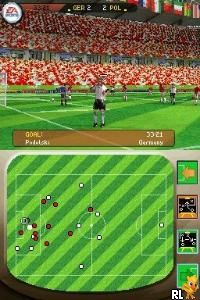
2006 FIFA World Cup – Germany 2006 (Europe) (En,Fr,De,Es,It)
0 7 4
2006 FIFA World Cup – Germany 2006 (Europe) (En,Fr,De,Es,It) is a classic Nintendo DS sports game that captures the excitement of international soccer during the 2006 World Cup. As a handheld title from the Nintendo DS era, it offers a simple and accessible soccer experience perfect for quick matches or casual play sessions. The game’s regional release includes multiple languages, making it versatile for players across Europe and beyond. Running directly in your browser, this emulated version means you can jump into the action instantly without any downloads or installations, making it an easy way to enjoy a nostalgic sports fix.
Why 2006 FIFA World Cup – Germany 2006 Is Worth Playing
This Nintendo DS classic stands out thanks to its straightforward gameplay and focus on simulating the feel of a real-world soccer match. The visuals are simple but effective, with clear player models and minimalistic stadium backgrounds that keep the focus on gameplay. It doesn’t aim for flashy graphics but makes up for it with responsive controls and a good feel for the game. The atmosphere captures the energy of the World Cup, with snippets of commentary and score updates that add authenticity. Fans of soccer will enjoy reliving the tournament’s key moments and playing matches that reflect the spirit of the event.
What keeps players coming back is how accessible and challenging it can be at the same time. It’s easy to pick up for newcomers but offers enough depth for more experienced players to enjoy tactical play. The tournament mode delivers quick, intense matches, and the simple controls make it ideal for quick sessions. While it doesn’t have a ton of modes or customization options, it provides a reliable, enjoyable soccer experience whether you’re on the go or playing in your browser.
Tips to Get Ahead
Practice your passing and shooting timing to improve your chances of scoring.
- Use quick passes to keep possession and set up scoring chances.
- Adjust your defensive positioning to better intercept crosses and dribbles.
- Take advantage of set pieces like free kicks and corners for easy goals.
- Watch out for stamina — tired players tend to perform worse and can be outplayed.
- Try different teams to find one that matches your play style best.
Things to Know Before You Start
What is the difficulty level of 2006 FIFA World Cup – Germany 2006?
The game is designed to be accessible, with simple controls and gameplay that can appeal to both casual players and soccer fans. While it’s not overly hard, getting the timing and positioning right can make a difference.
How long does a typical game last?
Matches usually take around 5-10 minutes, making it easy to play a quick game during a break or whenever you have a little time.
Is this game good for someone new to soccer video games?
Yes, its straightforward controls and easy gameplay make it suitable for beginners, but it still offers enough depth for players who want to sharpen their tactics.
Can I play longer sessions with 2006 FIFA World Cup – Germany 2006?
While it’s mainly for quick matches, you can enjoy longer periods by trying out different teams and tournament options. It doesn’t have story modes or extensive customization, but it’s engaging enough for repeated play.
Jump into the game and see how well you can capture the excitement of the 2006 FIFA World Cup – Germany 2006 — a Nintendo DS classic now playable free in your browser. It’s a simple soccer game that delivers instant fun without complicated features, perfect for casual fans or those nostalgic for early handheld gaming experiences.
Related games: you can also try 1 vs 100 (USA) and 18 Card Games (Europe) (En,Fr,De,Es,Nl), or browse all other games in the Nintendo DS category.
How to Play 2006 FIFA World Cup – Germany 2006 (Europe) (En,Fr,De,Es,It)?
Choose a team, pass, shoot, and defend to score goals and win matches. Play quick games or tournaments, focusing on timing and positioning to outplay your opponent.
Game Controls
Arrow keys move players; specific keys handle passing, shooting, and defending.
You may be interested in:
-
 Nintendo DS
♥ 1
Casper’s Scare School – Classroom Capers (USA)
Nintendo DS
♥ 1
Casper’s Scare School – Classroom Capers (USA) -
 Nintendo DS
♥ 1
Zunou Nouryoku Koujou Machine – Touch de Zunoo DS (Japan)
Nintendo DS
♥ 1
Zunou Nouryoku Koujou Machine – Touch de Zunoo DS (Japan) -
 Nintendo DS
♥ 1
Zunou ni Asekaku Game Series! Vol. 1 – Cool 104 Joker & Setline (Japan)
Nintendo DS
♥ 1
Zunou ni Asekaku Game Series! Vol. 1 – Cool 104 Joker & Setline (Japan) -
 Nintendo DS
♥ 9
Zuma’s Revenge (USA)
Nintendo DS
♥ 9
Zuma’s Revenge (USA) -
 Nintendo DS
♥ 1
Zubo (USA) (En,Fr,Es)
Nintendo DS
♥ 1
Zubo (USA) (En,Fr,Es) -
 Nintendo DS
♥ 1
Zubo (Europe) (En,Fr,De,Es,It,Nl,Sv)
Nintendo DS
♥ 1
Zubo (Europe) (En,Fr,De,Es,It,Nl,Sv) -
 Nintendo DS
♥ 1
Zorro – Quest for Justice (USA) (En,Fr,De,Es,It)
Nintendo DS
♥ 1
Zorro – Quest for Justice (USA) (En,Fr,De,Es,It) -
 Nintendo DS
♥ 1
Zorro – Quest for Justice (Europe) (En,Fr,De,Es,It)
Nintendo DS
♥ 1
Zorro – Quest for Justice (Europe) (En,Fr,De,Es,It)
Comments (0)
No comments yet. Be the first to comment!