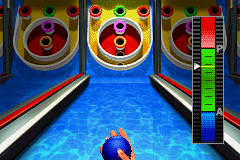
3 in 1 – Majesco’s Rec Room Challenge (U)(Sir VG)
0 0 0
Getting Into 3 in 1 – Majesco’s Rec Room Challenge
3 in 1 – Majesco’s Rec Room Challenge is a classic Game Boy Advance game that runs directly in your browser, offering three different mini-games within one package. The game is perfect for short play sessions, appealing to those who enjoy simple, pick-up-and-play challenges that don’t demand a lot of time. The main idea is to choose a mini-game, learn its basic rules, and then try to score as high as possible.
Playing usually involves selecting a game mode, understanding how it works, and jumping right into the action. The interface is straightforward and easy to navigate, making it accessible for new players. Since there are multiple mini-games, you can switch between them if you get tired of one, keeping things fresh. The gameplay emphasizes quick reflexes and pattern recognition, with each session lasting only a few minutes. That makes it great for quick breaks or casual gaming moments.
Standout Features
Even with its simple presentation, 3 in 1 – Majesco’s Rec Room Challenge has enough visual charm to hold your interest. The graphics are colorful and clear, with distinct backgrounds and character sprites that reflect the style of the GBA era. The sound is minimal but effective, giving useful feedback during gameplay and on game over.
Progress depends on high scores rather than levels or unlockables, encouraging players to keep improving. The game has a good amount of replay value for those who want to master each mini-game, whether by beating their personal bests or competing with friends in local multiplayer. Because each mini-game is short, you can go through them multiple times in one session, keeping things engaging. Collecting high scores and trying to beat personal records adds motivation, especially since there aren’t complex stories or unlockables involved.
Strategy and Tips
Getting the most out of this game means understanding each mini-game’s mechanics and reacting quickly. Practice helps improve, so don’t get discouraged if your first attempts aren’t perfect.
- Learn to recognize patterns: many mini-games depend on spotting visual cues and reacting fast.
- Stay consistent: focus on steady performance rather than rushing for high scores early on.
- If available, use the pause feature to plan your next move in more complex mini-games.
- Try out different modes to see which ones match your skills and develop tailored strategies.
- Pay attention to timing, as quick reactions are often rewarded more than slow, careful actions.
- Challenge friends or aim to beat your own high scores for more replay value.
Quick Questions
How do I start playing 3 in 1 – Majesco’s Rec Room Challenge?
Just select the game from the menu on the emulator interface, and it will load right away so you can start playing.
What is a common mistake beginners make?
Trying to rush through the mini-games without paying attention to patterns often results in mistakes and low scores. Focus on timing and observation instead.
Can I play this game comfortably on mobile or touchscreen devices?
Yes, since it runs directly in your browser, it works well with touch controls, making it easy to play on a mobile device without extra setup.
This collection of mini-games within 3 in 1 – Majesco’s Rec Room Challenge offers a straightforward, engaging experience rooted in the GBA era. Its quick sessions and replayability make it a good pick for casual players looking for brief but satisfying challenges without needing to download anything extra.
Related games: you can also try 2 in 1 – Sonic Advance & Sonic Battle (E)(Rising Sun) and 2 in 1 – Scooby Doo & Scooby Doo 2 – Desatado (S)(Independent), or browse all other games in the Game Boy Advance category.
How to Play 3 in 1 – Majesco’s Rec Room Challenge (U)(Sir VG)?
Choose a mini-game, learn its rules, and try to score high by reacting quickly and recognizing patterns. Switch between games to keep your session fun and challenging.
Game Controls
Arrow keys for navigation; action buttons mapped to keyboard keys; use them to play and select options.
You may be interested in:
-
 Game Boy Advance
♥ 2
Zooo (J)(Rising Sun)
Game Boy Advance
♥ 2
Zooo (J)(Rising Sun) -
 Game Boy Advance
♥ 4
Zooo (E)(Trashman)
Game Boy Advance
♥ 4
Zooo (E)(Trashman) -
 Game Boy Advance
♥ 2
ZooCube (U)(Mode7)
Game Boy Advance
♥ 2
ZooCube (U)(Mode7) -
 Game Boy Advance
♥ 1
ZooCube (E)(Blizzard)
Game Boy Advance
♥ 1
ZooCube (E)(Blizzard) -
 Game Boy Advance
♥ 1
Zone of the Enders – The Fist of Mars (U)(Mode7)
Game Boy Advance
♥ 1
Zone of the Enders – The Fist of Mars (U)(Mode7) -
 Game Boy Advance
♥ 1
Zone of the Enders – The Fist of Mars (E)(Cezar)
Game Boy Advance
♥ 1
Zone of the Enders – The Fist of Mars (E)(Cezar) -
 Game Boy Advance
♥ 1
Zoku Bokura no Taiyou – Taiyou Shounen Django (J)(Independent)
Game Boy Advance
♥ 1
Zoku Bokura no Taiyou – Taiyou Shounen Django (J)(Independent) -
 Game Boy Advance
♥ 7
Zoku Bokura no Taiyou – Taiyou Shounen Django (J)(Caravan)
Game Boy Advance
♥ 7
Zoku Bokura no Taiyou – Taiyou Shounen Django (J)(Caravan)
Comments (0)
No comments yet. Be the first to comment!