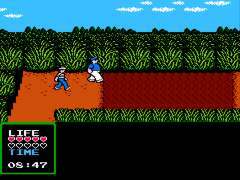
Adventures of Gilligan’s Island, The (USA)
0 1 1
Adventures of Gilligan’s Island, The (USA) is a classic NES game that puts players in the role of the castaways trying to survive and find a way off the island. Designed as an adventure game, it appeals to those who enjoy exploring environments, solving puzzles, and managing limited resources. Fans of retro gaming will appreciate how this NES title captures the charm and challenge typical of its era, running smoothly in your browser without any downloads.
Getting Into Adventures of Gilligan’s Island, The
In this game, players navigate the island, moving characters around to gather items and interact with the environment. The main gameplay involves exploring different areas, collecting tools or clues, and figuring out how to overcome obstacles that block progress. You control multiple characters, each with their own abilities, so switching between them helps solve puzzles or access new parts of the island.
A typical session begins with selecting a character and exploring the map for useful items or pathways. Combining objects or using specific characters can unlock new sections or solve problems. The interface is straightforward, focusing on puzzle-solving and resource management. Progress is often marked by uncovering new areas or completing specific objectives, encouraging replay to find all the secrets and solutions.
Standout Features
The visual style stays true to the NES’s pixel art aesthetic, capturing the nostalgic feel of the original. The island environment is colorful and charming, with distinct areas inviting exploration. Progress depends on completing puzzles and discovering hidden items, which adds depth and encourages revisiting earlier sections with new tools or information.
Replay value comes from controlling different characters and trying out various ways to solve puzzles. Each playthrough might reveal new paths or solutions, especially as you experiment with character combinations. The game promotes exploration and trial-and-error, making it a fun challenge for those interested in uncovering secrets and mastering the puzzles on the island.
Strategy and Tips
Start by exploring each accessible area thoroughly to gather essential items early on. Managing your characters’ inventory is important—carry useful tools and remember which character can access certain spots. Revisit areas after acquiring new items, as this often opens up new puzzles.
- Pay attention to clues in dialogue and the environment; they often suggest what to do next.
- Try combining items in your inventory to see if they unlock new solutions.
- Switch characters often to use their unique abilities for puzzles.
- Save your progress regularly, especially before risky actions or entering unknown zones.
- If you get stuck, revisit earlier locations; you might have missed an item or interaction needed to move forward.
Quick Questions
How do I start exploring the island effectively?
Begin with the characters you control, check your inventory, and systematically explore each area for interactable objects and items.
What is a common mistake for beginners?
New players often overlook important items or forget to revisit areas after gaining new tools, which can block progress.
Can I play Adventures of Gilligan’s Island, The on mobile or touch devices?
Yes, since the game runs directly in your browser through an emulator, it works well on mobile browsers and supports touch controls for navigation and interaction.
Adventures of Gilligan’s Island, The offers a nostalgic, puzzle-focused adventure on the NES. This browser version makes it easy to jump in and explore the island’s mysteries without any fuss.
Related games: you can also try 64-in-1 Classic Player and 3-D Block (Asia) (Unl) (Hwang Shinwei), or browse all other games in the NES category.
How to Play Adventures of Gilligan’s Island, The (USA)?
Explore the island, collect items, and solve puzzles by switching characters to find a way off the island. Complete objectives and uncover secrets through exploration and resource management.
Game Controls
Arrow keys move characters; other keys handle actions and item use.
You may be interested in:
-
![Zombie Hunter (Japan) [En by KingMike v1.01]](https://www.playf2p.com/wp-content/uploads/zombie-hunter-japan-en-by-kingmike-v1-01-200x120.png) NES
♥ 2
Zombie Hunter (Japan) [En by KingMike v1.01]
NES
♥ 2
Zombie Hunter (Japan) [En by KingMike v1.01] -
 NES
♥ 1
Zombie Hunter (Japan)
NES
♥ 1
Zombie Hunter (Japan) -
 NES
♥ 1
Zoids Mokushiroku (Japan)
NES
♥ 1
Zoids Mokushiroku (Japan) -
 NES
♥ 2
Zoids 2 – Zenebas no Gyakushuu (Japan)
NES
♥ 2
Zoids 2 – Zenebas no Gyakushuu (Japan) -
 NES
♥ 1
Zoids – Chuuou Tairiku no Tatakai (Japan)
NES
♥ 1
Zoids – Chuuou Tairiku no Tatakai (Japan) -
 NES
♥ 11
Zippy Race (Japan)
NES
♥ 11
Zippy Race (Japan) -
 NES
♥ 1
Zhen Ben Xi You Ji (Asia) (Unl)
NES
♥ 1
Zhen Ben Xi You Ji (Asia) (Unl) -
 NES
♥ 1
Zenbei!! Pro Basket (Japan)
NES
♥ 1
Zenbei!! Pro Basket (Japan)
Comments (0)
No comments yet. Be the first to comment!