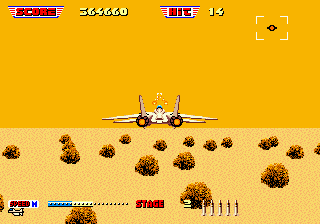
After Burner II (USA, Europe)
0 8 2
After Burner II (USA, Europe) is a classic Genesis game that captures the high-speed thrill of jet combat and arcade flight simulation. Its controls are straightforward, and the action is intense, so new players can jump in and enjoy it right away. As a favorite from the Genesis era, it offers a quick, adrenaline-filled experience that works well for short gaming sessions or longer playthroughs. Playing it in your browser means you can start right away without any downloads or complicated setup.
What Is After Burner II?
This game falls into the action and flight simulator genres, putting you in the cockpit of a fighter jet. Your main goal is to complete missions by shooting down enemy aircraft and dodging obstacles. The gameplay relies on quick reflexes, accurate aiming, and fast decisions, all set to energetic music and flashing visuals. It’s designed with simple controls, but mastering its speed and enemy patterns can be quite satisfying.
During each mission, you fly through different environments, engaging in dogfights and bombing runs. The camera is behind the aircraft, giving you a clear view of threats and terrain ahead. Success depends on balancing offensive moves with evasive actions, making it a mix of skill and timing. While simple, the game’s arcade roots mean it rewards quick thinking and persistence, especially as enemies become more aggressive.
What Keeps You Coming Back
What makes After Burner II engaging is its fast pace and straightforward gameplay. The thrill of flying at top speeds while avoiding missiles or lining up your shots keeps you hooked. The visuals and sound effects heighten the sense of speed, turning each run into a mini adrenaline rush. Its simple mechanics encourage repeated tries, whether it’s beating your high score or improving your flying skills.
Replayability comes from the increasing difficulty and the challenge of mastering the controls. Each mission presents new obstacles, tougher enemies, or tighter navigation. For players who enjoy honing their reflexes, getting good at flying and recognizing enemy patterns can turn a frustrating run into a satisfying victory. This mix of accessibility and challenge explains why it remains popular among arcade fans and casual players alike.
Handy Tips
If you’re new to the game or looking to improve, here are some helpful pointers:
- Maintain a steady pace; rushing can lead to crashes.
- Use evasive moves when missiles target you—swerving left or right can save your aircraft.
- Prioritize taking down larger enemy planes first to clear the screen faster.
- Watch your fuel and ammo, if applicable—manage your resources wisely.
- Practice flying straight to get better at aiming and targeting enemies.
- Replaying sections can help you learn enemy patterns and timing more effectively.
Player FAQ
Is After Burner II easy enough for beginners?
Yes, the controls are simple and intuitive, making it accessible even if you’re new to flight or arcade games.
Can younger players enjoy After Burner II?
While it features fast-paced action, its straightforward gameplay makes it suitable for many ages. Just keep in mind the visuals are intense, so parental guidance might be a good idea for younger kids.
Do I need an internet connection to play After Burner II?
Nope. Since you can play it directly in your browser without any downloads, you only need an internet connection initially. Once loaded, it works offline in your browser.
This classic Genesis game offers quick-paced aerial combat that’s easy to pick up but tough to master. After Burner II provides a nostalgic blast of action, perfect for quick gaming sessions or trying to beat your high score—all accessible directly through your browser.
Related games: you can also try Addams Family Values (Europe) (En,Fr,De) and 30 Day Project Revisited, or browse all other games in the Genesis category.
How to Play After Burner II (USA, Europe)?
Fly your jet through levels, shoot down enemies, and dodge missiles to complete missions. Use quick reflexes to aim, evade attacks, and survive as long as possible.
Game Controls
Arrow keys control movement; action buttons are mapped to keyboard keys for shooting and evasive maneuvers.
You may be interested in:
-
 Genesis
♥ 3
Zou! Zou! Zou! Rescue Daisakusen (Japan)
Genesis
♥ 3
Zou! Zou! Zou! Rescue Daisakusen (Japan) -
 Genesis
♥ 6
Zoom! (World)
Genesis
♥ 6
Zoom! (World) -
 Genesis
♥ 9
Zool – Ninja of the ‘Nth’ Dimension (USA)
Genesis
♥ 9
Zool – Ninja of the ‘Nth’ Dimension (USA) -
 Genesis
♥ 11
Zombies Ate My Neighbors (USA)
Genesis
♥ 11
Zombies Ate My Neighbors (USA) -
 Genesis
♥ 9
Zombies (Europe)
Genesis
♥ 9
Zombies (Europe) -
 Genesis
♥ 1
Zombie High (USA) (Proto)
Genesis
♥ 1
Zombie High (USA) (Proto) -
 Genesis
♥ 1
Zhuagui Dashi – Ghost Hunter (China) (Unl)
Genesis
♥ 1
Zhuagui Dashi – Ghost Hunter (China) (Unl) -
 Genesis
♥ 1
Zero Wing (Japan)
Genesis
♥ 1
Zero Wing (Japan)
Comments (0)
No comments yet. Be the first to comment!