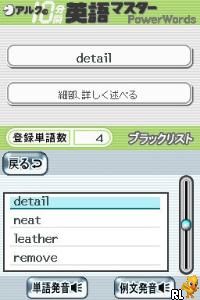
ALC no 10-punkan Eigo Master – Shokyuu (Japan)
0 1 0
ALC no 10-punkan Eigo Master – Shokyuu (Japan) is a straightforward Nintendo DS language learning game that’s easy to understand and use. It’s designed to help players improve their English through simple, structured exercises. Since this classic runs directly in your browser on this site, you can practice anytime without needing to install anything. Its minimalistic style makes language practice accessible and familiar, especially for those who enjoyed early educational games on the handheld console.
What Is ALC no 10-punkan Eigo Master – Shokyuu?
This game is a basic educational tool aimed at teaching English using the Nintendo DS’s touch screen and stylus. The core gameplay involves completing short, repetitive exercises meant to reinforce vocabulary, grammar, and sentence structure. It’s more like a series of lessons and drills than a traditional game, making language learning feel casual and manageable. The quick sessions help build confidence with English gradually.
Players encounter various question types, such as fill-in-the-blanks, matching words to meanings, and simple translation tasks. The interface is clear, with instructions and immediate feedback to support learning from mistakes. Being a classic Nintendo DS title, the focus is on learning mechanics rather than complex gameplay, which makes it suitable for all ages wanting to improve their English in a no-pressure setting.
What Keeps You Coming Back
The structured lessons encourage regular practice, which helps with language retention. Its straightforward approach allows players to focus on specific areas, like vocabulary or sentence structure, and see their progress over time. The repetition of exercises reinforces learning without feeling boring, thanks to the familiar touch controls of the DS that make interaction easy.
The game also includes a variety of question types to keep things interesting and support different learning styles. Short sessions make it easy to practice during busy days, and the incremental difficulty helps gradually develop skills. Since it’s a browser-based version of a beloved educational classic, you can revisit it anytime for review or casual practice, making it a reliable tool for ongoing learning.
Handy Tips
To get the most out of this game, try these tips:
- Start with the basic lessons to build a solid foundation before moving on to more advanced exercises.
- Use the stylus carefully to reduce mistakes on multiple-choice or fill-in-the-blank questions.
- Repeat lessons that give you trouble to strengthen your understanding and memory.
- Take short breaks between sessions to stay focused and avoid fatigue.
- Pay attention to immediate feedback to learn from errors and correct your understanding quickly.
Player FAQ
Is ALC no 10-punkan Eigo Master – Shokyuu suitable for beginners?
Yes, it’s designed for learners at all levels, with simple exercises and clear instructions perfect for beginners or anyone reviewing basic English skills.
Can young players use it easily?
Definitely. Its straightforward interface and gentle progression make it suitable for children and young learners, especially with some supervision or guidance.
Do I need an internet connection to play?
No, once it’s loaded on this site, ALC no 10-punkan Eigo Master – Shokyuu runs directly in your browser and doesn’t need extra internet access for gameplay.
This game offers a simple, effective way to practice English on your own schedule. Its focus on fundamental skills and easy access make it a good choice for learners of any age. Playing this Nintendo DS classic right in your browser keeps language practice convenient and hassle-free, whether for casual review or steady improvement.
Related games: you can also try 12 Family Games (Europe) and Adibou – Je Joue a Lire et a Compter (France), or browse all other games in the Nintendo DS category.
How to Play ALC no 10-punkan Eigo Master – Shokyuu (Japan)?
Complete simple exercises like fill-in-the-blanks and matching to learn English. Use the keyboard to select answers and practice regularly to improve vocabulary and grammar.
Game Controls
Arrow keys move the cursor; Enter confirms selections and actions.
You may be interested in:
-
 Nintendo DS
♥ 1
Casper’s Scare School – Classroom Capers (USA)
Nintendo DS
♥ 1
Casper’s Scare School – Classroom Capers (USA) -
 Nintendo DS
♥ 1
Zunou Nouryoku Koujou Machine – Touch de Zunoo DS (Japan)
Nintendo DS
♥ 1
Zunou Nouryoku Koujou Machine – Touch de Zunoo DS (Japan) -
 Nintendo DS
♥ 1
Zunou ni Asekaku Game Series! Vol. 1 – Cool 104 Joker & Setline (Japan)
Nintendo DS
♥ 1
Zunou ni Asekaku Game Series! Vol. 1 – Cool 104 Joker & Setline (Japan) -
 Nintendo DS
♥ 9
Zuma’s Revenge (USA)
Nintendo DS
♥ 9
Zuma’s Revenge (USA) -
 Nintendo DS
♥ 1
Zubo (USA) (En,Fr,Es)
Nintendo DS
♥ 1
Zubo (USA) (En,Fr,Es) -
 Nintendo DS
♥ 1
Zubo (Europe) (En,Fr,De,Es,It,Nl,Sv)
Nintendo DS
♥ 1
Zubo (Europe) (En,Fr,De,Es,It,Nl,Sv) -
 Nintendo DS
♥ 1
Zorro – Quest for Justice (USA) (En,Fr,De,Es,It)
Nintendo DS
♥ 1
Zorro – Quest for Justice (USA) (En,Fr,De,Es,It) -
 Nintendo DS
♥ 1
Zorro – Quest for Justice (Europe) (En,Fr,De,Es,It)
Nintendo DS
♥ 1
Zorro – Quest for Justice (Europe) (En,Fr,De,Es,It)
Comments (0)
No comments yet. Be the first to comment!