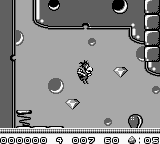
Alfred Chicken (Europe)
0 2 0
Alfred Chicken (Europe) is a classic Game Boy platformer where players control a lively chicken on a mission. Its simple controls and charming pixel art make it easy for newcomers to pick up, while longtime fans may find themselves nostalgic for the familiar style. You can start playing right away without any complicated setup, and since it runs directly in your browser, no downloads are necessary.
What Is Alfred Chicken?
This game fits into the action and platformer genres, putting you in the role of a brave chicken navigating through levels filled with obstacles and enemies. The main goal is to finish each stage by overcoming hazards, jumping over gaps, and avoiding or defeating enemies. The gameplay relies on precise timing and quick reflexes, which is common in early portable platformers.
The levels feature a variety of platforms and moving parts, encouraging players to develop a sense of rhythm and spatial awareness. Though easy to pick up, mastering the timing and movement can challenge even experienced players, making each attempt engaging.
What Keeps You Coming Back
One of the main appeals is the game’s tight, responsive controls that reward skillful play. The levels are short enough to try again quickly, motivating players to improve their times and strategies. Finding hidden items and learning enemy patterns adds replay value, encouraging players to go back for better scores and faster completion times.
The visuals and quirky sound effects create a lighthearted atmosphere that makes replaying levels enjoyable. Its straightforward progression invites players to keep trying to improve, making Alfred Chicken a satisfying challenge that stays fun without dragging on.
Handy Tips
Getting comfortable with jump timing is essential for moving smoothly through levels. Practice your jumps to avoid falls or missing platforms.
- Use precise timing when landing on moving platforms or dodging hazards.
- Watch enemy patterns — many can be avoided with well-timed jumps or waiting for the right moment.
- Explore each level carefully for hidden areas or bonus items that can be useful later.
- Don’t rush — patience often leads to better results and fewer mistakes.
- Pay attention to background and foreground elements to anticipate upcoming obstacles.
Player FAQ
Is Alfred Chicken suitable for younger players?
Yes, it has simple controls and clear goals, making it good for players of all ages, though some levels might require patience and precise timing.
Can I play Alfred Chicken offline or without an internet connection?
Since it runs directly in your browser, you can play offline once it loads. No extra downloads or internet needed after the initial load.
Is Alfred Chicken challenging or good for casual players?
The difficulty is gentle but can still offer a challenge for casual players wanting to improve their timing and accuracy through repeated tries.
Alfred Chicken offers a charming piece of retro gaming with accessible gameplay and enough depth to keep players coming back. Its straightforward action and platforming mechanics make it a fun choice, especially for fans of classic Game Boy games.
Related games: you can also try Play 3-pun Yosou Umaban Club (Japan) and Adventures of Lolo (Europe), or browse all other games in the Game Boy category.
How to Play Alfred Chicken (Europe)?
Guide Alfred Chicken through levels by jumping over gaps, avoiding enemies, and finding hidden items to complete each stage quickly and safely.
Game Controls
Arrow keys for movement; specific keys for jumping and actions, similar to a game controller.








Comments (0)
No comments yet. Be the first to comment!