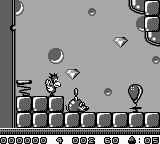
Alfred Chicken (Japan)
0 5 0
Alfred Chicken (Japan) is a classic Game Boy platformer and action game that offers a simple yet charming challenge for players who enjoy light-hearted, arcade-style gameplay. If you like retro titles with easy controls and colorful visuals, this game provides a nostalgic experience that runs directly in your browser, so you can start playing without downloads or emulators. It’s a good choice for fans of vintage platformers and those curious about early portable gaming from the Game Boy era.
Getting Into Alfred Chicken
The main gameplay has you guiding Alfred, a cheerful chicken, through various levels filled with obstacles, enemies, and collectibles. The mechanics focus on jumping and timing, with Alfred attacking mainly by pecking or bouncing to move around. Each level includes platforms, ladders, and hazards that you need to navigate to reach the end. The game is designed for short sessions, often lasting just a few minutes per level, making it perfect for quick bursts of play or casual gaming.
Most of the action involves moving up or across levels while avoiding enemies and dangers in the environment. Finding the right moment to jump between platforms or steer clear of pits is key. There aren’t any complex power-ups or weapons, so mastering Alfred’s movement and understanding enemy patterns are important for progress. The game encourages trial and error, with difficulty increasing gradually as you improve your timing and spatial awareness.
Standout Features
This classic from the Game Boy days features colorful, pixelated visuals that reflect the playful spirit of platformers. Its simple yet effective art style helps you tell enemies and obstacles apart, making the game intuitive even if you’re just starting out. Progression involves completing levels to unlock new ones, with difficulty slowly increasing to keep you engaged without feeling overwhelmed.
Replay value comes from trying to beat your best times or score higher by collecting items and avoiding hits. Levels are short enough to restart quickly and test different strategies, so you can enjoy quick, satisfying runs. The straightforward design and focus on precise timing make it accessible but still fun for those who like mastering simple mechanics.
Strategy and Tips
Getting started is easy—just jump in and experiment with Alfred’s movement. Pay attention to enemy patterns and time your jumps carefully to avoid unnecessary hits or falls.
- Watch enemy movements before acting to prevent mistakes.
- Plan your route through levels rather than rushing, especially in later stages.
- Use ladders and platforms to your advantage for safer navigation.
- Practice timing your jumps to land on moving platforms or cross gaps smoothly.
- Collect items when you can, but focus on safe routes over risky shortcuts.
- If you get stuck, take a break and come back with fresh eyes to spot better options.
Quick Questions
How do I get started with Alfred Chicken?
Just open the game and use the arrow keys or controls to move Alfred around levels; no complicated setup needed.
What’s a common mistake for beginners?
Rushing through levels without paying attention to enemy patterns often leads to unnecessary hits or falls.
Can I play Alfred Chicken on a mobile or touch screen device?
Since it runs in your browser, it works well on most devices, including mobile, with touch controls where supported.
Alfred Chicken offers a straightforward platforming challenge that rewards patience and good timing. Its charming visuals and simple mechanics make it a fun, accessible choice for fans of retro gaming or anyone looking for a quick, satisfying game to play in their browser. This game gives a taste of classic Game Boy platforming, all without downloads, right in your browser window.
Related games: you can also try Adventure Island (USA, Europe) and After Burst (Japan), or browse all other games in the Game Boy category.
How to Play Alfred Chicken (Japan)?
Guide Alfred through levels by jumping and avoiding enemies to reach the end. Collect items and time your moves carefully to progress and beat your best scores.
Game Controls
Arrow keys control movement; action keys handle jumping and attacking.








Comments (0)
No comments yet. Be the first to comment!