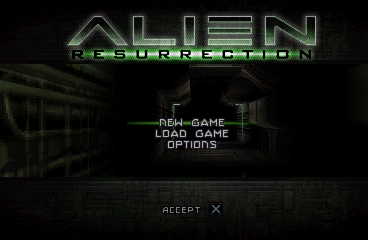
Alien Resurrection
0 49 38
Alien Resurrection is a classic PlayStation game that pulls players into a tense, atmospheric science fiction horror setting. Its dark corridors, eerie sound design, and relentless pacing create a sense of unease that makes every encounter feel like a brush with the unknown. As a piece of PlayStation history, it offers a nostalgic look at how horror and action were approached during that time, and it runs smoothly in your browser without the need for downloads or emulators.
Step Into the World of Alien Resurrection
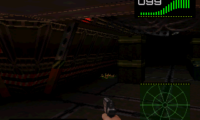
This game takes you to a bleak future where humanity’s survival is hanging by a thread, and alien creatures are everywhere. The visuals lean into a gritty, industrial look, with dim lighting and decayed corridors that build tension. The sound design reinforces this mood—distorted alarms, distant creature noises, and ambient hums set an unsettling tone that keeps you on edge. The environment feels cramped and hostile, making every step feel risky.
As you move through the game, the visuals and sounds work together to evoke feelings of isolation and danger. The soundtrack is sparse but effective, with subtle noises that heighten the tension. This blend of sights and sounds immerses you in a universe where threats are constant, and quick reflexes can mean the difference between survival and being caught off guard. The experience is designed to keep you feeling vulnerable yet determined to get through each challenge.
How the Gameplay Hooks You
The main loop involves exploring tight spaces, managing limited supplies, and battling hostile aliens. The pacing switches between quiet moments of exploration and sudden, intense encounters, keeping you alert. You’ll need to carefully navigate environments, solve simple puzzles, and fight enemies, all while thinking strategically rather than relying solely on brute force. The difficulty is balanced to keep things engaging without feeling unfair.
Conserving ammo and health items is key, as supplies are limited. Using the environment for hiding and ambushing can give you an edge. Pay attention to sound cues—they often signal nearby threats or hidden secrets. Exploring thoroughly can reveal useful items and routes, which might make your journey easier. The game runs smoothly in your browser, offering a tight experience that’s good for quick sessions or longer playtimes.
Pro Tips for Alien Resurrection
Focus on saving your resources and using the environment wisely. Sometimes sneaking around is better than rushing in. Listen closely to audio cues—they can tell you where danger is or reveal secrets. Take your time exploring each area; missing key items can make later parts more challenging.
- Learn enemy attack patterns to avoid damage.
- Use quick saves when possible, especially before entering new or dangerous rooms.
- Look around for useful objects or alternative routes.
- Adjust your approach based on what you encounter—stealth can often be more effective than direct combat.
Frequently Asked Questions
Does Alien Resurrection focus more on story or gameplay?
The game leans toward tense, atmospheric gameplay with minimal story cutscenes, plunging you directly into survival horror.
Is the gameplay repetitive or does it stay interesting?
Even with exploration and combat recurring, the constant alien threats and changing settings keep each session fresh and tense.
Can I enjoy short play sessions, or is it better for longer ones?
The pacing works well for both quick plays and longer sessions, fitting different schedules and play styles.
Playing Alien Resurrection in your browser gives you a taste of a gritty, suspenseful horror game rooted in PlayStation history. Its tense atmosphere and strategic gameplay make each session memorable, with encounters that stick with you long after you finish.
Related games: you can also try Action Man – Operation Extreme and Activision Classics, or browse all other games in the PlayStation category.
How to Play Alien Resurrection?
Explore dark corridors, find supplies, and fight or hide from aliens to survive. Move carefully, manage resources, and solve simple puzzles to progress through tense, atmospheric levels.
Game Controls
Arrow keys control movement; other keys handle actions like shooting and interacting.
You may be interested in:
-
 PlayStation
♥ 12
Alundra 2: A New Legend Begins
PlayStation
♥ 12
Alundra 2: A New Legend Begins -
 PlayStation
♥ 161
Alundra
PlayStation
♥ 161
Alundra -
 PlayStation
♥ 128
Alone in the Dark – One Eyed Jack’s Revenge
PlayStation
♥ 128
Alone in the Dark – One Eyed Jack’s Revenge -
 PlayStation
♥ 10
Allied General
PlayStation
♥ 10
Allied General -
 PlayStation
♥ 13
All-Star Slammin’ D-Ball
PlayStation
♥ 13
All-Star Slammin’ D-Ball -
 PlayStation
♥ 26
All Star Racing 2
PlayStation
♥ 26
All Star Racing 2 -
 PlayStation
♥ 24
All Star Racing
PlayStation
♥ 24
All Star Racing -
 PlayStation
♥ 139
Alien Trilogy
PlayStation
♥ 139
Alien Trilogy
Comments (0)
No comments yet. Be the first to comment!