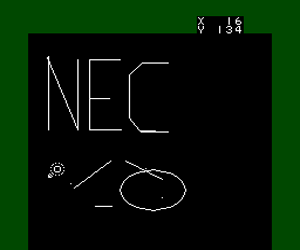
Artist Tool (Japan)
0 1 0
Step Into the World of Artist Tool
Artist Tool (Japan) is a classic TurboGrafx-16 game that invites players into a calm yet engaging creative environment. The visuals evoke the charm of early digital art programs, with a simple interface that feels both nostalgic and intuitive. The gentle soundscape complements the flow of drawing, making each session a quiet moment of artistic expression amid a pixelated landscape.
Set against a minimalist background, the game allows players to experiment with different brushes, colors, and shapes. Its aesthetic relies on a clean, uncluttered palette that emphasizes the act of creation rather than flashy effects. As you navigate the menus or craft your art, subtle sound effects reward precision and timing, reinforcing a relaxing atmosphere that encourages focus and calm. This simplicity makes Artist Tool more than just a drawing app — it’s a window into the contemplative joy of digital artistry, all playable directly in your browser as a TurboGrafx-16 classic.
How the Gameplay Hooks You
Artist Tool’s gameplay centers on creating art in a peaceful, almost meditative environment. There are no timers, scores, or competitive elements—just a smooth, flowing process of drawing and experimenting. The game encourages players to explore different tools and techniques at their own pace, making each session a personal journey rather than a race against time. Progression is subtle; as you unlock new brushes or colors, your creative options expand, inviting further experimentation.
What keeps the game engaging is its focus on process over outcome. The pacing is gentle, with no pressure to produce perfect art. Instead, you’re encouraged to play freely, blending colors, shaping strokes, or simply enjoying the act of creation. This makes Artist Tool ideal for short, casual play sessions or longer stretches of relaxed artistic exploration. It’s a calming experience that doesn’t overstay its welcome but rewards patience and curiosity.
Pro Tips for Artist Tool
Start with the default tools to familiarize yourself with the interface before branching out into more complex brushes and colors.
- Experiment with different brush sizes and opacity levels to discover unique textures.
- Use the undo feature liberally — it encourages trial and error without frustration.
- Try layering colors gradually for richer, more nuanced artwork.
- Save your favorite color palettes for quick access during sessions.
- Take short breaks to reset your focus, especially during extended creative periods.
Frequently Asked Questions
Can I create detailed art pieces in Artist Tool?
The game is designed for simple, stylized creations rather than intricate illustrations. Its focus is on relaxing experimentation rather than technical precision.
Does Artist Tool have different modes or challenges?
No, it’s a straightforward digital art environment without levels or challenges. The appeal lies in freeform creativity and exploration.
Is Artist Tool suitable for quick play sessions or longer ones?
Both. Its gentle pace makes it perfect for short relaxing draws or extended artistic outings when you want to unwind and focus.
Artist Tool offers a peaceful space for digital creativity that fits easily into any browsing session. Its simple charm and calming atmosphere make it a timeless choice for anyone looking to enjoy a quiet moment of artistic expression on a classic TurboGrafx-16 platform, now playable right in your browser.
Related games: you can also try Armed Formation F (Japan) and Play Adventure Island (Japan), or browse all other games in the TurboGrafx-16 category.
How to Play Artist Tool (Japan)?
Use the keyboard to select tools, colors, and shapes, then draw freely on the canvas. Experiment with different brushes and layering to create your digital art at your own pace.
Game Controls
Arrow keys act as the D-pad; Enter is Start; on-screen mapped keys handle the action buttons.
You may be interested in:
-
 TurboGrafx-16
♥ 1
Bouken Danshaku Don – The Lost Sunheart (Japan)
TurboGrafx-16
♥ 1
Bouken Danshaku Don – The Lost Sunheart (Japan) -
 TurboGrafx-16
♥ 6
Bonk’s Revenge (USA)
TurboGrafx-16
♥ 6
Bonk’s Revenge (USA) -
 TurboGrafx-16
♥ 8
Bonk’s Adventure (USA)
TurboGrafx-16
♥ 8
Bonk’s Adventure (USA) -
 TurboGrafx-16
♥ 10
Bonk III – Bonk’s Big Adventure (USA)
TurboGrafx-16
♥ 10
Bonk III – Bonk’s Big Adventure (USA) -
 TurboGrafx-16
♥ 38
Bomberman (USA)
TurboGrafx-16
♥ 38
Bomberman (USA) -
 TurboGrafx-16
♥ 5
Bomberman (Japan)
TurboGrafx-16
♥ 5
Bomberman (Japan) -
 TurboGrafx-16
♥ 36
Bomberman ’94 (Japan)
TurboGrafx-16
♥ 36
Bomberman ’94 (Japan) -
 TurboGrafx-16
♥ 18
Bomberman ’93 (USA)
TurboGrafx-16
♥ 18
Bomberman ’93 (USA)
Comments (0)
No comments yet. Be the first to comment!