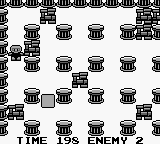
Atomic Punk (USA)
0 5 0
Atomic Punk (USA) is a classic Game Boy action and puzzle game that challenges your reflexes and strategic thinking. As a vintage title from the Game Boy era, it appeals to those who enjoy tight gameplay, puzzle-solving, and arcade-style fun. Running straight in your browser, this emulation captures the nostalgic feel of the original handheld device, so you can jump in and start playing without needing to download anything.
Getting Into Atomic Punk
The game is about navigating a maze-like space filled with hazards and obstacles. The main idea is to move your character through levels, avoiding or neutralizing dangers while collecting items or reaching key points. You pick a level and then carefully maneuver to dodge enemies or traps. It’s a game that combines quick decision-making with puzzle elements, requiring you to adapt your approach as you go.
Atomic Punk doesn’t have complicated modes or long storylines. Instead, each level offers a fresh challenge that tests your reflexes and problem-solving skills. The difficulty gradually increases, encouraging you to replay levels and learn the patterns and layouts. As a Game Boy classic, expect short yet intense sessions that reward precision and planning.
Standout Features
The visuals stay true to the pixel art style of its time, with colorful sprites that clearly mark hazards from safe zones. The animations are simple but effective, helping you quickly understand the environment and react accordingly. The level design invites exploration and experimentation, with puzzles that reward clever thinking and timing.
Progression is straightforward but keeps things interesting. Completing levels unlocks new challenges, giving you reasons to improve your times and avoid mistakes. The game’s structure encourages trying again and again, which makes it great for players who like mastering puzzles and beating their previous scores. Its short levels are perfect for quick play sessions, and the increasing difficulty keeps things engaging.
Strategy and Tips
Having a plan before jumping into a level helps you move faster. Spend time observing enemy patterns and hazards before rushing forward. Patience can help you avoid unnecessary mistakes, especially in later stages.
- Watch enemy movements and environmental dangers carefully before acting.
- Learn the layout of each level to find safe routes and shortcuts.
- Focus on collecting items or reaching objectives efficiently, rather than rushing blindly.
- Repetition helps you memorize puzzle solutions and improve your speed.
- Keep an eye on timers or limited resources that could influence your choices.
- Practice levels multiple times to refine your approach and boost your scores.
Quick Questions
How do I get started with Atomic Punk?
Just load the game in your browser and pick a level. The controls are simple—start moving and reacting to hazards right away.
What’s a common mistake for beginners?
Many new players rush into levels without studying enemy patterns, which often causes unnecessary losses. Take your time to learn each stage first.
Can I play Atomic Punk on a mobile device or touchscreen?
Yes, since it runs directly in your browser, it works well on mobile devices with touch controls, though using a keyboard might give more precise handling.
This in-browser version of Atomic Punk keeps the challenge and simplicity of the original Game Boy game. It’s a quick, engaging puzzle-action game that tests both reflexes and planning. Its straightforward gameplay and rising difficulty make it suitable for all skill levels, especially if you enjoy a nostalgic yet demanding experience.
Related games: you can also try All-Star Baseball '99 (USA) and Animal Breeder (Japan), or browse all other games in the Game Boy category.
How to Play Atomic Punk (USA)?
Navigate levels by moving your character to avoid hazards and enemies while collecting items or reaching goals. Study enemy patterns and plan your route for quick, precise movements to complete each challenge.
Game Controls
Arrow keys control movement; other keys handle actions as mapped on the emulator.








Comments (0)
No comments yet. Be the first to comment!