Baseball Simulator 1.000 (USA)
0 10 10
Baseball Simulator 1.000 (USA) is a classic NES baseball game that captures the sport with straightforward, easy-to-understand gameplay. Great for fans of the genre or anyone looking for a nostalgic sports experience, this game offers a simple yet engaging take on baseball without complicated mechanics or flashy visuals. It’s a good choice for quick sessions or casual play, especially since it runs directly in your browser through an emulated NES environment, so you can start playing without any setup.
Getting Into Baseball Simulator 1.000
The main gameplay focuses on the basic parts of baseball: batting, pitching, and fielding. The game is designed for quick, pick-up-and-play moments, with each game lasting just a few minutes—perfect for short bursts of fun. You can choose to play offense or defense, with controls that keep things simple on the field. The game offers a basic mode where you face the AI, letting you practice your skills or test different strategies.
During a typical game, you pick a team and then play a standard matchup, with the game handling pitch types, batting timing, and field positioning automatically. There aren’t any complex management options or career modes; instead, it’s all about the immediate action. This setup makes it easy for newcomers to get started, but still provides enough challenge for more experienced players. The pace is quick, with short innings and little downtime, so you can enjoy quick games or spend more time trying to beat records or improve your skills.
Standout Features
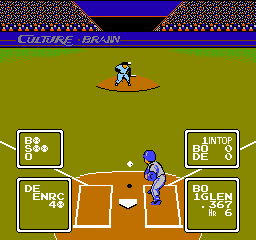
The visuals in Baseball Simulator 1.000 are simple, pixelated sprites typical of NES sports titles, clearly showing players and the ball. It doesn’t aim for realism but does a good job of conveying game states. The straightforward design ensures smooth performance, even on less powerful devices, and helps keep the focus on playing rather than flashy effects.
The game’s progression is limited to playing consecutive matches, with no complicated ranking or unlock system. Still, you can find replay value in trying to beat your own scores, improve batting averages, or experiment with different teams and tactics. Since it’s easy to access and quick to pick up, it encourages multiple sessions—whether you want to test your skills or just enjoy a quick game whenever you like.
Strategy and Tips
To do well in Baseball Simulator 1.000, focus on timing your swings well. Pitchers often throw predictable pitches, so watching and reacting quickly makes a difference. Practice your batting to hit more consistently and aim for the corners to make it harder for the opponent to catch your hits.
- Pay attention to the pitcher’s wind-up and release to anticipate pitches better.
- Adjust your batting timing depending on the pitch speed—press earlier for fastballs, later for slower ones.
- Use fielding controls carefully to throw out runners or stop hits from advancing.
- Try different teams if available, as some might have better stats or playing styles.
- Prioritize consistency over power—placing the ball in gaps often gives better results than swinging for home runs.
Quick Questions
How do I start a game in Baseball Simulator 1.000?
Just select the game from the menu, and it loads instantly in your browser—no extra setup needed.
What’s a common mistake for beginners?
Many new players tend to swing too early or too late; practicing timing helps improve accuracy and scoring.
Can I play this game on mobile or touch devices?
Yes, since it runs right in your browser, it works well on mobile devices with touch controls, though gameplay is optimized for keyboard input if on a PC or laptop.
Baseball Simulator 1.000 offers a simple, no-fuss baseball experience that’s perfect for quick games and casual fans. Its straightforward style makes it easy for newcomers to pick up, and it’s fun for anyone feeling nostalgic for NES sports titles—all playable free in your browser whenever you want.
Related games: you can also try Atlan Cirno Nazo and Athletic World (USA), or browse all other games in the NES category.
How to Play Baseball Simulator 1.000 (USA)?
Pick a team, then try to score runs by batting and prevent the opponent from scoring by pitching and fielding. Play quick matches focusing on timing and strategy to improve your skills.
Game Controls
Arrow keys control movement; buttons handle batting, pitching, and fielding actions.
You may be interested in:
-
![Zombie Hunter (Japan) [En by KingMike v1.01]](https://www.playf2p.com/wp-content/uploads/zombie-hunter-japan-en-by-kingmike-v1-01-200x120.png) NES
♥ 2
Zombie Hunter (Japan) [En by KingMike v1.01]
NES
♥ 2
Zombie Hunter (Japan) [En by KingMike v1.01] -
 NES
♥ 1
Zombie Hunter (Japan)
NES
♥ 1
Zombie Hunter (Japan) -
 NES
♥ 1
Zoids Mokushiroku (Japan)
NES
♥ 1
Zoids Mokushiroku (Japan) -
 NES
♥ 2
Zoids 2 – Zenebas no Gyakushuu (Japan)
NES
♥ 2
Zoids 2 – Zenebas no Gyakushuu (Japan) -
 NES
♥ 1
Zoids – Chuuou Tairiku no Tatakai (Japan)
NES
♥ 1
Zoids – Chuuou Tairiku no Tatakai (Japan) -
 NES
♥ 11
Zippy Race (Japan)
NES
♥ 11
Zippy Race (Japan) -
 NES
♥ 1
Zhen Ben Xi You Ji (Asia) (Unl)
NES
♥ 1
Zhen Ben Xi You Ji (Asia) (Unl) -
 NES
♥ 1
Zenbei!! Pro Basket (Japan)
NES
♥ 1
Zenbei!! Pro Basket (Japan)
Comments (0)
No comments yet. Be the first to comment!