Battle Jockey (Japan)
0 1 0
Battle Jockey (Japan) is a classic SNES game emulated in the browser, providing a simple racing experience with a unique twist. Originally released for the SNES console, it appeals to players who enjoy vintage racing titles with a quirky touch. Its straightforward mechanics and retro style make it accessible for newcomers while still offering enough challenge for seasoned players to enjoy in short sessions.
Getting Into Battle Jockey
The main gameplay involves racing a horse-like vehicle across various courses. There’s a single-player mode where you aim to beat your best times or set new records on different tracks. The controls are easy—mainly acceleration and steering—so players of all skill levels can pick it up quickly. During each race, you choose a course, start the race, and try to navigate through obstacles and turns efficiently. Quick reflexes and smooth control are key to improving your times and ranks.
While it doesn’t have lots of modes or complex mechanics, the game keeps things interesting with its simple yet challenging racing loop. Each race only takes a few minutes, perfect for quick bursts of play. The focus is on mastering each track’s layout to shave seconds off your best runs. Since it runs directly in your browser, you can jump straight into a race without any setup, making it easy to play whenever you have a few moments free.
Standout Features
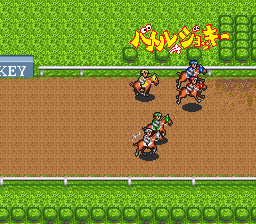
One of the most noticeable aspects of Battle Jockey is its pixel art style, which captures a playful, cartoonish look typical of many SNES titles. The visuals are colorful and clear, helping players easily distinguish track features and obstacles. Though simple, the design keeps the gameplay visually engaging, and the animations are smooth enough to give a satisfying sense of movement. Progression is straightforward—improve your times and unlock new courses or vehicles—but even with a limited scope, it offers replay value for those wanting to beat their personal bests.
Replayability mainly comes from trying to master each course and improve your runs. With multiple tracks and the challenge of tight turns and timing, players often return to push their performance further. The game doesn’t add power-ups or opponents, so success depends on your skill and familiarity with each track. This makes it a good pick for quick racing sessions that reward precision and consistency over time.
Strategy and Tips
Getting the best results in Battle Jockey isn’t just about pressing the gas. Here are some tips to help you perform better:
- Practice each course to memorize turns and obstacle placements, reducing hesitation during races.
- Focus on smooth steering rather than sharp, aggressive movements to stay in control at higher speeds.
- Use gentle acceleration to prevent losing traction on sharp corners, especially on tougher tracks.
- Look ahead and plan your line early before entering tricky sections to save time.
- Maintain a steady pace; rushing can cause mistakes and slow you down.
- If options are available, try different vehicle settings or characters to see if they affect handling or speed.
Quick Questions
Is Battle Jockey easy for beginners?
Yes, the mechanics are simple enough for new players, though mastering each course takes practice.
How long does a game session typically last?
Most races only take a few minutes, making it good for quick plays or multiple tries in a short span.
Can I play Battle Jockey on mobile or touch devices?
Since it runs in your browser, it should work on mobile browsers, but controls might be less precise without a keyboard or controller.
Battle Jockey offers a fun, fast-paced racing challenge with a retro vibe. Its straightforward gameplay and charming visuals make it a good choice for fans of vintage racing games looking for a quick, entertaining experience.
Related games: you can also try Batman (USA) (Proto) and Art of Fighting (Europe), or browse all other games in the SNES category.
How to Play Battle Jockey (Japan)?
Race your horse-like vehicle across tracks, steering and accelerating to beat your best times. Focus on smooth control and quick reflexes to navigate obstacles and sharp turns efficiently.
Game Controls
Arrow keys for steering and acceleration; other keys for actions as mapped on-screen.








Comments (0)
No comments yet. Be the first to comment!