Beyblade – Ikuze! Gekitou! Chou Jiryoku Battle! (J)(Independent)
0 1 0
Beyblade – Ikuze! Gekitou! Chou Jiryoku Battle! (J)(Independent) captures a slice of the Game Boy Advance era with its lively, pixelated arena and simple gameplay. It’s a nostalgic look back at handheld gaming, with bright visuals and energetic sounds that remind fans of early 2000s Beyblade tournaments. Whether you’re a longtime fan or just curious about spinning tops, it offers a fun throwback experience.
Step Into the World of Beyblade – Ikuze! Gekitou! Chou Jiryoku Battle!
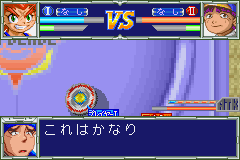
The game takes place in a colorful, arcade-style setting with cartoonish graphics that highlight the spinning tops and their fiery energy. The arena is a basic circular stage, with flashing borders and effects when tops collide or spin intensely. The soundtrack is lively, with quick percussion and upbeat melodies that give a sense of a tense competition. Despite its simplicity, the presentation keeps the excitement alive as you watch your tops whirl and collide.
Sound effects emphasize each hit and spin, creating an engaging atmosphere that echoes the thrill of real Beyblade battles. It runs smoothly in the browser, letting you jump into quick matches that recall the original handheld gameplay. Designed for fast-paced action, each round only takes a few moments—perfect for quick play or testing different strategies in a familiar, retro setting.
How the Gameplay Hooks You
This game depends on quick reactions and good timing, rewarding players who learn to control their spinning tops precisely. You launch your Beyblade by clicking or tapping, then watch it spin and hit your opponent’s top. The aim is to last longer or hit harder, with the main goal being to make your opponent stop spinning or push their top out of the arena.
The short battles make it easy to jump into multiple rounds without losing interest. Improving your launches and understanding the physics of collision adds a layer of strategy, even if the game’s core is simple. It’s easy to pick up but challenging to master, encouraging experimentation with timing and control for better results and more fun.
Pro Tips for Beyblade – Ikuze! Gekitou! Chou Jiryoku Battle!
Start with gentle, accurate launches to see how fast your opponent’s top spins before going for more forceful spins.
- Practice timing your launches to extend spin time and increase impact.
- Watch your opponent’s patterns and adjust your launch strength accordingly.
- Use quick spins early on to destabilize your opponent’s top.
- Keep your launches consistent to develop a steady rhythm.
- Try to control the collision angle to push your opponent’s top out of the arena.
Frequently Asked Questions
Can I play Beyblade – Ikuze! Gekitou! Chou Jiryoku Battle! for long periods?
Since matches are quick and energetic, it’s great for short bursts, but it might lose some appeal after mastering the mechanics.
Is this game suitable for all ages?
Yes, the simple controls and cartoony visuals make it accessible for many, especially fans of Beyblade or casual players looking for quick fun.
Does the game have different modes or levels?
This version focuses on straightforward battles without complex modes, emphasizing quick matches and timing skills.
Beyblade – Ikuze! Gekitou! Chou Jiryoku Battle! offers a lively, compact experience rooted in classic GBA style. Its easy mechanics and energetic presentation make it perfect for quick, competitive spin-top battles right in your browser.
Related games: you can also try Batman Begins (U)(TrashMan) and 2 in 1 – Finding Nemo & The Incredibles (E)(Independent), or browse all other games in the Game Boy Advance category.
How to Play Beyblade – Ikuze! Gekitou! Chou Jiryoku Battle! (J)(Independent)?
Launch your Beyblade by clicking or tapping, then try to spin it longer and hit your opponent’s top to win. Aim to make their top stop or leave the arena while keeping yours spinning.
Game Controls
Arrow keys act as the D-pad; Enter is Start; on-screen mapped keys handle the action buttons
You may be interested in:
-
 Game Boy Advance
♥ 2
Zooo (J)(Rising Sun)
Game Boy Advance
♥ 2
Zooo (J)(Rising Sun) -
 Game Boy Advance
♥ 4
Zooo (E)(Trashman)
Game Boy Advance
♥ 4
Zooo (E)(Trashman) -
 Game Boy Advance
♥ 2
ZooCube (U)(Mode7)
Game Boy Advance
♥ 2
ZooCube (U)(Mode7) -
 Game Boy Advance
♥ 1
ZooCube (E)(Blizzard)
Game Boy Advance
♥ 1
ZooCube (E)(Blizzard) -
 Game Boy Advance
♥ 1
Zone of the Enders – The Fist of Mars (U)(Mode7)
Game Boy Advance
♥ 1
Zone of the Enders – The Fist of Mars (U)(Mode7) -
 Game Boy Advance
♥ 1
Zone of the Enders – The Fist of Mars (E)(Cezar)
Game Boy Advance
♥ 1
Zone of the Enders – The Fist of Mars (E)(Cezar) -
 Game Boy Advance
♥ 1
Zoku Bokura no Taiyou – Taiyou Shounen Django (J)(Independent)
Game Boy Advance
♥ 1
Zoku Bokura no Taiyou – Taiyou Shounen Django (J)(Independent) -
 Game Boy Advance
♥ 7
Zoku Bokura no Taiyou – Taiyou Shounen Django (J)(Caravan)
Game Boy Advance
♥ 7
Zoku Bokura no Taiyou – Taiyou Shounen Django (J)(Caravan)
Comments (0)
No comments yet. Be the first to comment!