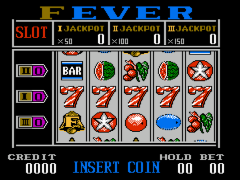
Bingo 75 (Asia) (Unl) (NES)
0 1 0
Bingo 75 (Asia) (Unl) (NES) is a straightforward digital version of the classic bingo game that started on the NES console. Designed to run right in your browser, it offers a nostalgic feel for players familiar with traditional bingo or those curious to try it without any downloads. The game provides a simple, relaxing way to enjoy a familiar pastime, with the convenience of instant access through your web browser.
Getting Into Bingo 75 (Asia)
This game captures the essence of classic bingo, where matching called numbers to those on your card is the main task. When the game starts, a number is announced, and players mark it if it appears on their card. The aim is to complete a pattern—often a line or full house—before anyone else. Each round moves quickly; once a pattern is filled, the game ends and a winner is shown. It works well for solo play against the computer or a simulated multiplayer setup, making it suitable for short breaks or longer sessions.
There are no complicated rules or modes—just waiting for numbers to be called and keeping track of your progress. Numbers are called at regular intervals, giving the game a steady rhythm. This simplicity makes it easy for newcomers to jump in, while seasoned bingo players can try to beat their previous times or complete patterns faster. Patience and focus are key, making it a good choice for casual gaming in your browser.
Standout Features
Visually, Bingo 75 (Asia) sticks to the traditional bingo look, with clear, bold number calls and easy-to-read cards. The interface focuses on functionality rather than flashy graphics, fitting the NES nostalgia. The clean design helps players read numbers and monitor their progress without distractions.
The game doesn’t have much in the way of progression—mostly, it’s about how many rounds you can finish or how fast you can fill a full house. You can keep coming back to try beating your best times or just enjoy the familiar gameplay. Since each game is randomly generated, no two sessions are exactly alike, encouraging repeated play. Its simple setup makes it accessible for players of all ages and skill levels, providing a laid-back gaming experience.
Strategy and Tips
Though bingo is mostly luck, a few tips can help you enjoy it more and maybe improve your chances. Paying attention to called numbers and marking your cards quickly can stop you from missing out. Organizing your cards and knowing their layout speeds things up. Don’t rush—accuracy beats speed, so avoid mistakes that might cost you the game. If you’re playing multiple cards, focus on the ones closer to completing a pattern.
- Keep an eye on the called numbers to catch matches promptly.
- Arrange your cards so you can spot potential patterns easily.
- Stay patient and take your time, prioritizing correctness.
- Practice with several cards to build your speed.
- Set goals for each game, like finishing a pattern within a certain number of calls.
Quick Questions
How do I get started with Bingo 75 (Asia)?
Just load it in your browser—no downloads or setup needed. Follow the prompts to start playing right away.
What’s a common mistake beginners make?
Many forget to mark called numbers quickly or get distracted, which can cause missed chances to complete patterns.
Can I play Bingo 75 (Asia) on a mobile device or touchscreen?
Yes, since it runs in your browser, it works well on mobile devices with touch controls, making it easy to play on the go.
Bingo 75 (Asia) gives a simple, familiar bingo experience that you can enjoy directly in your browser. Whether you’re after a quick game or just want a relaxing activity, this NES classic offers straightforward gameplay with enough variety to keep coming back.
Related games: you can also try Auto-Upturn (Asia) (Unl) (NES) and Ball Story – Jong Yuk Chuen Suet Fa Jong II (China) (Unl), or browse all other games in the NES category.
How to Play Bingo 75 (Asia) (Unl) (NES)?
Numbers are called out, and you mark them on your bingo card. Match a full line or full house to win before others do.
Game Controls
Arrow keys move the cursor; Enter marks numbers; other keys navigate and confirm selections.
You may be interested in:
-
![Zombie Hunter (Japan) [En by KingMike v1.01]](https://www.playf2p.com/wp-content/uploads/zombie-hunter-japan-en-by-kingmike-v1-01-200x120.png) NES
♥ 2
Zombie Hunter (Japan) [En by KingMike v1.01]
NES
♥ 2
Zombie Hunter (Japan) [En by KingMike v1.01] -
 NES
♥ 1
Zombie Hunter (Japan)
NES
♥ 1
Zombie Hunter (Japan) -
 NES
♥ 1
Zoids Mokushiroku (Japan)
NES
♥ 1
Zoids Mokushiroku (Japan) -
 NES
♥ 2
Zoids 2 – Zenebas no Gyakushuu (Japan)
NES
♥ 2
Zoids 2 – Zenebas no Gyakushuu (Japan) -
 NES
♥ 1
Zoids – Chuuou Tairiku no Tatakai (Japan)
NES
♥ 1
Zoids – Chuuou Tairiku no Tatakai (Japan) -
 NES
♥ 11
Zippy Race (Japan)
NES
♥ 11
Zippy Race (Japan) -
 NES
♥ 1
Zhen Ben Xi You Ji (Asia) (Unl)
NES
♥ 1
Zhen Ben Xi You Ji (Asia) (Unl) -
 NES
♥ 1
Zenbei!! Pro Basket (Japan)
NES
♥ 1
Zenbei!! Pro Basket (Japan)
Comments (0)
No comments yet. Be the first to comment!