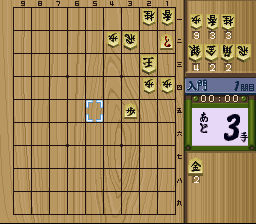
BS Super Tsume Shougi 1000 (Japan)
0 1 0
BS Super Tsume Shougi 1000 (Japan) is a classic SNES game that brings the traditional Japanese chess puzzle into your browser. It’s simple to pick up and offers a puzzle-solving experience that appeals to both newcomers and seasoned shogi fans. Its clean interface and clear rules make it accessible, even if you’re not familiar with the game’s native language or mechanics.
What Is BS Super Tsume Shougi 1000?
This game is a digital version of a shogi puzzle collection, focusing on “tsume” (checkmate) problems. The main goal is to find the sequence of moves that leads to checkmate within a certain number of turns. It’s similar to solving chess puzzles but with the unique pieces and rules of shogi, including drops and promotions. The game tests your strategic thinking and pattern recognition, so each puzzle becomes a challenge to solve in as few moves as possible.
It offers a large library of puzzles, from simple setups to very complex ones. Each presents a specific board position, and your task is to figure out how to deliver checkmate efficiently. Visual clues and move options are provided, making it suitable for players interested in tactical play and shogi strategies. Since it runs directly in your browser, you can try out puzzles instantly without downloading anything or setting up extra software.
What Keeps You Coming Back
The appeal of BS Super Tsume Shougi 1000 comes from its wide range of puzzles and the challenge of solving them within time or move limits. The progression system encourages players to improve by tackling harder problems, with new puzzles unlocking as you succeed. The interface is clean and simple, helping you focus on solving puzzles without distractions.
It also offers lasting replay value through the variety of positions and the satisfaction of mastering complex checkmate sequences. Many players revisit puzzles to refine their solutions or explore alternative moves. Its straightforward design means you can pick up right where you left off, whether for quick sessions or more focused practice. It’s a good choice for anyone wanting to sharpen their shogi skills or test their strategic thinking in a relaxed setting.
Handy Tips
If you’re starting out with BS Super Tsume Shougi 1000, keep these tips in mind:
- Pay attention to the opening moves; they often set the tone for the rest of the sequence.
- Look for forcing moves that limit your opponent’s responses early on.
- Use the hints or review features to study solutions when you get stuck.
- Practice solving puzzles multiple times to recognize common checkmate patterns.
- Watch for piece promotions and drops, which are key to completing checkmates efficiently.
Player FAQ
Is BS Super Tsume Shougi 1000 easy for beginners to pick up?
Yes, the interface is straightforward, and the basic rules are simple enough for newcomers to understand quickly.
Can younger players enjoy BS Super Tsume Shougi 1000?
Definitely, especially if they like chess or puzzles. Some puzzles may be tricky, so adult guidance can help with more complex setups.
Do I need an internet connection to play BS Super Tsume Shougi 1000?
No, since it runs straight in your browser, you can play offline without any downloads or additional setup.
BS Super Tsume Shougi 1000 offers a straightforward puzzle experience for fans of shogi and brain teasers. Its simple gameplay makes it easy for casual players, while its large puzzle library keeps those interested in strategy coming back for more. Playing here, you can practice and sharpen your skills anytime without fuss.
Related games: you can also try BS Konae-chan no Dokidoki Pengin Kazoku (Japan) and BS Parlor! Parlor! – Dai-2-shuu (Japan), or browse all other games in the SNES category.
How to Play BS Super Tsume Shougi 1000 (Japan)?
Solve shogi checkmate puzzles by finding the correct move sequence within a limited number of turns. Use visual clues and try to complete each puzzle efficiently to progress through the game.
Game Controls
Arrow keys move the cursor; Enter confirms moves; other keys select options or navigate menus.








Comments (0)
No comments yet. Be the first to comment!