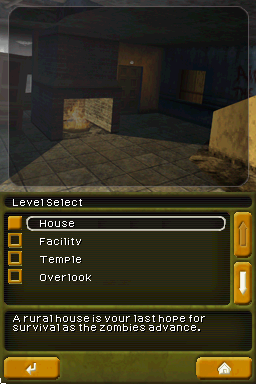
Call of Duty – Black Ops (Europe)
0 8 0
Call of Duty – Black Ops (Europe) is a classic Nintendo DS game that captures the intense combat and tactical gameplay of the series in a portable format. Made for quick picks and play, it sticks to the core experience with straightforward controls and engaging missions, so it’s accessible even for newcomers. Playing this Nintendo DS classic in your browser offers a nostalgic trip back to the handheld’s heyday without any downloads or installs.
What Is Call of Duty – Black Ops?
This game is a first-person shooter centered on military combat scenarios. The main goal is to complete various missions involving combat, stealth, and strategic planning. The DS version simplifies the larger battles seen on consoles but keeps the core shooting mechanics and mission-based gameplay that fans enjoy. The pacing is quick, with each mission blending shooting action and tactical decisions.
Players move through levels using the stylus and buttons, taking part in firefights, rescuing hostages, or infiltrating enemy bases. The structure encourages trying different approaches to completing objectives and offers a variety of weapons and gear typical of the franchise. Its simple gameplay makes it suitable for players of different skill levels, focusing on fun rather than complexity.
What Keeps You Coming Back
One of the main attractions is the variety of missions and the challenge of completing objectives under different conditions. The game has a balanced difficulty, making it engaging for newcomers and experienced players alike. Short session lengths mean you can enjoy a mission or two during a commute, but finishing everything still takes some time.
The replay value comes from experimenting with different strategies and weapon setups. The handheld format encourages quick sessions, but the game rewards trying out different tactics to see what works best. The familiar Call of Duty atmosphere, with military-themed settings and intense firefights, keeps players interested over multiple playthroughs.
Handy Tips
Getting comfortable with the controls early can help you react faster during fights. Use cover wisely to avoid taking damage. Focus on completing objectives efficiently to save time and reduce unnecessary firefights. Watch your ammo and health supplies, which are limited during missions. Try out different weapons to find what fits your style. Revisit missions to improve your scores or explore alternative strategies for extra fun.
Player FAQ
Is Call of Duty – Black Ops easy for new players to pick up?
Yes, the controls and mission setup are simple enough for newcomers to first-person shooters on the Nintendo DS. It offers enough guidance to get started without feeling overwhelming.
Can younger players enjoy Call of Duty – Black Ops?
While it features mild violence typical of the series, it’s generally suitable for older children and teens. Parental discretion is recommended, especially for younger players sensitive to combat themes.
Does this version of Call of Duty – Black Ops require an internet connection?
No, it’s designed for offline play only. You can enjoy the missions and gameplay entirely within your browser without needing to connect online.
Call of Duty – Black Ops remains a solid choice for fans of military shooters, particularly on the Nintendo DS. This browser version keeps its core gameplay intact, making it easy to pick up whenever you’re after a quick burst of action.
Related games: you can also try Bionicle Heroes (Europe) (En,Fr,De,Es,It,Da) and B-17 – Fortress in the Sky (Europe) (En,Fr,Es,It), or browse all other games in the Nintendo DS category.
How to Play Call of Duty – Black Ops (Europe)?
Complete missions by moving, shooting, and using cover to defeat enemies and achieve objectives. Experiment with weapons and strategies to improve your score and progress through the game.
Game Controls
Arrow keys or WASD move; space or Enter to shoot; other keys for actions and menu navigation.
You may be interested in:
-
 Nintendo DS
♥ 1
Casper’s Scare School – Classroom Capers (USA)
Nintendo DS
♥ 1
Casper’s Scare School – Classroom Capers (USA) -
 Nintendo DS
♥ 1
Zunou Nouryoku Koujou Machine – Touch de Zunoo DS (Japan)
Nintendo DS
♥ 1
Zunou Nouryoku Koujou Machine – Touch de Zunoo DS (Japan) -
 Nintendo DS
♥ 1
Zunou ni Asekaku Game Series! Vol. 1 – Cool 104 Joker & Setline (Japan)
Nintendo DS
♥ 1
Zunou ni Asekaku Game Series! Vol. 1 – Cool 104 Joker & Setline (Japan) -
 Nintendo DS
♥ 9
Zuma’s Revenge (USA)
Nintendo DS
♥ 9
Zuma’s Revenge (USA) -
 Nintendo DS
♥ 1
Zubo (USA) (En,Fr,Es)
Nintendo DS
♥ 1
Zubo (USA) (En,Fr,Es) -
 Nintendo DS
♥ 1
Zubo (Europe) (En,Fr,De,Es,It,Nl,Sv)
Nintendo DS
♥ 1
Zubo (Europe) (En,Fr,De,Es,It,Nl,Sv) -
 Nintendo DS
♥ 1
Zorro – Quest for Justice (USA) (En,Fr,De,Es,It)
Nintendo DS
♥ 1
Zorro – Quest for Justice (USA) (En,Fr,De,Es,It) -
 Nintendo DS
♥ 1
Zorro – Quest for Justice (Europe) (En,Fr,De,Es,It)
Nintendo DS
♥ 1
Zorro – Quest for Justice (Europe) (En,Fr,De,Es,It)
Comments (0)
No comments yet. Be the first to comment!