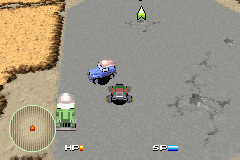
Car Battler Joe (U)(Venom)
0 4 0
Car Battler Joe (U)(Venom) is a classic Game Boy Advance game that mixes action, role-playing, and racing elements into a fun and engaging package. Originally for the GBA, you can now play it directly in your browser, bringing back a game that combines combat, vehicle upgrades, and race-style gameplay. If you enjoy titles that test your reflexes while rewarding careful planning, Car Battler Joe offers a straightforward but compelling experience.
Getting Into Car Battler Joe
The main idea of Car Battler Joe is controlling a vehicle you can customize, used for battles and races. You start by choosing a vehicle and then take part in various competitions or combat scenarios. The game has a loop where you gather resources, upgrade your car, and then jump into battles or races to move forward. Usually, each session begins with a mission or challenge, leading to a series of encounters that challenge your driving and weapon use.
Throughout the game, you’ll switch between speeding through environments and fighting opponents. Rewards from wins can be used to improve your car’s armor, weapons, and speed. There’s no fixed storyline, so replaying battles with different setups helps you get better at the game. Each attempt feels like a chance to fine-tune your tactics and prepare your vehicle for what’s next.
Standout Features
The graphics are simple but effective, capturing the classic GBA look — colorful sprites, clear animations, and distinct vehicle designs. The visuals help you easily spot enemies, obstacles, and items during fast-paced moments. Your progress depends on how well you adapt your vehicle to different opponents and race conditions, rewarding careful customization and skillful driving.
There’s good replay value, thanks to the variety of battles, races, and upgrade choices. As you get better at your vehicle and learn enemy patterns, the game keeps challenging you without feeling overwhelming. Its straightforward mechanics make it accessible but still deep enough for players who want to optimize their vehicle and tactics. The focus on vehicular combat and racing keeps each session interesting.
Strategy and Tips
Starting with a balanced approach to upgrading your vehicle can help battles go more smoothly. It’s a good idea to improve durability and speed early on before investing too much in weapons.
- Watch enemy patterns and weaknesses to plan your upgrades.
- Use defensive moves to avoid damage, especially in tougher battles.
- Gather resources efficiently so you can buy important upgrades.
- Practice controlling your vehicle at high speeds to handle tight turns better.
- Try different vehicle setups to find what suits your style best.
Quick Questions
How do I start playing Car Battler Joe?
Just load it in your browser and start controlling your vehicle — no setup needed. Pick missions or battles and go.
What’s a common mistake for new players?
Focusing too much on weapons early on without balancing speed and durability can leave your vehicle vulnerable.
Can I play this on mobile or touch devices?
Yes, since it runs directly in the browser, it works well on mobile devices with touch controls, so you can enjoy it without extra software.
Car Battler Joe offers a simple but strategic experience centered on vehicular combat and racing. Its focus on customization and tactics makes it a good pick for fans of action and role-playing games on the GBA. Playing it in your browser means you can jump right in whenever you feel like it, without needing to download anything.
Related games: you can also try Bruce Lee – Return of the Legend (E)(Venom) and 2 in 1 – Power Rangers – Ninja Storm & Power Rangers – Time Force (U)(Trashman), or browse all other games in the Game Boy Advance category.
How to Play Car Battler Joe (U)(Venom)?
Choose and upgrade your vehicle, then race or battle opponents to earn resources and improve your car. Repeat the cycle of combat and racing to progress and refine your tactics.
Game Controls
Arrow keys control movement; other keys handle actions and upgrades.
You may be interested in:
-
 Game Boy Advance
♥ 2
Zooo (J)(Rising Sun)
Game Boy Advance
♥ 2
Zooo (J)(Rising Sun) -
 Game Boy Advance
♥ 4
Zooo (E)(Trashman)
Game Boy Advance
♥ 4
Zooo (E)(Trashman) -
 Game Boy Advance
♥ 2
ZooCube (U)(Mode7)
Game Boy Advance
♥ 2
ZooCube (U)(Mode7) -
 Game Boy Advance
♥ 1
ZooCube (E)(Blizzard)
Game Boy Advance
♥ 1
ZooCube (E)(Blizzard) -
 Game Boy Advance
♥ 1
Zone of the Enders – The Fist of Mars (U)(Mode7)
Game Boy Advance
♥ 1
Zone of the Enders – The Fist of Mars (U)(Mode7) -
 Game Boy Advance
♥ 1
Zone of the Enders – The Fist of Mars (E)(Cezar)
Game Boy Advance
♥ 1
Zone of the Enders – The Fist of Mars (E)(Cezar) -
 Game Boy Advance
♥ 1
Zoku Bokura no Taiyou – Taiyou Shounen Django (J)(Independent)
Game Boy Advance
♥ 1
Zoku Bokura no Taiyou – Taiyou Shounen Django (J)(Independent) -
 Game Boy Advance
♥ 7
Zoku Bokura no Taiyou – Taiyou Shounen Django (J)(Caravan)
Game Boy Advance
♥ 7
Zoku Bokura no Taiyou – Taiyou Shounen Django (J)(Caravan)
Comments (0)
No comments yet. Be the first to comment!