Catan (Europe) (En,De)
0 1 0
What Is Catan?
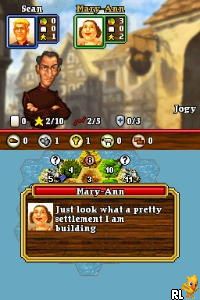
Catan (Europe) (En,De) is a classic Nintendo DS game that brings the well-loved board game to your handheld in a digital format. Its simple yet strategic gameplay makes it easy for newcomers to pick up and enjoy, while offering enough depth to satisfy seasoned players. This Nintendo DS classic captures the essence of resource management and trading, translating the social experience of the original into a smooth digital session.
The game revolves around building settlements, roads, and cities on the island of Catan, competing to be the first to reach a set number of victory points. You collect resources like wood, brick, wheat, ore, and sheep, and trade with other players or the game’s economy to expand your territory. The goal is to outsmart opponents through strategic placement and resource management, making each game a fresh puzzle with different challenges and opportunities.
What Keeps You Coming Back
This version of Catan offers multiple game modes and a competitive AI that adapts to your skill level, encouraging repeated play. The game’s replay value comes from variable setup options, randomized resource placement, and different strategies on each map. The digital format streamlines common game phases, reducing downtime and keeping the experience engaging from start to finish.
Online multiplayer modes aren’t available here, but the game’s AI opponents and local multiplayer options on the DS provide enough variety to keep sessions interesting. The game’s mechanics are straightforward, making it easy to learn, but mastering the trade-offs and tactical positioning takes time. That balance of accessibility and depth is what makes Catan a staple for both casual and dedicated players on the Nintendo DS.
Handy Tips
Getting the most out of your game involves smart placement and resource management. Here are some quick tips to improve your chances:
- Prioritize settling near diverse resource tiles early to ensure a steady income of different materials.
- Watch opponents’ settlements to block their expansion paths and limit their resource access.
- Trade wisely—don’t give away too many resources unless it benefits your long-term strategy.
- Build roads to connect your settlements and control key expansion routes on the map.
- Keep an eye on the development card deck; they can provide crucial advantages at pivotal moments.
Player FAQ
Is Catan easy enough for younger players or complete beginners?
Yes. Catan’s rules are simple enough for beginners, especially with the tutorial and simplified interface on the Nintendo DS. It’s accessible for players of all ages, making it a solid introduction to strategic resource management.
Can I play Catan offline or without an internet connection?
This version runs entirely within the console, so you can enjoy Catan offline whenever you want. No internet connection is needed once the game loads, which makes it convenient for quick sessions or travel.
Is this game suitable for players unfamiliar with the original board game?
Absolutely. The digital adaptation provides clear instructions and visual cues that help new players understand the gameplay without prior knowledge. It’s a good way to learn the basics of Catan while having fun.
Playing Catan on this platform offers a simple way to experience the classic game. Its mechanics and strategic depth make it a popular choice for fans of resource management and board game adaptations. The straightforward design allows you to jump right in and enjoy a quick, satisfying session anytime you want to build, trade, and expand on the island of Catan.
Related games: you can also try Blue Dragon – Awakened Shadow (Spain) and Actua Pool (Europe) (En,De,Es,It), or browse all other games in the Nintendo DS category.
How to Play Catan (Europe) (En,De)?
Build settlements, roads, and cities on Catan, gather resources, and trade strategically to reach the victory point goal before opponents do.
Game Controls
Arrow keys move the cursor; Enter selects; other keys handle actions and menu navigation.
You may be interested in:
-
 Nintendo DS
♥ 1
Casper’s Scare School – Classroom Capers (USA)
Nintendo DS
♥ 1
Casper’s Scare School – Classroom Capers (USA) -
 Nintendo DS
♥ 1
Zunou Nouryoku Koujou Machine – Touch de Zunoo DS (Japan)
Nintendo DS
♥ 1
Zunou Nouryoku Koujou Machine – Touch de Zunoo DS (Japan) -
 Nintendo DS
♥ 1
Zunou ni Asekaku Game Series! Vol. 1 – Cool 104 Joker & Setline (Japan)
Nintendo DS
♥ 1
Zunou ni Asekaku Game Series! Vol. 1 – Cool 104 Joker & Setline (Japan) -
 Nintendo DS
♥ 9
Zuma’s Revenge (USA)
Nintendo DS
♥ 9
Zuma’s Revenge (USA) -
 Nintendo DS
♥ 1
Zubo (USA) (En,Fr,Es)
Nintendo DS
♥ 1
Zubo (USA) (En,Fr,Es) -
 Nintendo DS
♥ 1
Zubo (Europe) (En,Fr,De,Es,It,Nl,Sv)
Nintendo DS
♥ 1
Zubo (Europe) (En,Fr,De,Es,It,Nl,Sv) -
 Nintendo DS
♥ 1
Zorro – Quest for Justice (USA) (En,Fr,De,Es,It)
Nintendo DS
♥ 1
Zorro – Quest for Justice (USA) (En,Fr,De,Es,It) -
 Nintendo DS
♥ 1
Zorro – Quest for Justice (Europe) (En,Fr,De,Es,It)
Nintendo DS
♥ 1
Zorro – Quest for Justice (Europe) (En,Fr,De,Es,It)
Comments (0)
No comments yet. Be the first to comment!