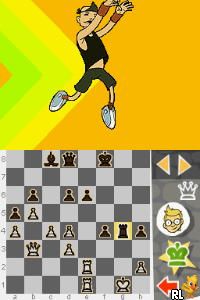
Chess for Kids (Europe) (En,Fr,De,Es,It)
0 1 0
Chess for Kids (Europe) (En,Fr,De,Es,It) is a classic Nintendo DS title that introduces players to the basics of chess through a simple and accessible approach. Designed with younger players in mind, it offers a gentle entry point into the game, making it suitable for beginners and casual players alike. This Nintendo DS classic is a nostalgic piece from the handheld’s era, allowing players to enjoy a digital chess experience directly in their browser without any downloads or installations.
Getting Into Chess for Kids
The game features straightforward gameplay focused on playing chess matches against an AI opponent or exploring different learning modes. When you start a session, you can choose to jump into a quick game or access tutorials to learn chess rules and tactics. The core gameplay involves moving pieces on a virtual board, with the game offering guidance on legal moves and basic strategies. As you play, it highlights possible moves and offers hints, helping new players understand how chess works.
Matches move at a steady pace, making it easy to pick up without feeling overwhelmed. The game keeps track of your wins and losses, encouraging practice and improvement. There are modes dedicated to teaching concepts like check, checkmate, and piece value, making each session both educational and fun. The interface is clean and intuitive, letting players focus on their moves and the flow of the game, which is perfect for those new to chess or younger players just starting out.
Standout Features
Visually, Chess for Kids keeps things simple with clear, easy-to-understand graphics. The chessboard is neatly drawn, with distinguishable pieces that are easy to recognize, even on smaller screens. The game uses bright, friendly colors and minimal clutter, making it accessible for players of all ages. Progression-wise, the game rewards players for completing tutorials and winning matches, gradually unlocking new difficulty levels or hints, which helps keep the game interesting over time.
Replayability comes from its beginner-friendly design and focus on learning. Players can practice different scenarios, try various strategies, or challenge themselves against tougher AI opponents. Since the game emphasizes learning over complex mechanics, it encourages repeated play to get better at the basics. As a browser-based emulator, it offers instant access, so players can jump into a game whenever they want without waiting or setup troubles.
Strategy and Tips
Starting with the basics is a good idea when playing this version of chess. Take your time to understand each piece’s role and how it moves. Focus on controlling the center early because it gives you more options for your pieces later.
- Use the hints the game provides to learn common tactical moves and avoid mistakes.
- Don’t rush your moves; think about what might happen next before acting.
- Practice endgames to get better at checkmating with fewer pieces on the board.
- Try different openings to see which ones give you the most control and confidence.
- Review your matches to spot mistakes and learn from them.
Quick Questions
How do I get started if I’ve never played chess before?
The game offers tutorials and hints that guide you through the rules and basic strategies, making it easy for newcomers to start playing right away.
What’s a common mistake new players make?
Many beginners move pieces without considering future threats or forget how important controlling the center early in the game is.
Can I play this on a mobile device or touchscreen?
Since it runs directly in your browser, it works with touchscreens and mobile browsers, so you can play on different devices without extra setup.
Chess for Kids provides a straightforward, educational experience that helps players understand chess fundamentals. Its approachable style makes it a solid choice for newcomers or anyone looking for an easy way to get started with a browser-based game.
Related games: you can also try Avalon Code (Japan) and Angel Cat Sugar (Europe) (Sv,No,Da,Fi), or browse all other games in the Nintendo DS category.
How to Play Chess for Kids (Europe) (En,Fr,De,Es,It)?
Move your pieces to capture the opponent's king by selecting and dragging or clicking on squares. Learn rules and tactics through guided matches and tutorials, improving with practice.
Game Controls
Arrow keys move the cursor; Enter selects and confirms moves.
You may be interested in:
-
 Nintendo DS
♥ 1
Casper’s Scare School – Classroom Capers (USA)
Nintendo DS
♥ 1
Casper’s Scare School – Classroom Capers (USA) -
 Nintendo DS
♥ 1
Zunou Nouryoku Koujou Machine – Touch de Zunoo DS (Japan)
Nintendo DS
♥ 1
Zunou Nouryoku Koujou Machine – Touch de Zunoo DS (Japan) -
 Nintendo DS
♥ 1
Zunou ni Asekaku Game Series! Vol. 1 – Cool 104 Joker & Setline (Japan)
Nintendo DS
♥ 1
Zunou ni Asekaku Game Series! Vol. 1 – Cool 104 Joker & Setline (Japan) -
 Nintendo DS
♥ 9
Zuma’s Revenge (USA)
Nintendo DS
♥ 9
Zuma’s Revenge (USA) -
 Nintendo DS
♥ 1
Zubo (USA) (En,Fr,Es)
Nintendo DS
♥ 1
Zubo (USA) (En,Fr,Es) -
 Nintendo DS
♥ 1
Zubo (Europe) (En,Fr,De,Es,It,Nl,Sv)
Nintendo DS
♥ 1
Zubo (Europe) (En,Fr,De,Es,It,Nl,Sv) -
 Nintendo DS
♥ 1
Zorro – Quest for Justice (USA) (En,Fr,De,Es,It)
Nintendo DS
♥ 1
Zorro – Quest for Justice (USA) (En,Fr,De,Es,It) -
 Nintendo DS
♥ 1
Zorro – Quest for Justice (Europe) (En,Fr,De,Es,It)
Nintendo DS
♥ 1
Zorro – Quest for Justice (Europe) (En,Fr,De,Es,It)
Comments (0)
No comments yet. Be the first to comment!