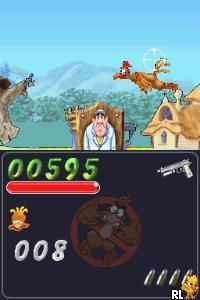
Chicken Shoot (Europe) (En,Fr,De,Es,It)
0 1 0
Chicken Shoot (Europe) (En,Fr,De,Es,It) is a classic Nintendo DS game that provides a straightforward arcade-style shooting experience. With simple mechanics and colorful visuals, it appeals to players looking for casual, light-hearted gameplay. Whether you enjoy shooting galleries or just want a relaxing distraction, this game offers a familiar challenge playable free in your browser.
Getting Into Chicken Shoot
The main gameplay involves shooting moving targets, mainly chickens, that appear on the screen. Players take on the role of a shooter aiming at targets that glide across the screen in different directions and speeds. The game has a series of levels, each slightly more challenging as the speed and number of chickens increase. Quick reflexes and good timing are key to hitting as many targets as possible before time runs out or misses pile up.
Different modes might focus on accuracy or speed, encouraging players to sharpen their aim or beat their high scores. Designed for short play sessions, it’s easy to pick up and put down. Controls are simple—often just tapping or clicking to shoot—which works well in a browser environment. This Nintendo DS classic is perfect for quick play, whether you’re trying to improve your score or just enjoy some casual shooting fun.
Standout Features
Visually, Chicken Shoot uses bright, cartoon-style graphics that keep things light and inviting. The chickens and backgrounds are colorful, with smooth animations that make targets move naturally across the screen. This aesthetic makes the gameplay engaging without needing complex visuals, so it runs well even on less powerful devices or in browser emulation.
Progression is straightforward—players move through levels by hitting a set number of targets and racking up high scores. The game’s replay value comes from aiming to improve accuracy and speed, as well as competing with your best scores. Its simple mechanics and short sessions make it a good choice for quick, repeatable play, especially if you enjoy mastering a classic shooting gallery.
Strategy and Tips
If you’re just starting out, focus on aiming carefully rather than rushing. Precision often beats frantic shooting here. Staying calm helps you hit more chickens and score higher. Practice with the early levels to get used to how the chickens move, which can vary in speed and direction.
- Aim slightly ahead of fast-moving chickens; predicting their path helps improve your hits.
- Target chickens that are closer or moving faster to boost your score.
- Avoid wasting shots on chickens that are hidden or moving out of view.
- Use short pauses between levels to reset and prepare for faster, tougher stages.
- Keep an eye on your time and remaining targets to avoid rushing and missing easy shots.
Quick Questions
How do I get started playing Chicken Shoot?
Just load the game in your browser, and it starts right away—no downloads needed.
What’s a common mistake beginners make?
Many try to shoot too quickly without aiming carefully, which leads to misses and lower scores. Taking your time early on helps build accuracy.
Can I play Chicken Shoot comfortably on a mobile device or touchscreen?
Yes. Since it’s emulated in the browser with simple controls, it works well on touchscreens, making it easy to play casually on mobile devices.
Overall, Chicken Shoot offers a straightforward shooting gallery experience adapted for browser play. Its easy mechanics and bright visuals make it a fun choice for quick sessions, especially if you enjoy simple target shooting games. Playing directly in your browser makes it easy to try whenever you want a casual challenge on the Nintendo DS platform.
Related games: you can also try Cavallo & Pony – La Scuola di Equitazione (Europe) (Fr,It) and Bokujou Monogatari – Colobockle Station (Japan) (Rev 2), or browse all other games in the Nintendo DS category.
How to Play Chicken Shoot (Europe) (En,Fr,De,Es,It)?
Aim and click to shoot moving chickens across levels, trying to hit as many as possible before time runs out. Improve your accuracy and speed to beat your high scores in this simple shooting gallery.
Game Controls
Use the keyboard to aim and shoot; typically, arrow keys or mouse clicks control the game.
You may be interested in:
-
 Nintendo DS
♥ 1
Casper’s Scare School – Classroom Capers (USA)
Nintendo DS
♥ 1
Casper’s Scare School – Classroom Capers (USA) -
 Nintendo DS
♥ 1
Zunou Nouryoku Koujou Machine – Touch de Zunoo DS (Japan)
Nintendo DS
♥ 1
Zunou Nouryoku Koujou Machine – Touch de Zunoo DS (Japan) -
 Nintendo DS
♥ 1
Zunou ni Asekaku Game Series! Vol. 1 – Cool 104 Joker & Setline (Japan)
Nintendo DS
♥ 1
Zunou ni Asekaku Game Series! Vol. 1 – Cool 104 Joker & Setline (Japan) -
 Nintendo DS
♥ 9
Zuma’s Revenge (USA)
Nintendo DS
♥ 9
Zuma’s Revenge (USA) -
 Nintendo DS
♥ 1
Zubo (USA) (En,Fr,Es)
Nintendo DS
♥ 1
Zubo (USA) (En,Fr,Es) -
 Nintendo DS
♥ 1
Zubo (Europe) (En,Fr,De,Es,It,Nl,Sv)
Nintendo DS
♥ 1
Zubo (Europe) (En,Fr,De,Es,It,Nl,Sv) -
 Nintendo DS
♥ 1
Zorro – Quest for Justice (USA) (En,Fr,De,Es,It)
Nintendo DS
♥ 1
Zorro – Quest for Justice (USA) (En,Fr,De,Es,It) -
 Nintendo DS
♥ 1
Zorro – Quest for Justice (Europe) (En,Fr,De,Es,It)
Nintendo DS
♥ 1
Zorro – Quest for Justice (Europe) (En,Fr,De,Es,It)
Comments (0)
No comments yet. Be the first to comment!