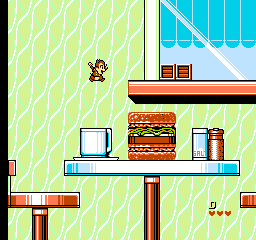
Chip to Dale no Daisakusen 2 (Japan)
0 1 0
Chip to Dale no Daisakusen 2 is a classic NES game you can play right in your browser, bringing back memories for fans of vintage platformers. It features the familiar characters Chip and Dale in a side-scrolling adventure that tests your reflexes and timing. If you enjoy retro titles with simple mechanics and pixel art, this game offers a familiar experience without the need for downloads or installations.
Getting Into Chip to Dale no Daisakusen 2
The gameplay involves moving through levels filled with obstacles, enemies, and hidden secrets. As you control Chip and Dale, your goal is to go from left to right, avoiding hazards and defeating enemies when possible. The game calls for quick reactions and precise timing, especially when jumping over gaps or dodging attacks. It’s a typical NES platformer, so each session features quick bursts of action, with players trying to clear levels efficiently while managing limited lives.
The game keeps things simple with no complicated mechanics or modes. It focuses on precise platforming and pattern recognition. Players often replay levels to improve their times or find secret areas, making each run a chance to sharpen skills or uncover new parts of the game. Its straightforward design makes it accessible for newcomers but still challenging enough for experienced players aiming for high scores or speedruns.
Standout Features
The visuals capture the pixel-perfect charm of the NES era. Its colorful sprites and simple backgrounds evoke nostalgia, while the smooth animations bring the characters and enemies to life. The game moves through levels that get harder, introducing new enemies and platforming challenges that keep things interesting. Exploration is encouraged, with hidden areas rewarding curious players who take their time to search every corner.
Replayability comes from trying to beat high scores, finish levels faster, or find all secret passages. The mechanics are straightforward, making it easy to pick up but tough to master. Playing in your browser means you can start a session instantly without any setup, making it a quick and accessible choice for retro gaming. Whether you’re collecting or just playing casually, the balance of challenge and nostalgia makes it worth coming back to multiple times.
Strategy and Tips
Start by practicing your timing for jumps and attacks to avoid losing lives. Patience and watching enemy patterns can help you survive longer and get further.
- Notice enemy movements so you can plan your attacks or dodges.
- Explore levels carefully; secret areas often hide extra lives or power-ups.
- Keep an eye on your remaining lives and don’t rush—sometimes pausing to plan saves time later.
- Practice tough sections repeatedly to recognize patterns and improve your reactions.
- If you’re stuck, switch between Chip and Dale if the game allows, to use their different abilities.
Quick Questions
How do I get started playing?
You can play immediately on this site; just load the game, and it runs in your browser without any fuss.
What is a common mistake for beginners?
Many players rush through levels without paying attention to enemy patterns, which can lead to unnecessary losses. Taking your time tends to improve your chances of survival.
Can I play this on mobile or touch devices?
The game plays best on desktops and laptops through a browser. Touch controls might not work well or be supported, but some mobile browsers may handle it with limited responsiveness.
Chip to Dale no Daisakusen 2 offers a straightforward, nostalgic platforming experience. Jump into this NES classic right here and enjoy a piece of gaming history at your own pace.
Related games: you can also try California Raisins – The Grape Escape (USA) (Proto2) and Adventures of Rad Gravity, The (Europe), or browse all other games in the NES category.
How to Play Chip to Dale no Daisakusen 2 (Japan)?
Move Chip and Dale from left to right, avoiding obstacles and enemies, while jumping or defeating threats to complete levels. Focus on timing and pattern recognition to progress and discover secrets.
Game Controls
Arrow keys act as the D-pad; space or designated keys handle jumping and attacking.
You may be interested in:
-
![Zombie Hunter (Japan) [En by KingMike v1.01]](https://www.playf2p.com/wp-content/uploads/zombie-hunter-japan-en-by-kingmike-v1-01-200x120.png) NES
♥ 2
Zombie Hunter (Japan) [En by KingMike v1.01]
NES
♥ 2
Zombie Hunter (Japan) [En by KingMike v1.01] -
 NES
♥ 1
Zombie Hunter (Japan)
NES
♥ 1
Zombie Hunter (Japan) -
 NES
♥ 1
Zoids Mokushiroku (Japan)
NES
♥ 1
Zoids Mokushiroku (Japan) -
 NES
♥ 2
Zoids 2 – Zenebas no Gyakushuu (Japan)
NES
♥ 2
Zoids 2 – Zenebas no Gyakushuu (Japan) -
 NES
♥ 1
Zoids – Chuuou Tairiku no Tatakai (Japan)
NES
♥ 1
Zoids – Chuuou Tairiku no Tatakai (Japan) -
 NES
♥ 11
Zippy Race (Japan)
NES
♥ 11
Zippy Race (Japan) -
 NES
♥ 1
Zhen Ben Xi You Ji (Asia) (Unl)
NES
♥ 1
Zhen Ben Xi You Ji (Asia) (Unl) -
 NES
♥ 1
Zenbei!! Pro Basket (Japan)
NES
♥ 1
Zenbei!! Pro Basket (Japan)
Comments (0)
No comments yet. Be the first to comment!