Chubby Cherub (USA)
1 6 5
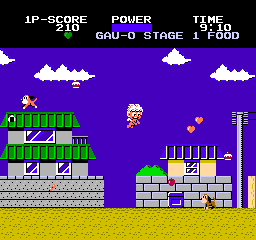
Chubby Cherub (USA) is a classic NES action game that offers a whimsical, pixelated adventure straight from the 8-bit era. Its colorful sprites and lively soundtrack evoke a nostalgic charm, placing players in a playful universe where a chubby angelic figure must navigate a series of straightforward yet challenging levels. Designed for quick, engaging sessions, this title captures the simple excitement of early console gaming and is perfect for browsers seeking a taste of vintage action without any downloads.
Step Into the World of Chubby Cherub
The visuals on this NES platform burst with classic pixel art—bright, cheerful colors and charming character animations fill the screen. The atmosphere is lighthearted, with a soundtrack that complements the upbeat, innocent tone. The levels feature a straightforward layout, emphasizing clarity and accessibility. As you progress, sound effects punctuate your actions—jumps, collisions, and power-ups—adding to the playful rhythm.
The environment feels intentionally simple, yet it maintains lively energy. Backgrounds change subtly as you move forward, hinting at different themed stages, while the chubby cherub character bounces exaggeratedly to highlight its carefree nature. This visual style and musical backdrop create an inviting, nostalgic feeling for players familiar with NES classics, yet it remains approachable for newcomers.
How the Gameplay Hooks You
The game centers around controlling the cherub as it moves through side-scrolling levels filled with obstacles, enemies, and collectible items. The gameplay relies on quick reflexes and timing, as players need to jump over hazards or avoid enemies to progress. Each level offers a clear challenge, encouraging players to sharpen their skills and complete it in fewer attempts.
The pacing stays brisk, with levels designed to be short but satisfying. Progress depends on mastering jump timing and recognizing enemy patterns, keeping the experience engaging without feeling overwhelming. Its simplicity makes it great for short bursts of play, and the increasing difficulty adds a sense of achievement as players move through the stages.
Pro Tips for Chubby Cherub
Start by practicing your jump timing to avoid losing lives early on. Collect power-ups when you see them to make navigation smoother.
- Watch enemy patterns to anticipate their movements and avoid unnecessary damage.
- Practice your jumps to clear gaps and obstacles efficiently.
- Finish levels quickly to boost your score and progress faster.
- Use the in-browser emulator’s quick reset feature to try different routes or strategies.
Frequently Asked Questions
Is Chubby Cherub good for short play sessions?
Absolutely. Each level is designed to be completed quickly, making it perfect for quick gaming breaks or casual play. You can jump in, finish a stage, and step away without a big time commitment.
Does the game become repetitive over time?
The gameplay loop is straightforward, which might feel familiar after a while. However, the increasing difficulty and variety in levels help keep things fresh enough for shorter sessions.
Can I play Chubby Cherub on different devices or only here?
This game runs directly in your browser, so it works on any device with internet access and a compatible browser. No downloads or installations are needed for instant play.
The charm of Chubby Cherub lies in its simple, joyful gameplay that brings out the essence of NES action. Its colorful visuals and easy mechanics make it a fun choice for fans of retro games or anyone after a quick, nostalgic challenge.
Related games: you can also try Bonk's Adventure (USA) and Chiller (USA) (Unl), or browse all other games in the NES category.
How to Play Chubby Cherub (USA)?
Guide the chubby cherub through side-scrolling levels by jumping over obstacles and enemies, collecting power-ups, and completing each stage quickly. Focus on timing jumps and avoiding hazards to progress.
Game Controls
Arrow keys control movement; jump and action buttons are mapped to keyboard keys.
You may be interested in:
-
![Zombie Hunter (Japan) [En by KingMike v1.01]](https://www.playf2p.com/wp-content/uploads/zombie-hunter-japan-en-by-kingmike-v1-01-200x120.png) NES
♥ 2
Zombie Hunter (Japan) [En by KingMike v1.01]
NES
♥ 2
Zombie Hunter (Japan) [En by KingMike v1.01] -
 NES
♥ 1
Zombie Hunter (Japan)
NES
♥ 1
Zombie Hunter (Japan) -
 NES
♥ 1
Zoids Mokushiroku (Japan)
NES
♥ 1
Zoids Mokushiroku (Japan) -
 NES
♥ 2
Zoids 2 – Zenebas no Gyakushuu (Japan)
NES
♥ 2
Zoids 2 – Zenebas no Gyakushuu (Japan) -
 NES
♥ 1
Zoids – Chuuou Tairiku no Tatakai (Japan)
NES
♥ 1
Zoids – Chuuou Tairiku no Tatakai (Japan) -
 NES
♥ 11
Zippy Race (Japan)
NES
♥ 11
Zippy Race (Japan) -
 NES
♥ 1
Zhen Ben Xi You Ji (Asia) (Unl)
NES
♥ 1
Zhen Ben Xi You Ji (Asia) (Unl) -
 NES
♥ 1
Zenbei!! Pro Basket (Japan)
NES
♥ 1
Zenbei!! Pro Basket (Japan)
Comments (0)
No comments yet. Be the first to comment!