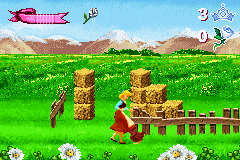
Cinderella – Magical Dreams (E)(sUppLeX)
0 6 0
Cinderella – Magical Dreams (E)(sUppLeX) is a classic Game Boy Advance action game that mixes fairy-tale charm with simple gameplay. Designed for those who want a nostalgic handheld experience, it combines basic platforming and obstacle avoidance within a familiar Cinderella theme. As part of the GBA library, it offers a compact adventure that focuses on timing and reflexes, all playable through the browser emulator on this site.
Cinderella – Magical Dreams: Gameplay Overview
The game involves guiding Cinderella through various levels filled with obstacles, enemies, and environmental challenges. Its main mechanics are running, jumping, and dodging, with players controlling Cinderella as she moves through each stage. The gameplay follows a straightforward path but needs precision and pattern recognition to move forward. While the actions are simple, levels get tougher with faster enemies and more complex obstacles.
Progress depends on completing levels within a time limit or with few mistakes, rewarding careful play. Though it doesn’t have elaborate power-ups or weapons, the core idea is to avoid hazards and reach the end of each stage. The controls are designed for quick reactions, making it suitable for short gaming sessions or longer ones if players aim to improve their scores or times.
Modes, Levels and Progression
This game offers a single mode with a series of levels that increase in difficulty. Each stage introduces new obstacles and timing challenges, encouraging players to sharpen their reflexes. The level design stays consistent but varies enough to keep things interesting, with some stages requiring more precise jumps or strategic pauses to avoid enemies.
While there aren’t multiple modes or branching paths, the variety in level design helps maintain engagement. Advancing through stages gives a sense of accomplishment, and since the game is relatively short, it’s easy to play in quick sessions. You might replay levels to improve scores or finish times, or to get better at each challenge.
Winning Strategies
Success relies on good timing and recognizing patterns. Paying attention to enemy movement and memorizing obstacle sequences can help you navigate levels more smoothly.
- Watch enemy patterns carefully to find safe moments to move across.
- Practice jumps and timing to avoid falling or hitting obstacles, especially in later levels.
- Use pauses when needed to plan your next move against tricky hazards.
- Maintaining a steady rhythm helps prevent mistakes more than rushing through levels.
- Try to keep mistakes to a minimum to boost your score and unlock higher ranks.
Common Questions About Cinderella – Magical Dreams
How does the difficulty change as I play?
It gets tougher as faster enemies appear and obstacles become more complex, demanding quicker reactions and better timing.
Are there different modes or difficulty settings?
No, the game has just one set of levels. But replaying them to beat your best scores or times adds some variation.
How long does a typical game last?
A full run might take around 15-30 minutes, depending on your skill and whether you’re aiming for high scores or just completing the stages.
Playing Cinderella – Magical Dreams here means you can jump right in without installing anything. It’s a straightforward, browser-based way to enjoy a vintage GBA game. Its simple mechanics and increasing challenge make it a good pick for casual players or anyone craving a bit of nostalgia. The focus on timing and pattern recognition offers enough depth to want to replay and master each stage, making it a nice addition to your browser-based GBA collection.
Related games: you can also try Calciobit (J)(WRG) and Bomberman Max 2 – Max Version (J)(Hyperion), or browse all other games in the Game Boy Advance category.
How to Play Cinderella – Magical Dreams (E)(sUppLeX)?
Guide Cinderella through levels by running, jumping, and dodging obstacles. Time your actions carefully to avoid enemies and reach the end before time runs out.
Game Controls
Arrow keys control movement; action buttons are mapped to other keys for jumping and dodging.
You may be interested in:
-
 Game Boy Advance
♥ 2
Zooo (J)(Rising Sun)
Game Boy Advance
♥ 2
Zooo (J)(Rising Sun) -
 Game Boy Advance
♥ 4
Zooo (E)(Trashman)
Game Boy Advance
♥ 4
Zooo (E)(Trashman) -
 Game Boy Advance
♥ 2
ZooCube (U)(Mode7)
Game Boy Advance
♥ 2
ZooCube (U)(Mode7) -
 Game Boy Advance
♥ 1
ZooCube (E)(Blizzard)
Game Boy Advance
♥ 1
ZooCube (E)(Blizzard) -
 Game Boy Advance
♥ 1
Zone of the Enders – The Fist of Mars (U)(Mode7)
Game Boy Advance
♥ 1
Zone of the Enders – The Fist of Mars (U)(Mode7) -
 Game Boy Advance
♥ 1
Zone of the Enders – The Fist of Mars (E)(Cezar)
Game Boy Advance
♥ 1
Zone of the Enders – The Fist of Mars (E)(Cezar) -
 Game Boy Advance
♥ 1
Zoku Bokura no Taiyou – Taiyou Shounen Django (J)(Independent)
Game Boy Advance
♥ 1
Zoku Bokura no Taiyou – Taiyou Shounen Django (J)(Independent) -
 Game Boy Advance
♥ 7
Zoku Bokura no Taiyou – Taiyou Shounen Django (J)(Caravan)
Game Boy Advance
♥ 7
Zoku Bokura no Taiyou – Taiyou Shounen Django (J)(Caravan)
Comments (0)
No comments yet. Be the first to comment!