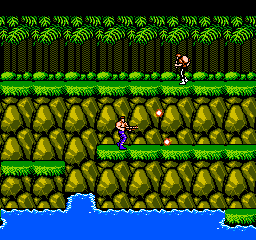
Contra (USA)
0 229 79
Contra (USA) is a classic NES game that has become a staple of the run-and-gun genre. This fast-paced action game challenges players to fight their way through enemy lines using a variety of weapons and tactics. If you enjoy challenging platform shooters with cooperative gameplay, this game offers a nostalgic experience that holds up well in a browser environment.
Getting Into Contra
In Contra, players control one of two soldiers tasked with defeating an invading alien force. The main gameplay involves navigating side-scrolling levels filled with enemies, obstacles, and hidden power-ups. The game is known for its tight controls, requiring precise timing for shooting, jumping, and dodging enemy fire. Sessions typically involve progressing through levels, defeating boss characters, and collecting upgrades to improve firepower.
This NES classic supports two-player cooperative play, which makes it popular for arcade-style sessions with friends. Each level offers a mix of enemy encounters, platforming sections, and moments of intense gunfire. As you move forward, the difficulty ramps up with more aggressive enemies and complex level layouts. Success depends on quick reflexes and strategic use of your weapon upgrades, which can be found or purchased throughout the game.
Standout Features
The visuals of Contra are bright and colorful, with pixel art that captures the energetic feel of the original NES game. Enemy designs are varied, and bosses are large, memorable, and require pattern recognition to defeat. The game’s progression system lets players upgrade their weapons, adding replay value as you experiment with different loadouts for different levels.
Contra’s level design encourages multiple playthroughs, as players can find hidden areas, secret power-ups, and alternate routes. Its difficulty curve is steep but fair, making each victory satisfying. Playing it in your browser makes it easy to jump in and try different strategies without needing external hardware or setups.
Strategy and Tips
Starting with the right approach can really improve your chances. Focus on conserving your lives early on and avoid rushing into enemy groups without a plan.
- Prioritize collecting weapon power-ups; they significantly boost your firepower and survival chances.
- Coordinate with your co-op partner to cover each other; staying close helps manage enemy waves and avoid getting overwhelmed.
- Learn enemy attack patterns to dodge effectively and time your shots for maximum damage.
- Use the spread gun when available—it’s especially useful against bosses and large groups of enemies.
- Keep moving — standing still makes you an easy target, especially during boss fights.
- Look for hidden areas and alternate paths to find extra lives or upgrades that can help you advance further.
Quick Questions
What’s the best way to get started if I’ve never played Contra before?
Start on the easiest level or with a friend to learn enemy patterns and controls without feeling overwhelmed.
What is a common mistake new players make?
Many players rush into enemies without paying attention to attack patterns or neglect to collect weapon upgrades, making the game much harder.
Can I play Contra comfortably on mobile or touch devices?
While the game runs in your browser, controls are designed for keyboard input, so playing on a mobile device might require some adaptation or external controllers for the best experience.
Trying out Contra in your browser offers a simple way to enjoy a great NES classic. Its tight gameplay, cooperative modes, and challenging levels keep it engaging, making it a good choice for fans of old-school action games looking for a quick retro fix.
Related games: you can also try 8 Eyes (Japan) and Action 52 (USA) (Unl), or browse all other games in the NES category.
How to Play Contra (USA)?
Control your soldier to shoot, jump, and dodge enemies through side-scrolling levels, defeating bosses and collecting upgrades to progress and survive. Play cooperatively with a friend for better chances of success.
Game Controls
Arrow keys act as the D-pad; spacebar and other keys handle shooting and jumping actions.
You may be interested in:
-
![Zombie Hunter (Japan) [En by KingMike v1.01]](https://www.playf2p.com/wp-content/uploads/zombie-hunter-japan-en-by-kingmike-v1-01-200x120.png) NES
♥ 2
Zombie Hunter (Japan) [En by KingMike v1.01]
NES
♥ 2
Zombie Hunter (Japan) [En by KingMike v1.01] -
 NES
♥ 1
Zombie Hunter (Japan)
NES
♥ 1
Zombie Hunter (Japan) -
 NES
♥ 1
Zoids Mokushiroku (Japan)
NES
♥ 1
Zoids Mokushiroku (Japan) -
 NES
♥ 2
Zoids 2 – Zenebas no Gyakushuu (Japan)
NES
♥ 2
Zoids 2 – Zenebas no Gyakushuu (Japan) -
 NES
♥ 1
Zoids – Chuuou Tairiku no Tatakai (Japan)
NES
♥ 1
Zoids – Chuuou Tairiku no Tatakai (Japan) -
 NES
♥ 11
Zippy Race (Japan)
NES
♥ 11
Zippy Race (Japan) -
 NES
♥ 1
Zhen Ben Xi You Ji (Asia) (Unl)
NES
♥ 1
Zhen Ben Xi You Ji (Asia) (Unl) -
 NES
♥ 1
Zenbei!! Pro Basket (Japan)
NES
♥ 1
Zenbei!! Pro Basket (Japan)
Comments (0)
No comments yet. Be the first to comment!