Cool Spot (Europe)
0 26 16
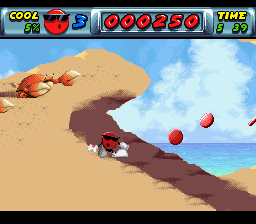
Cool Spot (Europe) is a lively piece of SNES nostalgia that captures the spirit of early ’90s platformers. This game from the SNES era invites players into a colorful, cartoonish world where a confident mascot guides the way through a series of action-filled levels. Its bright visuals and memorable sound design evoke memories of a time when platform gaming was at its peak, offering a straightforward yet engaging experience that you can play right in your browser—no download needed.
Step Into the World of Cool Spot
The visuals burst with vivid, bold colors, emphasizing its cartoon-inspired style. Each level is filled with exaggerated shapes, lively backgrounds, and playful character animations that highlight its fun tone. The soundtrack matches this cheerful vibe with funky, upbeat tunes that keep the energy high during gameplay. It strikes a balance between nostalgia and fun, making it appealing to both longtime fans and newcomers curious about classic platformers.
Sound effects punctuate each jump, bounce, and enemy encounter, reinforcing the arcade feel of the game. The design is clear—players can easily tell apart obstacles, enemies, and collectibles, helping navigation feel natural. Though rooted in the SNES era, its visual and audio style still feels fresh, capturing a time when pixel art and catchy tunes made gaming memorable.
How the Gameplay Hooks You
At its core, Cool Spot offers a simple platforming routine: run, jump, dodge enemies, and gather items as you move through levels. The pacing is quick, with each stage designed to test your reflexes without overcomplicating things. It encourages fast decision-making, rewarding players who can time their moves well. Progression feels smooth, with each new level introducing fresh layouts and obstacles to keep the gameplay engaging without feeling overwhelming.
The game balances challenge with accessibility, making it fun for quick sessions or longer playthroughs. Completing levels gives a sense of achievement, and the increasing difficulty keeps you motivated to improve. Its focus on action and platforming mechanics creates a rhythm that keeps players coming back for more of its simple yet satisfying gameplay loop.
Pro Tips for Cool Spot
To get the most out of this classic, consider these tips:
- Time your jumps carefully to dodge enemies and hazards.
- Grab power-ups and items whenever you can to boost your chances of survival.
- Study enemy patterns to dodge their attacks more easily.
- Explore each level to find shortcuts or bonus areas.
- Take your time—patience often leads to better timing and fewer mistakes.
- Watch your remaining lives, especially in tougher levels.
Frequently Asked Questions
Does Cool Spot have multiple difficulty levels?
The challenge increases gradually as you go, typical of SNES platformers. There are no specific difficulty settings, but mastering timing and memorizing levels helps you do better.
Can I pause or save during a game?
This version runs in your browser and doesn’t support save states. Pausing is just a quick pause; short sessions work best for tackling individual levels.
Is it suitable for all ages and quick play sessions?
Definitely. Its bright visuals and simple mechanics make it accessible for younger players, and you can enjoy quick, satisfying sessions without much fuss.
Playing Cool Spot offers a taste of classic platforming fun with energetic gameplay and simple controls. Its colorful design and pace make it a good choice for short bursts or a nostalgic revisit. Its charm lies in its straightforward, honest approach to platforming, making it a genuine cool spot in the SNES lineup.
Related games: you can also try BS Sousa Sentai Wappers – Soushuu Hen (Japan) and Arabian Nights – Sabaku no Seirei Ou (Japan), or browse all other games in the SNES category.
How to Play Cool Spot (Europe)?
Run, jump, and dodge enemies while collecting items to complete each level. Progress through increasingly challenging stages by timing your moves and exploring for power-ups.
Game Controls
Arrow keys act as the D-pad; Enter is Start; on-screen mapped keys handle the action buttons.








Comments (0)
No comments yet. Be the first to comment!