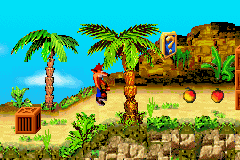
Crash Bandicoot 2 N-Tranced (U)(Noitami)
0 44 4
Crash Bandicoot 2 N-Tranced (U)(Noitami) is a classic Game Boy Advance game emulated directly in your browser, bringing a beloved platformer experience to your fingertips. If you enjoyed the original PlayStation series or love challenging action-platformers, this title offers familiar gameplay with a portable twist. Its straightforward design makes it accessible for newcomers, yet its precise controls and level design keep seasoned players engaged.
Getting Into Crash Bandicoot 2 N-Tranced
This game focuses on guiding Crash through a series of platforming levels filled with obstacles, enemies, and collectibles. You run, jump, and dodge hazards while gathering items that unlock new areas or grant extra lives. Each stage often ends with a boss fight or a specific challenge testing your timing and reflexes. The progression is simple: complete one level, move on to the next, with difficulty gradually increasing.
The game is suited for quick sessions, perfect for short bursts of play. You can aim to master individual levels or hunt for all hidden items and secrets scattered across stages. The controls are straightforward but demand precision, especially in tricky platforming sections or when timing jumps to avoid enemies. Since it’s emulated in your browser, there are no loading screens or installation steps, so you can jump right in and start playing immediately.
Standout Features
The visuals are colorful and lively, capturing the cartoonish style of the original series. The sprite work and backgrounds are crisp, making each level visually distinct and appealing. Progression rewards players with new levels, abilities, or power-ups, encouraging revisiting stages for better scores or hidden items. Collectibles and optional challenges add replay value, giving players goals beyond simply finishing levels.
Multiple difficulty settings and hidden areas keep the game engaging. Its simple design means you can pick it up for a quick run or spend more time refining your skills. The level design strikes a good balance between challenge and fairness, making it suitable for a range of skill levels. Overall, it’s a fun game with colorful visuals and satisfying platforming gameplay.
Strategy and Tips
For the best experience, focus on timing your jumps well and learning enemy behaviors. Patience helps avoid mistakes and preserves lives.
- Gather Wumpa fruits whenever possible for extra lives and points, especially in tough spots.
- Explore each level carefully for hidden paths and bonus areas that hold extra items.
- Use power-ups wisely; they can make tricky sections or tough enemies easier.
- Practice difficult jumps and boss fights separately to build confidence across levels.
- Pay attention to checkpoint markers to save yourself from replaying entire sections after errors.
Quick Questions
How should I start if I’m new to platformers?
Take your time to learn each level’s layout and enemy patterns. Patience helps you improve and avoid unnecessary mistakes.
What’s the most common beginner mistake?
Jumping too early or too late often leads to falls or losing lives. Practice your timing to gain better control.
Can I play this game comfortably on a mobile device or touch screen?
Yes, since it runs in your browser, it works well with touch controls. Still, a keyboard or gamepad might give you more precision if you have one available.
Crash Bandicoot 2 N-Tranced offers a solid platforming experience with lively visuals and simple mechanics. Whether you’re trying to finish levels quickly or find every hidden secret, it remains a fun option for fans of action platformers on the Game Boy Advance, now just a click away in your browser.
Related games: you can also try Chicken Shoot 2 (E)(Sir VG) and Card e-Reader + (J)(BatMan), or browse all other games in the Game Boy Advance category.
How to Play Crash Bandicoot 2 N-Tranced (U)(Noitami)?
Guide Crash through levels by jumping, dodging enemies, and collecting items. Complete each stage to progress, aiming for high scores and hidden secrets along the way.
Game Controls
Arrow keys control movement; action buttons are mapped to keyboard keys for jumping and interacting.
You may be interested in:
-
 Game Boy Advance
♥ 2
Zooo (J)(Rising Sun)
Game Boy Advance
♥ 2
Zooo (J)(Rising Sun) -
 Game Boy Advance
♥ 4
Zooo (E)(Trashman)
Game Boy Advance
♥ 4
Zooo (E)(Trashman) -
 Game Boy Advance
♥ 2
ZooCube (U)(Mode7)
Game Boy Advance
♥ 2
ZooCube (U)(Mode7) -
 Game Boy Advance
♥ 1
ZooCube (E)(Blizzard)
Game Boy Advance
♥ 1
ZooCube (E)(Blizzard) -
 Game Boy Advance
♥ 1
Zone of the Enders – The Fist of Mars (U)(Mode7)
Game Boy Advance
♥ 1
Zone of the Enders – The Fist of Mars (U)(Mode7) -
 Game Boy Advance
♥ 1
Zone of the Enders – The Fist of Mars (E)(Cezar)
Game Boy Advance
♥ 1
Zone of the Enders – The Fist of Mars (E)(Cezar) -
 Game Boy Advance
♥ 1
Zoku Bokura no Taiyou – Taiyou Shounen Django (J)(Independent)
Game Boy Advance
♥ 1
Zoku Bokura no Taiyou – Taiyou Shounen Django (J)(Independent) -
 Game Boy Advance
♥ 7
Zoku Bokura no Taiyou – Taiyou Shounen Django (J)(Caravan)
Game Boy Advance
♥ 7
Zoku Bokura no Taiyou – Taiyou Shounen Django (J)(Caravan)
Comments (0)
No comments yet. Be the first to comment!