Crayola Treasure Adventures (USA)
0 1 0
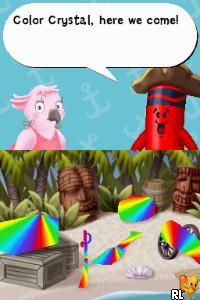
Crayola Treasure Adventures (USA) is a lively Nintendo DS game that offers a cheerful, exploration-based experience rooted in creativity and discovery. As a classic from the Nintendo DS era, it appeals to younger players and those who enjoy gentle puzzle-solving and adventure. The bright visuals and approachable mechanics make it a good choice for a casual, family-friendly outing on a browser-based emulator.
Getting Into Crayola Treasure Adventures
The game revolves around exploring colorful environments, collecting items, and solving simple puzzles. The main gameplay involves moving through different scenes, interacting with objects, and completing tasks that reveal more of the story or unlock new areas. It’s designed for short, casual sessions, with each scene offering a straightforward challenge that doesn’t require complex mechanics or quick reflexes.
Players typically move forward by completing objectives in each level, like finding hidden objects or assembling items to progress. There aren’t many modes or multiplayer features; instead, the game encourages exploring its vivid worlds and collecting items to see everything it has to offer. It runs smoothly in-browser, making it easy to play without any setup or downloads.
Standout Features
The visuals are bright and cartoon-like, matching the colorful, Crayola-inspired theme. The environments are simple but charming, filled with vibrant colors and playful designs that appeal to many ages. Progression is straightforward but satisfying, with each scene unlocking the next and encouraging continued exploration and collection.
Replay value comes from finding all the hidden items and completing optional tasks within each scene. Since it’s easy to pick up and play, it’s suitable for quick entertainment or relaxing gameplay. While it doesn’t feature complex mechanics or branching storylines, the cheerful presentation and simple puzzles make it a pleasant experience for those who enjoy light exploration and collection activities.
Strategy and Tips
If you’re starting out, take your time exploring each scene before moving on. Check every corner — hidden items often blend into the background or are tucked behind objects.
- Pay attention to clues or prompts that hint at where to find hidden objects; they can help you save time.
- Check your inventory or collection pages often to see what you’ve already found and what’s still missing.
- If you get stuck, go back and re-examine areas you’ve already visited; sometimes the answer is right in front of you.
- The game is meant to be accessible, so don’t stress over perfect efficiency — enjoy the colorful exploration.
- Try to complete all optional tasks for extra items and unlockables, which can add to your replay experience.
Quick Questions
How do I get started in Crayola Treasure Adventures?
Just click to begin, and you’ll be guided through the first scene with clear prompts on what to do next.
What is a common mistake for beginners?
Many new players rush through scenes without exploring everything, missing hidden clues or items. Take your time to investigate each area carefully.
Can I play Crayola Treasure Adventures on mobile or touch devices?
Yes, since it runs directly in your browser, it works well on mobile devices with touch controls, making it easy to play anywhere.
Crayola Treasure Adventures offers a simple, colorful experience perfect for casual players and young explorers. Its engaging visuals and straightforward gameplay make it a friendly option for anyone wanting a nostalgic-style adventure right in their browser.
Related games: you can also try Clash King V201 (Japan) and Away – Shuffle Dungeon (Europe) (En,Fr,De,Es,It), or browse all other games in the Nintendo DS category.
How to Play Crayola Treasure Adventures (USA)?
Explore colorful scenes, find hidden objects, and complete simple puzzles to unlock new areas and progress through the cheerful adventure.
Game Controls
Arrow keys move; space or Enter interacts with objects and confirms actions.
You may be interested in:
-
 Nintendo DS
♥ 1
Casper’s Scare School – Classroom Capers (USA)
Nintendo DS
♥ 1
Casper’s Scare School – Classroom Capers (USA) -
 Nintendo DS
♥ 1
Zunou Nouryoku Koujou Machine – Touch de Zunoo DS (Japan)
Nintendo DS
♥ 1
Zunou Nouryoku Koujou Machine – Touch de Zunoo DS (Japan) -
 Nintendo DS
♥ 1
Zunou ni Asekaku Game Series! Vol. 1 – Cool 104 Joker & Setline (Japan)
Nintendo DS
♥ 1
Zunou ni Asekaku Game Series! Vol. 1 – Cool 104 Joker & Setline (Japan) -
 Nintendo DS
♥ 9
Zuma’s Revenge (USA)
Nintendo DS
♥ 9
Zuma’s Revenge (USA) -
 Nintendo DS
♥ 1
Zubo (USA) (En,Fr,Es)
Nintendo DS
♥ 1
Zubo (USA) (En,Fr,Es) -
 Nintendo DS
♥ 1
Zubo (Europe) (En,Fr,De,Es,It,Nl,Sv)
Nintendo DS
♥ 1
Zubo (Europe) (En,Fr,De,Es,It,Nl,Sv) -
 Nintendo DS
♥ 1
Zorro – Quest for Justice (USA) (En,Fr,De,Es,It)
Nintendo DS
♥ 1
Zorro – Quest for Justice (USA) (En,Fr,De,Es,It) -
 Nintendo DS
♥ 1
Zorro – Quest for Justice (Europe) (En,Fr,De,Es,It)
Nintendo DS
♥ 1
Zorro – Quest for Justice (Europe) (En,Fr,De,Es,It)
Comments (0)
No comments yet. Be the first to comment!