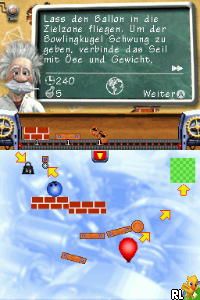
Crazy Machines (Germany) (En,De)
0 1 0
Crazy Machines (Germany) (En,De) is a classic Nintendo DS game that introduces the puzzle genre to your handheld with an emphasis on inventive contraptions and physics-based challenges. Originally made for the Nintendo DS, this game appeals to those who enjoy problem-solving and creative thinking. Running directly in your browser, it offers a way to experience this puzzle game without downloads or installations, making it easy to try out for fans of the platform.
Getting Into Crazy Machines
In Crazy Machines, you’re given various scenarios that require building complex machines to hit specific goals. The core gameplay involves choosing and combining parts—like gears, levers, pulleys, and explosions—to create a chain reaction that solves each puzzle. There aren’t any time limits; instead, it encourages experimentation and trial-and-error. You can try different setups until you find one that works, making each session a test of logical thinking and persistence.
Most levels are pretty short but get tougher as you go. The game also has a sandbox mode where you can build freely, along with a series of challenges that guide you through more structured puzzles. The interface is designed for quick access to parts and easy assembly, so it’s great for quick gaming sessions or longer problem-solving marathons. Since it runs in-browser, you can switch between puzzles easily, whether you’re at home or out and about.
Standout Features
Visually, Crazy Machines keeps a clean, cartoonish look that makes everything clear. The colorful parts and simple animations help you follow the flow of your contraptions, which is useful when debugging or tweaking your designs. The game unlocks new parts and tools as you complete challenges, giving a sense of progress and fresh options to try.
It offers good replay value because of the variety of puzzles and the ability to find multiple solutions for each level. Some players enjoy going back to earlier challenges with different ideas, while others spend time in the sandbox mode inventing their own machines. The mechanics promote creative thinking, so it stays interesting even after many attempts. Its straightforward design and gradually increasing difficulty make it suitable for players of different ages and skill levels.
Strategy and Tips
Try to approach each puzzle with patience and think about the sequence of actions needed to trigger the goal. Testing different combinations can reveal new solutions or shortcuts.
- Start with simple, reliable setups before adding more complex parts.
- Use the undo button often so you can experiment without losing your progress.
- Pay attention to how parts interact; small changes can have a big impact on the outcome.
- Experiment with different arrangements rather than sticking to just one.
- If you get stuck, taking a break and returning later can help you see things differently.
Quick Questions
How do I get started with Crazy Machines on this browser version?
The game loads quickly, and you can start building machines right away with the in-game controls. No setup needed beyond clicking to begin.
What’s a common mistake beginners make?
Many players try to solve puzzles with overly complicated setups. Starting simple and adding parts gradually usually works better.
Can I play Crazy Machines on mobile or touch devices?
This version runs in your browser, so it should work smoothly on touch screens, making it easy to play on smartphones or tablets.
Playing Crazy Machines offers a relaxing yet engaging experience, perfect for puzzle fans and creators alike. Its focus on building and experimenting with crazy machines makes it a timeless challenge you can enjoy whenever curiosity strikes, all without leaving your browser.
Related games: you can also try Barbie Fashion Show – An Eye for Style (USA) (En,Fr) and Asphalt – Urban GT 2 (USA) (En,Fr,Es), or browse all other games in the Nintendo DS category.
How to Play Crazy Machines (Germany) (En,De)?
Build machines by combining parts like gears and levers to solve puzzles. Experiment with different setups until you trigger the desired outcome, using trial and error to find solutions.
Game Controls
Arrow keys move selection; Enter or space to place parts; mouse or keyboard to navigate menus.
You may be interested in:
-
 Nintendo DS
♥ 1
Casper’s Scare School – Classroom Capers (USA)
Nintendo DS
♥ 1
Casper’s Scare School – Classroom Capers (USA) -
 Nintendo DS
♥ 1
Zunou Nouryoku Koujou Machine – Touch de Zunoo DS (Japan)
Nintendo DS
♥ 1
Zunou Nouryoku Koujou Machine – Touch de Zunoo DS (Japan) -
 Nintendo DS
♥ 1
Zunou ni Asekaku Game Series! Vol. 1 – Cool 104 Joker & Setline (Japan)
Nintendo DS
♥ 1
Zunou ni Asekaku Game Series! Vol. 1 – Cool 104 Joker & Setline (Japan) -
 Nintendo DS
♥ 9
Zuma’s Revenge (USA)
Nintendo DS
♥ 9
Zuma’s Revenge (USA) -
 Nintendo DS
♥ 1
Zubo (USA) (En,Fr,Es)
Nintendo DS
♥ 1
Zubo (USA) (En,Fr,Es) -
 Nintendo DS
♥ 1
Zubo (Europe) (En,Fr,De,Es,It,Nl,Sv)
Nintendo DS
♥ 1
Zubo (Europe) (En,Fr,De,Es,It,Nl,Sv) -
 Nintendo DS
♥ 1
Zorro – Quest for Justice (USA) (En,Fr,De,Es,It)
Nintendo DS
♥ 1
Zorro – Quest for Justice (USA) (En,Fr,De,Es,It) -
 Nintendo DS
♥ 1
Zorro – Quest for Justice (Europe) (En,Fr,De,Es,It)
Nintendo DS
♥ 1
Zorro – Quest for Justice (Europe) (En,Fr,De,Es,It)
Comments (0)
No comments yet. Be the first to comment!