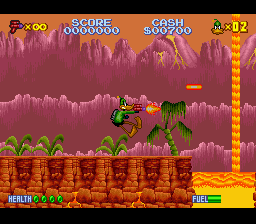
Daffy Duck – The Marvin Missions (Europe)
0 2 0
Daffy Duck – The Marvin Missions (Europe) is a classic SNES game you can play right in your browser. It offers simple, straightforward action that’s easy to pick up and enjoy. Rooted in the SNES era, this game brings back the retro platforming style with familiar controls and clear objectives, making it suitable for players of all ages and skill levels. Its nostalgic appeal and traditional gameplay mechanics make it a solid choice for fans of old-school action games looking for a quick, fun distraction online.
What Is Daffy Duck – The Marvin Missions?
This SNES game is about guiding Daffy Duck through various levels filled with obstacles and enemies. The main idea is to move through the environment, avoid hazards, and complete tasks that test your timing and reflexes. Its simple design allows players to jump right in without a steep learning curve, focusing on quick reactions and recognizing patterns.
The game has several stages, each with its own layout and challenges, requiring players to adapt their approach to move forward. The focus on platforming and timing keeps things interesting, and the cartoon character adds a fun touch that fans of Looney Tunes will appreciate. Overall, it’s a compact, action-packed game that offers instant entertainment without complicated mechanics or long sessions.
What Keeps You Coming Back
One reason many enjoy Daffy Duck – The Marvin Missions is its simplicity and nostalgic feel. The pixel art and sound evoke the SNES days, bringing back memories for seasoned gamers and inviting newcomers to try it out. Its short levels are perfect for quick play sessions, encouraging repeated attempts to beat high scores or improve your time. The challenge comes from mastering each stage’s layout and timing, which makes replaying satisfying after setbacks.
The game’s focus on precision and memorization adds to its replay value. Since it’s easy to get started but tough to master, players often find themselves trying again to do better. It also encourages experimenting, whether it’s finding the best route or timing jumps just right. All these elements make Daffy Duck – The Marvin Missions a fun choice for casual players and action fans alike.
Handy Tips
To get the most out of the game, keep these tips in mind:
- Observe enemy movements; knowing their patterns helps avoid damage.
- Use quick jumps and precise timing to handle tricky sections more smoothly.
- Pick up any power-ups or items you find—they can help through tough spots.
- Practice each level to memorize layouts and enemy positions, making it easier to finish quickly.
- Take your time—waiting for the right moment instead of rushing can save you from unnecessary hits.
Player FAQ
Is Daffy Duck – The Marvin Missions easy for newcomers?
Yes, the controls are simple, and the objectives are clear, making it accessible for players new to SNES-style games.
Can kids enjoy this game?
Definitely. Its cartoon theme and uncomplicated gameplay make it suitable for children and family play.
Do I need an internet connection to play Daffy Duck – The Marvin Missions?
No, the game runs directly in your browser and doesn’t need an internet connection after it loads. That means you can enjoy it anytime without hassle.
Playing Daffy Duck – The Marvin Missions here offers a quick way to experience a piece of SNES history. Its simple gameplay and charming style make it a good pick for anyone after a classic action challenge. See how far you can get with Daffy’s wacky antics in this timeless browser game.
Related games: you can also try BS Let's Pachinko Nante Gindama 2 (Japan) and Addams Family, The – Pugsley's Scavenger Hunt (USA) (Beta), or browse all other games in the SNES category.
How to Play Daffy Duck – The Marvin Missions (Europe)?
Guide Daffy Duck through levels by jumping and avoiding enemies to reach the end. Complete tasks quickly and memorize enemy patterns to improve your score and progress.
Game Controls
Arrow keys control movement; action buttons are mapped to on-screen keys for jumping and interacting.








Comments (0)
No comments yet. Be the first to comment!