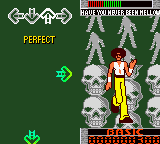
Dance Dance Revolution GB (Japan)
0 5 0
Dance Dance Revolution GB (Japan) is a classic Game Boy Color game that brings the rhythm-based fun of the arcade series to a portable format. Its simple controls and catchy music make it easy for newcomers to pick up and enjoy, even if they’ve never played a dance game before. Playing it on this browser emulator offers a nostalgic experience that requires no downloads or installations.
What Is Dance Dance Revolution GB?
This game belongs to the music and rhythm genre, where players match directional inputs to the beat of the music. The core gameplay involves stepping on the corresponding arrows in time with the on-screen prompts, creating an engaging and physically active experience. The game’s progression depends on the player’s timing accuracy, with higher scores awarded for precise moves and rhythm.
Designed for portable play, Dance Dance Revolution GB offers a selection of songs and difficulty levels that challenge players of all ages. Its straightforward gameplay makes it accessible for beginners, while the increasing difficulty keeps experienced players engaged. The game’s visual cues and audio feedback help players stay in sync, making it a fun test of timing and coordination.
What Keeps You Coming Back
One of the main attractions is the variety of songs and difficulty settings, which motivate players to improve their scores and master more challenging tracks. The game’s scoring system encourages replayability, as players aim for higher accuracy and better combos. Its simple interface and familiar controls make it easy to jump into a quick session or dedicate longer periods to practicing specific songs.
Dance Dance Revolution GB also offers multiple modes, like single-player sessions and score challenges, adding more ways to enjoy the game. Its rhythmic gameplay naturally invites players to beat their previous performances, creating a sense of progression. The energetic music and visual feedback keep the experience lively and engaging, making it a popular choice for casual gaming.
Handy Tips
Start with easier songs to get a feel for the timing and rhythm. Focus on hitting the arrows accurately rather than just pressing quickly. Use the visual cues on screen to anticipate upcoming steps and improve your reaction time. Regular practice helps develop your sense of rhythm and coordination. Don’t worry if you miss some early on — with time, your performance will improve.
- Adjust the volume or music settings if available, to better focus on the beat.
- Concentrate on the timing of your steps rather than speed; accuracy earns higher scores.
- Try different difficulty levels to gradually build your skills.
- Watch the visual prompts to anticipate moves and stay in rhythm.
- Take breaks if you feel tired to keep reactions sharp and avoid frustration.
Player FAQ
Is Dance Dance Revolution GB easy for beginners?
Yes, the game has beginner-friendly modes and adjustable difficulty levels, making it accessible for new players.
Can younger players enjoy Dance Dance Revolution GB?
Absolutely. Its simple mechanics and fun music make it suitable for kids, though some songs and levels might be more challenging for very young players.
Do I need an internet connection to play Dance Dance Revolution GB?
No, the game runs entirely within the browser emulator, so no internet connection is needed once loaded. It’s great for quick sessions without online requirements.
Dance Dance Revolution GB stays lively and accessible, capturing the feel of the arcade classic on the Game Boy Color. Playing here in your browser gives you a quick dose of dance music fun, with plenty of room to improve and enjoy at your own pace.
Related games: you can also try Antz (USA) (En,Fr,Es) and Cardcaptor Sakura – Itsumo Sakura-chan to Issho (Japan), or browse all other games in the Game Boy Color category.
How to Play Dance Dance Revolution GB (Japan)?
Press the arrow keys in time with the music to match the on-screen prompts and score points. Keep rhythm and improve your accuracy with each song.
Game Controls
Arrow keys control the directional inputs; other keys may be used for menu navigation.
You may be interested in:
-
 Game Boy Color
♥ 43
Zook Hero Z
Game Boy Color
♥ 43
Zook Hero Z -
 Game Boy Color
♥ 1
Zok Zok Heroes (Japan)
Game Boy Color
♥ 1
Zok Zok Heroes (Japan) -
 Game Boy Color
♥ 1
Zoids – Shirogane no Juukishin Liger Zero (Japan)
Game Boy Color
♥ 1
Zoids – Shirogane no Juukishin Liger Zero (Japan) -
 Game Boy Color
♥ 1
Zoids – Jashin Fukkatsu! Genobreaker Hen (Japan)
Game Boy Color
♥ 1
Zoids – Jashin Fukkatsu! Genobreaker Hen (Japan) -
 Game Boy Color
♥ 2
Zoboomafoo – Playtime in Zobooland (USA)
Game Boy Color
♥ 2
Zoboomafoo – Playtime in Zobooland (USA) -
 Game Boy Color
♥ 1
Zidane Football Generation (Europe) (En,Fr,De,Es,It)
Game Boy Color
♥ 1
Zidane Football Generation (Europe) (En,Fr,De,Es,It) -
 Game Boy Color
♥ 1
Zen-Nihon Shounen Soccer Taikai – Mezase Nihon Ichi! (Japan)
Game Boy Color
♥ 1
Zen-Nihon Shounen Soccer Taikai – Mezase Nihon Ichi! (Japan) -
 Game Boy Color
♥ 1
Zebco Fishing! (USA)
Game Boy Color
♥ 1
Zebco Fishing! (USA)
Comments (0)
No comments yet. Be the first to comment!