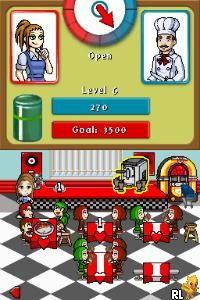
Diner Dash (Europe) (En,Fr,De,Es,It)
0 1 0
Diner Dash (Europe) (En,Fr,De,Es,It) is a well-loved Nintendo DS game that captures the hectic energy and charming chaos of managing a busy restaurant. It brings the fast-paced management gameplay from the original PC version to the handheld console, all wrapped in Nintendo’s nostalgic dual-screen design. Whether you enjoy making quick decisions or just like a lively time-management challenge, this game offers a fun experience that fits well on the Nintendo DS. It invites players to take on the role of a restaurant owner, juggling orders, seating customers, and keeping everyone satisfied—all within a colorful, cartoon-style setting.
Step Into the World of Diner Dash
As a Nintendo DS classic, Diner Dash features a bright, animated environment that feels lively and welcoming. Its cartoon style showcases expressive characters and detailed restaurant layouts that change with each level. The dual screens give you a clear view of both the customer line and the order area, making it easier to manage multiple tasks at once. Cheerful background music and sound effects for actions like seating guests or serving food add to the busy diner vibe. The game moves quickly, capturing the rush of a busy restaurant, but it stays accessible thanks to easy controls and simple goals.
How the Gameplay Hooks You
What makes Diner Dash so appealing is its straightforward yet addictive cycle: seat customers, take their orders, serve food, and clear tables—all while handling a steady flow of patrons. New customer types with different patience levels and order complexities appear as you progress, requiring quick thinking and prioritization. The game rewards efficiency and multitasking, encouraging you to optimize your movements and decisions to earn tips and advance through levels. Unlocking new restaurant themes and layouts keeps things fresh without changing the core gameplay. Its rhythm encourages short, focused play sessions where timing and strategy matter most.
Pro Tips for Diner Dash
To get the most out of the game, try to master its pace and manage your resources carefully. Here are some helpful suggestions:
- Seat customers based on their patience to avoid losing tips.
- Group similar orders to serve multiple guests at once, cutting down wait times.
- Arrange seating to make the most of your space and access to tables.
- Watch the order queue so you can anticipate what’s coming next and prepare your actions.
- Upgrade your restaurant’s layout and equipment when you can to speed up service.
- Keep calm during busy moments; panicking will slow you down and might cost tips.
Frequently Asked Questions
Does the game get repetitive after a while?
While the core tasks stay the same, the game keeps things interesting with increasing difficulty and new restaurant themes. The pacing helps prevent it from feeling too repetitive.
Can I play Diner Dash in short sessions?
Yes, each level is designed to be completed in a few minutes, making it easy to enjoy quick bursts of play.
Is the atmosphere suitable for all ages?
Absolutely. Its cheerful visuals and playful sounds make it appropriate for players of all ages. The light-hearted tone and simple mechanics are friendly for kids and nostalgic for older players alike.
Playing Diner Dash on this site offers an easy way to enjoy this classic management game. Bright visuals, lively sounds, and engaging gameplay make it perfect for casual gaming—no downloads needed. Whether you’re aiming for high scores or just want a quick fun challenge, this game drops you into the busy world of restaurant management and asks how well you can keep the diners happy.
Related games: you can also try Contra 4 (USA) and Deal or No Deal (Australia), or browse all other games in the Nintendo DS category.
How to Play Diner Dash (Europe) (En,Fr,De,Es,It)?
Manage a busy restaurant by seating customers, taking orders, serving food, and clearing tables quickly to keep everyone happy and earn tips. Complete levels by handling increasing customer flow and upgrading your restaurant.
Game Controls
Arrow keys for movement; Enter or space to interact and serve.
You may be interested in:
-
 Nintendo DS
♥ 1
Casper’s Scare School – Classroom Capers (USA)
Nintendo DS
♥ 1
Casper’s Scare School – Classroom Capers (USA) -
 Nintendo DS
♥ 1
Zunou Nouryoku Koujou Machine – Touch de Zunoo DS (Japan)
Nintendo DS
♥ 1
Zunou Nouryoku Koujou Machine – Touch de Zunoo DS (Japan) -
 Nintendo DS
♥ 1
Zunou ni Asekaku Game Series! Vol. 1 – Cool 104 Joker & Setline (Japan)
Nintendo DS
♥ 1
Zunou ni Asekaku Game Series! Vol. 1 – Cool 104 Joker & Setline (Japan) -
 Nintendo DS
♥ 9
Zuma’s Revenge (USA)
Nintendo DS
♥ 9
Zuma’s Revenge (USA) -
 Nintendo DS
♥ 1
Zubo (USA) (En,Fr,Es)
Nintendo DS
♥ 1
Zubo (USA) (En,Fr,Es) -
 Nintendo DS
♥ 1
Zubo (Europe) (En,Fr,De,Es,It,Nl,Sv)
Nintendo DS
♥ 1
Zubo (Europe) (En,Fr,De,Es,It,Nl,Sv) -
 Nintendo DS
♥ 1
Zorro – Quest for Justice (USA) (En,Fr,De,Es,It)
Nintendo DS
♥ 1
Zorro – Quest for Justice (USA) (En,Fr,De,Es,It) -
 Nintendo DS
♥ 1
Zorro – Quest for Justice (Europe) (En,Fr,De,Es,It)
Nintendo DS
♥ 1
Zorro – Quest for Justice (Europe) (En,Fr,De,Es,It)
Comments (0)
No comments yet. Be the first to comment!