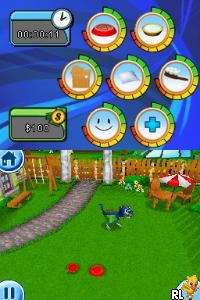
Dino Pets – The Virtual Pet Game (USA)
0 1 0
Dino Pets – The Virtual Pet Game (USA) is a classic Nintendo DS title that mixes virtual pet simulation with a prehistoric theme. Its simple gameplay and charming visuals make it easy for players of all ages to enjoy, offering a nostalgic feel rooted in the handheld’s era. As a digital pet game from the Nintendo DS, it focuses on nurturing and interaction, designed to fit within the portable console’s style and capabilities.
Dino Pets – The Virtual Pet Game: Gameplay Overview
The main activity involves caring for a small dinosaur, with daily tasks like feeding, cleaning, and playing. The game uses the touch controls typical of the Nintendo DS, making interactions straightforward. Players keep an eye on their dino’s needs through menus, making sure it stays happy and healthy. As the dino grows, new behaviors and mini-games become available, encouraging continued attention and engagement.
The game encourages regular check-ins, with progress depending on consistent care. While it doesn’t have complex mechanics or battles, it presents a gentle challenge in maintaining the dino’s well-being. The colorful, cartoon-like visuals create a friendly environment that emphasizes nurturing rather than competition or exploration.
Modes, Levels and Progression
The game mainly offers a single-player experience focused on one dino. It doesn’t have multiple modes or extensive levels but shows progression through different growth stages of the pet. As players care for their dino, they might unlock accessories, mini-games, or features, giving a subtle sense of advancement. Its simplicity relies on routine interactions rather than complex challenges.
While there isn’t much variation in gameplay structure, caring for a growing dinosaur encourages replay. Players might start new games with different care approaches or try different pet types if available. The relaxed pace and the bond formed with the pet over time stand out as the main rewards.
Winning Strategies
Keeping your dino happy requires regular care. Feeding and cleaning often help your pet grow steadily. Playing mini-games and activities can boost happiness and unlock new features.
- Stick to a daily routine to avoid neglect and support steady growth.
- Use mini-games to earn extra points or unlock items.
- Watch your dino’s moods and needs so nothing gets neglected.
- Try different feeding or interaction patterns to see what your pet prefers.
- Pay attention to growth stages; timely care helps your dino reach its full potential sooner.
Common Questions About Dino Pets – The Virtual Pet Game
How does the difficulty change as my dino grows?
The difficulty stays gentle, mainly involving consistent care. As your pet matures, it needs more attention, but there are no sudden spikes, making it suitable for younger players or casual gamers.
Are there different modes or levels?
No, but you can see progress through your pet’s growth stages and the unlocking of accessories or mini-games, which keeps things interesting over time.
How much replay value does the game have?
Replaying comes from caring for different pets, trying out various care styles, or restarting to see different growth results. Its simple design makes it easy to jump in for short sessions.
Playing Dino Pets – The Virtual Pet Game offers a straightforward, nurturing experience that fits well into casual gaming. Caring for a virtual dinosaur gives a gentle introduction to pet simulation games, and it can be played directly in your browser without extra downloads or setup. This nostalgic Nintendo DS title remains a solid choice for fans of virtual pets and classic gaming alike.
Related games: you can also try Cate West – The Vanishing Files (USA) and Cars (Europe) (Sv,No,Da,Fi), or browse all other games in the Nintendo DS category.
How to Play Dino Pets – The Virtual Pet Game (USA)?
Care for your dinosaur by feeding, cleaning, and playing daily to keep it happy and healthy. Watch its growth and unlock new features through regular interaction and mini-games.
Game Controls
Arrow keys act as the D-pad; Enter is Start; on-screen mapped keys handle the action buttons.
You may be interested in:
-
 Nintendo DS
♥ 1
Casper’s Scare School – Classroom Capers (USA)
Nintendo DS
♥ 1
Casper’s Scare School – Classroom Capers (USA) -
 Nintendo DS
♥ 1
Zunou Nouryoku Koujou Machine – Touch de Zunoo DS (Japan)
Nintendo DS
♥ 1
Zunou Nouryoku Koujou Machine – Touch de Zunoo DS (Japan) -
 Nintendo DS
♥ 1
Zunou ni Asekaku Game Series! Vol. 1 – Cool 104 Joker & Setline (Japan)
Nintendo DS
♥ 1
Zunou ni Asekaku Game Series! Vol. 1 – Cool 104 Joker & Setline (Japan) -
 Nintendo DS
♥ 9
Zuma’s Revenge (USA)
Nintendo DS
♥ 9
Zuma’s Revenge (USA) -
 Nintendo DS
♥ 1
Zubo (USA) (En,Fr,Es)
Nintendo DS
♥ 1
Zubo (USA) (En,Fr,Es) -
 Nintendo DS
♥ 1
Zubo (Europe) (En,Fr,De,Es,It,Nl,Sv)
Nintendo DS
♥ 1
Zubo (Europe) (En,Fr,De,Es,It,Nl,Sv) -
 Nintendo DS
♥ 1
Zorro – Quest for Justice (USA) (En,Fr,De,Es,It)
Nintendo DS
♥ 1
Zorro – Quest for Justice (USA) (En,Fr,De,Es,It) -
 Nintendo DS
♥ 1
Zorro – Quest for Justice (Europe) (En,Fr,De,Es,It)
Nintendo DS
♥ 1
Zorro – Quest for Justice (Europe) (En,Fr,De,Es,It)
Comments (0)
No comments yet. Be the first to comment!