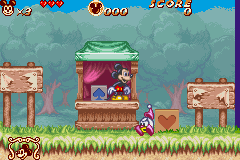
Disney’s Magical Quest 2 Starring Mickey and Minnie (U)(Evasion)
0 23 3
Disney’s Magical Quest 2 Starring Mickey and Minnie (U)(Evasion) is a classic Game Boy Advance game that you can now play directly in your browser. Its simple controls and charming visuals make it easy for new players and seasoned gamers to pick up and enjoy. This game from the GBA era offers a nostalgic trip with gameplay that’s straightforward but engaging enough to keep you interested without a steep learning curve.
What Is Disney’s Magical Quest 2 Starring Mickey and Minnie?
This is a platformer where you guide Mickey and Minnie through levels filled with obstacles, enemies, and collectibles. The core gameplay involves jumping, dodging, and using each character’s unique abilities to move forward. The goal is to explore each stage, face challenges, and reach the end. Replaying levels to find hidden secrets or improve your score adds to the fun.
Since it was originally made for the Game Boy Advance, the game emphasizes timing and recognizing patterns. The levels are short but packed with enough variety and difficulty to keep you coming back. The pixel art style captures Disney’s charm, creating a colorful world that’s simple to enjoy and rewarding to master.
What Keeps You Coming Back
One reason players return is the game’s well-balanced challenge. It’s tough enough to be interesting but not frustrating, making it good for players of different ages. Collecting items and discovering secrets motivates replaying levels, as there’s always something new to find or a higher score to aim for. Mickey and Minnie’s different abilities also add variety, encouraging you to experiment and try new approaches.
The variety of levels and different strategies you can use keep things fresh. Some parts require quick reflexes, while others reward careful planning. The colorful visuals and familiar characters make replaying especially enjoyable for Disney fans or fans of retro platformers who like a light, enjoyable challenge.
Handy Tips
To get the most out of Disney’s Magical Quest 2, keep these tips in mind:
- Work on timing your jumps to avoid falling or getting hit; precision really matters.
- Explore each level thoroughly to find hidden items and secret paths.
- Discover and use the unique abilities of Mickey and Minnie to access new areas and solve puzzles.
- Try to complete levels quickly to boost your score and unlock bonus content.
- Use checkpoints wisely—don’t rush through tricky sections.
- If you’re stuck, taking a break can help you see a new way forward when you return.
Player FAQ
Is Disney’s Magical Quest 2 suitable for young children?
Yes, the controls and gameplay are simple enough for children and beginners. Its gentle difficulty and familiar characters make it inviting for younger players.
Can I play Disney’s Magical Quest 2 offline or without an internet connection?
Since it runs in your browser on this site, you can play without an internet connection once it loads. It’s perfect for quick sessions or playing on the go.
Is this game good for newcomers to platformers?
Definitely. Its straightforward mechanics and mild difficulty make it accessible for those new to the genre, especially if they enjoy Disney or retro-style games.
Disney’s Magical Quest 2 starring Mickey and Minnie offers a charming, approachable platforming experience rooted in the Game Boy Advance era. Its simple gameplay, bright visuals, and secrets to discover make it fun to replay—perfect for fans of classic Nintendo-style adventures.
Related games: you can also try Blackthorne (E)(Endless Piracy) and Bratz – Rock Angelz (F)(Independent), or browse all other games in the Game Boy Advance category.
How to Play Disney’s Magical Quest 2 Starring Mickey and Minnie (U)(Evasion)?
Guide Mickey and Minnie through levels by jumping, dodging enemies, and using their unique abilities to reach the end, collecting items and secrets along the way.
Game Controls
Arrow keys control movement; action buttons are mapped to keyboard keys for jumping and using abilities.
You may be interested in:
-
 Game Boy Advance
♥ 2
Zooo (J)(Rising Sun)
Game Boy Advance
♥ 2
Zooo (J)(Rising Sun) -
 Game Boy Advance
♥ 4
Zooo (E)(Trashman)
Game Boy Advance
♥ 4
Zooo (E)(Trashman) -
 Game Boy Advance
♥ 2
ZooCube (U)(Mode7)
Game Boy Advance
♥ 2
ZooCube (U)(Mode7) -
 Game Boy Advance
♥ 1
ZooCube (E)(Blizzard)
Game Boy Advance
♥ 1
ZooCube (E)(Blizzard) -
 Game Boy Advance
♥ 1
Zone of the Enders – The Fist of Mars (U)(Mode7)
Game Boy Advance
♥ 1
Zone of the Enders – The Fist of Mars (U)(Mode7) -
 Game Boy Advance
♥ 1
Zone of the Enders – The Fist of Mars (E)(Cezar)
Game Boy Advance
♥ 1
Zone of the Enders – The Fist of Mars (E)(Cezar) -
 Game Boy Advance
♥ 1
Zoku Bokura no Taiyou – Taiyou Shounen Django (J)(Independent)
Game Boy Advance
♥ 1
Zoku Bokura no Taiyou – Taiyou Shounen Django (J)(Independent) -
 Game Boy Advance
♥ 7
Zoku Bokura no Taiyou – Taiyou Shounen Django (J)(Caravan)
Game Boy Advance
♥ 7
Zoku Bokura no Taiyou – Taiyou Shounen Django (J)(Caravan)
Comments (0)
No comments yet. Be the first to comment!