Dolucky no A.League Soccer (Japan)
0 4 0
Dolucky no A.League Soccer (Japan) is a classic SNES game that captures the simple thrill of 16-bit soccer. Its pixelated pitches, straightforward controls, and nostalgic charm bring back an era when sports titles focused on fast-paced gameplay rather than complex mechanics. This game delivers a no-frills soccer experience, echoing early console sports games with an emphasis on accessible fun. Playing it here in your browser allows you to enjoy a piece of the SNES era without any downloads or emulators.
Step Into the World of Dolucky no A.League Soccer
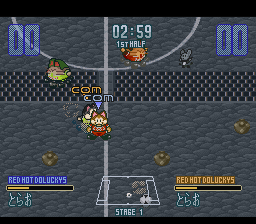
The visuals are typical of 16-bit games, with bright, blocky sprites and minimal stadium backgrounds. The field’s simple grid and animated players create a familiar feel for fans of retro sports titles. The sound design features chiptune melodies and basic crowd noises, crafting a lively yet uncomplicated atmosphere. While not flashy, the presentation gets across the energy of a soccer match through straightforward graphics and sound effects.
Matches happen in a clean, pixelated setting where players control their team in fast-paced, side-view games. The background music loops rhythmically, keeping the energy high. Though the visuals and audio aren’t aiming for realism, they evoke a nostalgic snapshot of 16-bit sports games, focusing on quick gameplay and immediate fun rather than detailed simulation.
How the Gameplay Hooks You
The core gameplay loop involves quick, arcade-style matches centered on scoring goals and outsmarting opponents. The controls are simple, making it easy to pick up, but the game rewards good timing and positioning. Matches are brief, often just a few minutes long, which works well for quick browser sessions. The pace is brisk, with minimal menus or pauses, so you can jump right into the action.
The game’s design promotes instant engagement: score, defend, pass—all without fuss. As you play, you develop a sense of mastery through timing shots and positioning players, though the overall experience stays accessible. Its straightforward approach keeps the momentum high, perfect for short breaks or casual competitions with friends, whether in a quick session or a few rounds back-to-back.
Pro Tips for Dolucky no A.League Soccer
Getting the most out of the game means understanding its quick rhythm and simple mechanics. Here are a few tips:
- Use quick passes to keep possession and set up shots on goal.
- Move players strategically to outmaneuver opponents and create scoring chances.
- Pay attention to the small window for timing your shots—accuracy often beats power.
- Switch players wisely to cover the goal and block shots.
- Practice quick reactions during goal kicks and corners for better defense.
- Keep matches short to avoid fatigue—perfect for quick browser sessions.
Frequently Asked Questions
Does Dolucky no A.League Soccer work well for quick sessions?
Absolutely. Its short matches and fast pace make it great for casual, quick play right in your browser.
Is the game suitable for players unfamiliar with soccer?
Definitely. Its simple controls and straightforward gameplay are easy for newcomers, with no need for complex strategies.
Does the game become repetitive over time?
While it’s a classic sports game with limited modes, the quick gameplay and competitive feel keep it engaging, especially in short bursts.
Dolucky no A.League Soccer is a charming piece of SNES sports history, offering instant, uncomplicated soccer fun right in your browser. Its nostalgic pixel art and lively gameplay make it worth a revisit for fans of vintage games or just casual soccer matches.
Related games: you can also try Big Ichigeki! Pachi-Slot Daikouryaku 2 – Universal Collection (Japan) and Capcom's Soccer Shootout (USA) (Beta), or browse all other games in the SNES category.
How to Play Dolucky no A.League Soccer (Japan)?
Control your team to score goals and defend against opponents in quick, fast-paced matches. Use simple passes and positioning to outplay your rivals in short, arcade-style soccer games.
Game Controls
Arrow keys act as the D-pad; Enter is Start; action buttons are mapped to keyboard keys.








Comments (0)
No comments yet. Be the first to comment!