Doom (USA)
0 89 2
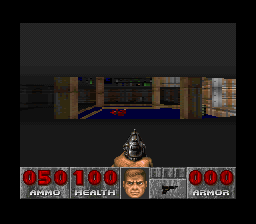
Doom (USA) is a classic SNES game that brings a first-person shooter experience directly to your browser. Originally a PC title, this port captures the quick action and simple gameplay of the original, adapted for a console era known for its pixel art and sprite-based visuals. Many retro gamers enjoy playing it here because you can jump right into the chaos without needing emulators or ROMs. It’s easy to start a game and get caught up in the intense moments of this legendary shooter whenever you want.
Getting Into Doom
The main idea of Doom is to move through maze-like levels filled with enemies, weapons, and hidden secrets. As a first-person game, your view is from the character’s eyes, which makes everything feel more immediate. You’ll need quick reflexes and smart resource use, with a limited set of weapons like shotguns, chainguns, and rockets. Your goal is to clear each level of monsters while collecting keycards to open locked doors. The pace is rapid, and enemies often attack in groups, so staying alert is crucial.
Most of your time will be spent exploring, fighting enemies, and finding the exit. Levels are designed for short bursts of play—each one can be finished in a few minutes—but mastering the game involves memorizing enemy positions and level layouts. It doesn’t have multiplayer or a story mode; instead, it encourages replaying on higher difficulties or hunting for secret areas. Success depends on balancing aggression and caution, managing ammo, and choosing the right weapons for different threats.
Standout Features
This SNES version of Doom keeps the core visuals and gameplay of the original, with pixel art that captures the gritty sci-fi horror vibe. While it can’t match the PC’s graphics, it faithfully reproduces the level designs and enemy sprites, making it feel authentic for the era. Progress is simple—complete levels to move on, with difficulty rising as you go. The challenge lies in managing limited supplies and navigating maze-like environments under pressure, which makes replaying the game rewarding.
Trying different difficulty settings, discovering secrets, and improving your times add to the replay value. The straightforward design makes it accessible for new players but still engaging for veterans aiming to perfect their runs or speedrun. Because it runs directly in your browser, you can pick up a new session whenever you like, testing your skills on increasingly tough levels or just enjoying some classic pixel chaos.
Strategy and Tips
Getting started is simple, but a few tips can help. Save your ammo early—use weaker weapons like the pistol or chainsaw if you have them. Keep an eye out for health and armor pickups to stay in the fight longer. Learning the level layout helps avoid unnecessary fights and find shortcuts. When facing groups of enemies, try to lure them into narrow spaces to deal with them more easily.
- Use your environment—corner enemies or shoot from behind cover when possible.
- Save your strongest weapons for tough enemies or boss fights, and switch between weapons to stay efficient.
- Explore each level thoroughly to find secrets with extra ammo, health, or weapons.
- Take your time—rushing can lead to more damage and make clearing levels harder.
- Pay attention to sound cues; they often signal nearby enemies or secret openings.
Quick Questions
How do I get started with Doom on this browser version?
Just click to load the game, and it starts immediately. Use your keyboard controls to move and shoot.
What’s a common mistake beginners make?
Many rush into rooms without checking for threats or conserving ammo, which can lead to quick deaths. Take some time to explore and plan your moves.
Can I play Doom comfortably on mobile or touch devices?
The game runs in your browser, but touch controls might be less precise. Connecting a keyboard or gamepad will make playing easier.
Playing Doom here offers a simple way to enjoy one of the most influential first-person shooters ever made. Its fast-paced gameplay and level design still challenge players, making it a true classic for anyone interested in retro gaming.
Related games: you can also try Arabian Nights – Sabaku no Seirei Ou (English v1.0) and BS Kodomo Chousadan Mighty Pockets Chousa 3 – Kyakusen Queen Patra no Nazo (Japan), or browse all other games in the SNES category.
How to Play Doom (USA)?
Move through maze-like levels, fight enemies with limited weapons, collect keycards, and find the exit to complete each stage. Stay alert, manage resources, and clear all monsters to progress.
Game Controls
Arrow keys or WASD move; space or Enter fire or interact; other keys for weapon selection.








Comments (0)
No comments yet. Be the first to comment!