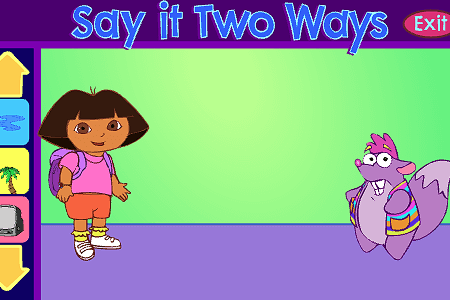
Dora the Explorer: Say It Two Ways
0 50 50
Dora the Explorer: Say It Two Ways is a charming and accessible flash game that invites players to join Dora and her friends on a fun language adventure. Perfect for young learners and nostalgic fans alike, this game is easy to pick up and enjoy directly in your browser. Its simple controls and engaging design make it a good choice for practicing vocabulary and pronunciation while having a good time. With no downloads or complicated instructions needed, Dora the Explorer: Say It Two Ways provides a quick, entertaining experience that can be enjoyed anytime, anywhere.
What Is Dora the Explorer: Say It Two Ways?
This game fits into the casual, educational genre, combining elements of language learning and interactive play. Players listen carefully to words and then choose or say the correct translation or pronunciation—often shown in two different ways. The main activity involves matching sounds, words, or phrases, making it ideal for young kids developing their language skills or fans of Dora who want to revisit their favorite character in a playful way.
During the game, players will encounter various mini-challenges that test their understanding of vocabulary and pronunciation. Whether it’s selecting the right way to say a word or repeating it aloud, the game encourages active participation. Its straightforward setup means there are no confusing rules—just fun, learning, and a chance to build confidence in language skills while exploring familiar characters and themes from Dora the Explorer: Say It Two Ways.
What Keeps You Coming Back
One reason players return to Dora the Explorer: Say It Two Ways is its fun mix of educational content and engaging gameplay. The game offers a variety of words and phrases to learn and repeat, which keeps things fresh. The colorful visuals and cheerful sounds from the Dora universe make every session lively and enjoyable, encouraging repeated play.
The simple mechanics and gentle difficulty make it accessible for all ages. Kids can practice pronunciation and vocabulary without frustration, and parents appreciate the educational aspect. The design encourages trying again and improving each time, making every session a chance to do a little better. Because of that, Dora the Explorer: Say It Two Ways isn’t just a quick distraction—it’s a satisfying experience that players want to revisit for more language practice.
Handy Tips
Thinking about trying Dora the Explorer: Say It Two Ways? Here are some tips to enjoy it more and learn as you go:
- Pay attention to the pronunciation before choosing your answer to sharpen your listening skills.
- Repeat words aloud after hearing them to strengthen your pronunciation and memory.
- Take your time with each challenge—rushing can lead to mistakes, so enjoy the process.
- Try saying the same word in different ways to get used to various expressions and accents.
- Use the game as practice for young children learning new vocabulary or pronunciation.
- Pause and replay sections if you need to better understand tricky words or phrases.
- Share the game with friends or family for a fun group activity or friendly competition.
Player FAQ
Is Dora the Explorer: Say It Two Ways easy enough for young children to pick up?
Yes, the game is designed to be simple, making it suitable for young players and beginners. Its clear prompts and straightforward interface help kids learn pronunciation and vocabulary easily.
Can I play Dora the Explorer: Say It Two Ways offline or on any device?
You can play it directly in your browser, so as long as you have an internet connection, it works on any device—PC, tablet, or some smartphones. It doesn’t require downloads or installations, which makes it pretty convenient.
Is Dora the Explorer: Say It Two Ways suitable for players of all ages?
While mainly aimed at children and early learners, the simple gameplay and nostalgic appeal make it enjoyable for anyone interested in language practice or fans of Dora looking for a quick, fun challenge.
Overall, Dora the Explorer: Say It Two Ways offers an inviting experience that’s easy to pick up and hard to put down. Whether you’re helping a child learn or revisiting Dora’s world yourself, this game is a lively way to practice language skills right in your browser. Its charm, educational aspect, and straightforward design make it a good addition to any casual gaming collection.
Related games: you can also try Amorphous and Frisbee Dog, or browse all other games in the Flash category.
How to Play Dora the Explorer: Say It Two Ways?
Listen to a word or phrase and choose or say the correct translation or pronunciation from two options. Match sounds and repeat to improve your language skills in a fun way.
Game Controls
Use the mouse to select options or click to speak; keyboard controls are not required.
You may be interested in:
-
 Flash
♥ 0
Nick Jr. Jukebox
Flash
♥ 0
Nick Jr. Jukebox -
 Flash
♥ 0
Go Diego Go: Rainforest Adventure
Flash
♥ 0
Go Diego Go: Rainforest Adventure -
 Flash
♥ 0
Dora’s Star Mountain Mini-Golf!
Flash
♥ 0
Dora’s Star Mountain Mini-Golf! -
 Flash
♥ 0
Mr. Meaty Treasures Of The Deep
Flash
♥ 0
Mr. Meaty Treasures Of The Deep -
 Flash
♥ 0
SpongeBob’s Pizza Toss!
Flash
♥ 0
SpongeBob’s Pizza Toss! -
 Flash
♥ 0
SpongeBob Squarepants: Squeaky Boot Blurbs
Flash
♥ 0
SpongeBob Squarepants: Squeaky Boot Blurbs -
 Flash
♥ 0
SpongeBob: Coloring Book
Flash
♥ 0
SpongeBob: Coloring Book -
 Flash
♥ 0
Bully the Bully
Flash
♥ 0
Bully the Bully
Comments (0)
No comments yet. Be the first to comment!