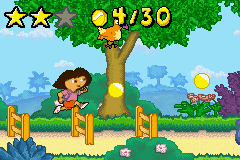
Dora the Explorer – The Search for Pirate Pig’s Treasure (U)(Eurasia)
0 17 1
Dora the Explorer – The Search for Pirate Pig’s Treasure (U)(Eurasia) is a classic Game Boy Advance title that brings the beloved educational character into a platformer adventure. It’s designed to be simple enough for kids but offers enough variety to keep things interesting. The controls are straightforward, and objectives are clear, so it’s easy to pick up whether you’re familiar with Dora or just starting out.
What Is Dora the Explorer – The Search for Pirate Pig’s Treasure?
This game blends educational elements with side-scrolling gameplay. Players help Dora explore colorful levels, solve puzzles, and find clues to uncover Pirate Pig’s treasure. Moving Dora through different environments, collecting items, and completing tasks suited for a younger audience make up the core experience.
While it emphasizes learning and problem-solving, it also has a light-hearted platformer feel. The design encourages exploration, with each level offering a new challenge that helps develop skills like pattern recognition and memory. It’s made to be accessible, making it suitable for children and newcomers alike.
What Keeps You Coming Back
The game’s appeal lies in its simple gameplay and familiar characters, which make replaying levels satisfying. Bright visuals and a cheerful soundtrack create a friendly atmosphere, encouraging players to revisit areas, find missed items, or solve puzzles more efficiently. Its structure encourages repeated play, especially for kids eager to master each stage.
The variety of tasks and the gradual introduction of new puzzles add some depth without making things complicated. The game rewards curiosity, often prompting players to explore every corner for hidden clues or bonus items. This keeps the experience fresh, even after multiple sessions, as players sharpen their skills and find new ways to complete levels.
Handy Tips
Explore each level thoroughly; many puzzles need specific items to move forward. Keep an eye out for clues that point to the next step.
- Use Dora’s directional hints to navigate tricky parts.
- Gather all the items you find before proceeding to avoid missing anything important.
- Watch for visual and sound cues—they often tell you where to go or what to do next.
- If you get stuck, try revisiting earlier areas; sometimes a different approach helps.
- Take your time enjoying the educational snippets—they add to the fun and learning.
Player FAQ
Is Dora the Explorer – The Search for Pirate Pig’s Treasure suitable for young children?
Yes, it’s designed with younger players in mind, featuring simple controls and gentle difficulty levels.
Can I play this without an internet connection?
Absolutely. Since it runs directly in your browser as a Game Boy Advance game, no internet connection is needed once it’s loaded.
Is this game good for people new to platformers?
Definitely. Its educational focus and straightforward gameplay make it accessible for beginners, especially children learning basic navigation and problem-solving skills.
Playing Dora the Explorer – The Search for Pirate Pig’s Treasure offers a friendly and educational platforming experience that’s easy to enjoy. Its colorful visuals, simple mechanics, and engaging puzzles make it a nice choice for young gamers and fans of the series. You can play it directly in your browser without any hassle, making it a fun retro pick for anyone wanting to revisit a classic from the Game Boy Advance days.
Related games: you can also try Barbie Horse Adventures (U)(Cezar) and Chicken Shoot (U)(Independent), or browse all other games in the Game Boy Advance category.
How to Play Dora the Explorer – The Search for Pirate Pig’s Treasure (U)(Eurasia)?
Help Dora explore colorful levels, solve puzzles, and find Pirate Pig's treasure by collecting items and completing tasks across different environments.
Game Controls
Arrow keys move Dora; other keys handle jumping, interacting, and menu options.
You may be interested in:
-
 Game Boy Advance
♥ 2
Zooo (J)(Rising Sun)
Game Boy Advance
♥ 2
Zooo (J)(Rising Sun) -
 Game Boy Advance
♥ 4
Zooo (E)(Trashman)
Game Boy Advance
♥ 4
Zooo (E)(Trashman) -
 Game Boy Advance
♥ 2
ZooCube (U)(Mode7)
Game Boy Advance
♥ 2
ZooCube (U)(Mode7) -
 Game Boy Advance
♥ 1
ZooCube (E)(Blizzard)
Game Boy Advance
♥ 1
ZooCube (E)(Blizzard) -
 Game Boy Advance
♥ 1
Zone of the Enders – The Fist of Mars (U)(Mode7)
Game Boy Advance
♥ 1
Zone of the Enders – The Fist of Mars (U)(Mode7) -
 Game Boy Advance
♥ 1
Zone of the Enders – The Fist of Mars (E)(Cezar)
Game Boy Advance
♥ 1
Zone of the Enders – The Fist of Mars (E)(Cezar) -
 Game Boy Advance
♥ 1
Zoku Bokura no Taiyou – Taiyou Shounen Django (J)(Independent)
Game Boy Advance
♥ 1
Zoku Bokura no Taiyou – Taiyou Shounen Django (J)(Independent) -
 Game Boy Advance
♥ 7
Zoku Bokura no Taiyou – Taiyou Shounen Django (J)(Caravan)
Game Boy Advance
♥ 7
Zoku Bokura no Taiyou – Taiyou Shounen Django (J)(Caravan)
Comments (0)
No comments yet. Be the first to comment!