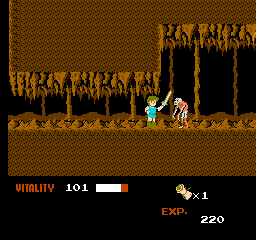
Dragon Buster (Japan)
0 2 0
Dragon Buster (Japan) is a classic NES action role-playing platformer that combines combat, exploration, and progress in a way that keeps players on their toes. A favorite from the NES era, it draws fans of retro gaming, especially those who appreciate pixel art and straightforward gameplay with RPG touches. Playing it right in your browser, this emulated version means you can jump into the game without needing downloads or installations.
Getting Into Dragon Buster
The main gameplay involves moving through side-scrolling levels packed with enemies and obstacles. You control a hero who fights monsters, dodges traps, and moves through levels that blend platformer and RPG elements. Timing your attacks and avoiding enemy hits are key to staying alive. Each run involves exploring different stages, battling foes, and picking up items or power-ups to boost your abilities.
This NES game follows a simple progression. As you clear levels, tougher enemies appear, and platform sections become more complex. It doesn’t have detailed RPG features like character customization, but it rewards players who learn the rhythm of combat and navigation. The difficulty increases gradually, providing enough challenge for those who enjoy sharpening their timing and tactics across multiple tries.
Standout Features
The pixel art keeps the classic NES look alive, with colorful sprites and backgrounds that bring back nostalgia. Animations are simple but clear, making it easy to spot enemies and hazards during hectic moments. The level design encourages exploring for hidden paths and secret areas, rewarding attentive players.
Progress depends on defeating enemies and progressing through stages, with each level offering new layouts and challenges. While it doesn’t feature branching stories or multiple endings, its short length and rising difficulty make it worth replaying to improve skills. Its mechanics are straightforward enough for newcomers, but the increasing challenge adds depth for players wanting to master it.
Strategy and Tips
Getting started is easy, but becoming skilled takes patience. Pay attention to enemy patterns and time your attacks carefully. Moving precisely and staying patient are important for tougher sections.
- Focus on timing your attacks and dodges to reduce damage.
- Explore each level thoroughly; secret areas and hidden items can help you move forward more easily.
- Take your time when navigating levels to avoid unnecessary hits from enemies or traps.
- Use the environment to your advantage—knock enemies into hazards or steer clear of crowded spots.
- Save your power-ups for boss fights or difficult sections to get the most benefit.
- If you find yourself struggling, stick with a few levels at a time to build confidence and sharpen your skills.
Quick Questions
Is Dragon Buster beginner-friendly?
Yes, its controls are simple, and mechanics are straightforward. Still, expect the challenge to ramp up as you progress.
How long does a typical game last?
Depending on your skill, a full run might take between 20 and 40 minutes, especially if you’re exploring levels carefully.
Can I play this on mobile or touch devices?
This browser version is best suited for desktop, but it can work on mobile browsers. Controls are optimized for keyboard, so it might feel less comfortable on touchscreens.
Overall, Dragon Buster gives a good taste of early NES action and role-playing gameplay, with enough challenge to keep things interesting. Its mix of platforming, combat, and progression makes it a rewarding pick for fans of classic games. Whether revisiting or trying it for the first time, this version lets you enjoy a genuine NES experience right in your browser—no fuss, no downloads, just classic fun.
Related games: you can also try Captain Saver (Japan) and Blue Marlin, The (USA), or browse all other games in the NES category.
How to Play Dragon Buster (Japan)?
Move through side-scrolling levels, fight monsters, dodge traps, and explore for hidden items to progress and increase your score. Focus on timing attacks and navigating carefully to survive longer.
Game Controls
Arrow keys control movement; action buttons are mapped to keyboard keys for attacking and jumping.
You may be interested in:
-
![Zombie Hunter (Japan) [En by KingMike v1.01]](https://www.playf2p.com/wp-content/uploads/zombie-hunter-japan-en-by-kingmike-v1-01-200x120.png) NES
♥ 2
Zombie Hunter (Japan) [En by KingMike v1.01]
NES
♥ 2
Zombie Hunter (Japan) [En by KingMike v1.01] -
 NES
♥ 1
Zombie Hunter (Japan)
NES
♥ 1
Zombie Hunter (Japan) -
 NES
♥ 1
Zoids Mokushiroku (Japan)
NES
♥ 1
Zoids Mokushiroku (Japan) -
 NES
♥ 2
Zoids 2 – Zenebas no Gyakushuu (Japan)
NES
♥ 2
Zoids 2 – Zenebas no Gyakushuu (Japan) -
 NES
♥ 1
Zoids – Chuuou Tairiku no Tatakai (Japan)
NES
♥ 1
Zoids – Chuuou Tairiku no Tatakai (Japan) -
 NES
♥ 11
Zippy Race (Japan)
NES
♥ 11
Zippy Race (Japan) -
 NES
♥ 1
Zhen Ben Xi You Ji (Asia) (Unl)
NES
♥ 1
Zhen Ben Xi You Ji (Asia) (Unl) -
 NES
♥ 1
Zenbei!! Pro Basket (Japan)
NES
♥ 1
Zenbei!! Pro Basket (Japan)
Comments (0)
No comments yet. Be the first to comment!