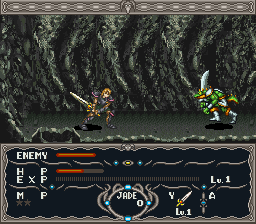
Dragon View (USA)
0 5 0
Dragon View (USA) is a classic SNES game that combines action and role-playing elements, appealing to players who enjoy a mix of combat, exploration, and character growth. As a SNES classic emulated directly in your browser, it offers a nostalgic experience of gaming from the 16-bit era. This game is perfect for those who appreciate pixel art, challenging gameplay, and a story-driven adventure rooted in fantasy settings.
Getting Into Dragon View
The game centers around navigating a side-scrolling world with RPG mechanics layered into the action. Players control a hero exploring diverse environments, encountering enemies, and gaining new abilities or items to move forward. The main loop involves exploring levels, fighting enemies in real-time combat, and collecting items to upgrade your character. You’ll move through stages, defeat foes, solve puzzles, and face boss battles, all while keeping an eye on health and resources.
Progression is mostly about completing levels and defeating bosses, with some exploration encouraging backtracking for upgrades or secrets. The game doesn’t have branching storylines but focuses on skillful combat and strategic use of items. As an action RPG, your play sessions can be quick or longer as you get more familiar with enemy patterns and level layouts. There are no multiplayer modes; it’s a solo adventure of discovery and combat.
Standout Features
Visually, Dragon View captures the charm of 16-bit pixel art with colorful environments and detailed sprite work. Its level designs range from lush forests to dark dungeons, each crafted with atmosphere and practical design in mind. The progression system encourages replaying levels, as you can revisit earlier stages with new abilities, uncover hidden items, or test different combat strategies.
Replay value comes from the challenge and exploration focus. As you learn enemy attack patterns and refine your upgrades, new routes and secrets become accessible. While it’s not an open-world RPG, the layered levels and boss encounters invite multiple playthroughs, especially if you’re aiming for higher scores or faster completions. The in-browser emulation makes it easy to pick up and play whenever you like.
Strategy and Tips
Start by getting comfortable with the controls and enemy behaviors early on. Focus on upgrading your character whenever possible to make boss fights easier. Keep an eye out for hidden areas and secret items that can boost your health or attack power.
- Practice dodging enemy attacks to preserve health during tougher fights.
- Explore every corner of each level to find hidden items and shortcuts.
- Balance attacking and defensive positioning to survive longer.
- Save your stronger weapons or abilities for boss battles rather than wasting them on weaker enemies.
- Watch enemy attack patterns carefully before rushing in to attack.
Quick Questions
How do I get started if I’ve never played before?
Begin by exploring the initial levels to learn enemy patterns and controls. Take your time to get comfortable with movement and attacks before tackling the more difficult sections.
What’s a common mistake new players make?
Many rush into fights without observing enemy attack patterns, which can lead to unnecessary damage. Patience and timing make a big difference.
Can I play Dragon View comfortably on mobile or touch screens?
Since it runs directly in your browser, it works on mobile devices with a compatible browser. The controls might be less precise than with a keyboard or controller, but it’s still playable and enjoyable.
Dragon View offers a straightforward, tough journey into action RPG gameplay, with enough depth to keep players coming back. Its pixel art and classic design make it a solid addition to any SNES collection, especially for those interested in retro titles on this platform.
Related games: you can also try College Football USA '97 – The Road to New Orleans (USA) and Aladdin (Spain), or browse all other games in the SNES category.
How to Play Dragon View (USA)?
Explore levels, fight enemies in real-time, and collect items to upgrade your character while defeating bosses and uncovering secrets in a side-scrolling fantasy world.
Game Controls
Arrow keys for movement; action buttons mapped to keyboard keys for attacking, jumping, and using items.








Comments (0)
No comments yet. Be the first to comment!