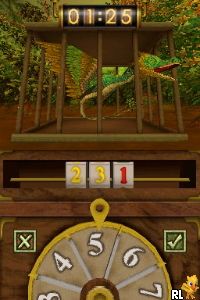
Dragonology (Europe) (En,Fr,De,Es,It,Nl)
0 1 0
Dragonology (Europe) (En,Fr,De,Es,It,Nl) is a charming Nintendo DS classic that transports players into a world where dragons and mystery intertwine. The game weaves exploration and discovery together, all wrapped in a visual style reminiscent of early 2000s handheld adventures. Its multilingual support makes it accessible across Europe, inviting players to step into a universe filled with secrets and mythical creatures right from their browser. Playing online means you can jump right in without downloads, making it a cozy nostalgic escape for those who grew up with the Nintendo DS or anyone curious about its legacy.
Step Into the World of Dragonology
The visuals have a hand-illustrated feel, with soft colors and detailed linework that create a whimsical yet mysterious atmosphere. Its sound design features gentle ambient noises and subtle musical cues that enhance the sense of wonder and discovery. The environment feels like a living storybook, with each scene carefully crafted to draw players into a fantasy realm where dragons are not just creatures, but ancient guardians of forgotten knowledge. The pacing encourages quiet exploration, rewarding patience and curiosity with new insights and hidden lore. It’s a universe that invites you to linger, examine, and piece together fragments of long-lost dragon mythology.
How the Gameplay Hooks You
At its core, Dragonology is about uncovering secrets through puzzles, interactions, and exploration. The gameplay is gentle yet engaging, with each discovery leading to another clue or piece of lore. Progression feels steady, gradually revealing the depth of its world as players solve riddles or connect clues about dragons’ origins. The pace is deliberate, encouraging careful examination of each scene and item, so every small detail counts. It offers a satisfying sense of achievement without rushing, making it suitable for quick sessions or longer, immersive playthroughs.
Pro Tips for Dragonology
Start by exploring each environment thoroughly to find hidden clues and puzzle pieces.
- Pay attention to visual details; many secrets are revealed through subtle hints in the artwork.
- Listen closely to ambient sounds; they often provide clues for solving puzzles or uncovering lore.
- Take notes or remember key symbols; they may come in handy later on.
- Revisit previous scenes after new discoveries; some secrets only reveal themselves over time.
- Be patient — the game’s slow pace encourages careful observation and thoughtful play.
Frequently Asked Questions
Does Dragonology have much replay value or is it a one-time experience?
The game is designed around exploration, so each session can feel fresh as you uncover new details. It’s more about soaking in the atmosphere than fast-paced action, allowing for multiple playthroughs to find secrets you might have missed first time around.
Is the game suited for short gaming sessions or longer stretches?
It works well in short bursts since each scene or puzzle can be explored independently. Its relaxed pace makes it great for casual play whenever you have a few minutes to spare.
Will the atmosphere feel tense or calming?
The experience leans toward calming and contemplative, with no high-stakes combat or time pressures. Perfect for those who enjoy atmospheric storytelling and quiet discovery without stress.
Playing Dragonology on this site offers a nostalgic journey into a beautifully crafted universe, where every detail sparks curiosity. It’s a game that rewards patience, observation, and a love for mythical stories, making it a memorable part of any collection.
Related games: you can also try Cars (Europe) (Sv,No,Da,Fi) and Chibi Maruko-chan DS – Maru-chan no Machi (Japan), or browse all other games in the Nintendo DS category.
How to Play Dragonology (Europe) (En,Fr,De,Es,It,Nl)?
Explore scenes, find hidden clues, and solve puzzles to uncover dragon secrets and lore at a steady pace. Carefully examine details and revisit scenes to progress through the story.
Game Controls
Arrow keys move the cursor; Enter confirms selections; on-screen keys handle interactions.
You may be interested in:
-
 Nintendo DS
♥ 1
Casper’s Scare School – Classroom Capers (USA)
Nintendo DS
♥ 1
Casper’s Scare School – Classroom Capers (USA) -
 Nintendo DS
♥ 1
Zunou Nouryoku Koujou Machine – Touch de Zunoo DS (Japan)
Nintendo DS
♥ 1
Zunou Nouryoku Koujou Machine – Touch de Zunoo DS (Japan) -
 Nintendo DS
♥ 1
Zunou ni Asekaku Game Series! Vol. 1 – Cool 104 Joker & Setline (Japan)
Nintendo DS
♥ 1
Zunou ni Asekaku Game Series! Vol. 1 – Cool 104 Joker & Setline (Japan) -
 Nintendo DS
♥ 9
Zuma’s Revenge (USA)
Nintendo DS
♥ 9
Zuma’s Revenge (USA) -
 Nintendo DS
♥ 1
Zubo (USA) (En,Fr,Es)
Nintendo DS
♥ 1
Zubo (USA) (En,Fr,Es) -
 Nintendo DS
♥ 1
Zubo (Europe) (En,Fr,De,Es,It,Nl,Sv)
Nintendo DS
♥ 1
Zubo (Europe) (En,Fr,De,Es,It,Nl,Sv) -
 Nintendo DS
♥ 1
Zorro – Quest for Justice (USA) (En,Fr,De,Es,It)
Nintendo DS
♥ 1
Zorro – Quest for Justice (USA) (En,Fr,De,Es,It) -
 Nintendo DS
♥ 1
Zorro – Quest for Justice (Europe) (En,Fr,De,Es,It)
Nintendo DS
♥ 1
Zorro – Quest for Justice (Europe) (En,Fr,De,Es,It)
Comments (0)
No comments yet. Be the first to comment!