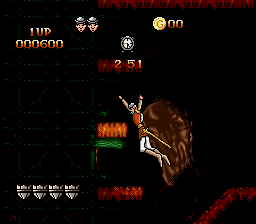
Dragon’s Lair (Europe) (Beta)
0 1 0
Dragon’s Lair (Europe) (Beta) is a classic SNES game emulated in your browser, bringing a piece of arcade history into a convenient, playable format. If you enjoy action and puzzle games that require precise timing and quick reflexes, this game offers a nostalgic look at a pioneering genre of interactive animation. Its straightforward gameplay and vintage charm make it accessible to both new players and longtime fans of the era.
Getting Into Dragon’s Lair
This game centers around a series of quick-time events where players watch animated scenes and must make accurate choices to move forward. The gameplay involves reacting at the right moments to decisions that determine if the hero survives or meets an unfortunate end. There are no difficulty settings or modes; each run follows a sequence of scenes that test your timing and decision-making. Sessions are usually short, often lasting just a few minutes.
Playing Dragon’s Lair is about recognizing patterns and reacting swiftly. As each scene unfolds, you’ll be prompted to pick from a few options—sometimes by pressing a button or moving the joystick. Success depends on memorization, quick reflexes, and understanding the cues that signal the correct action. It’s a linear experience, with the main goal being to guide the hero through the story without dying. The game doesn’t have save states or checkpoints, so each run is a fresh attempt at mastering the scenes.
Standout Features
The visuals are a key part of Dragon’s Lair, showcasing colorful, cartoon-style animation that caught the arcade’s attention when it first came out. This version faithfully reproduces the original art style, making each scene vibrant and engaging. The challenge increases as the timing becomes more precise and reactions need to be quicker as you go further. Replay value comes from trying to beat your previous score, memorizing scenes, and sharpening your reactions.
Since the game is based on a set sequence of animated scenes, replayability depends on mastering timing and completing the story without dying. While it doesn’t have branching paths or multiple endings, the challenge of perfecting reactions makes it appealing for players who enjoy precision gameplay. Playing in your browser makes it easy to jump in again and again to improve your score without any downloads or setup.
Strategy and Tips
Pay attention to visual cues in each scene, as timing really matters. Practice each segment multiple times to memorize correct responses and speed up reactions.
- Watch the animated cues carefully to know when to press buttons, as hesitation can lead to failure.
- Stay calm and avoid rushing your reactions; accuracy beats speed.
- Replay scenes to learn the pattern, especially if you keep dying at the same spot.
- Don’t get discouraged by early setbacks—improving your timing takes patience.
- Remember, since the game is linear, consistency is more important than improvising responses.
Quick Questions
How do I get started with Dragon’s Lair?
You just load the game in your browser, and it starts right away—no setup needed. Watch the scenes and react to prompts as they appear.
What is the most common mistake beginners make?
Many hesitate or react too late to cues, which often costs a life early on. Focus on quick recognition and timely responses.
Can I play this game on mobile or touch devices?
Yes, since it runs in your browser, you can play on mobile devices. Gameplay relies heavily on quick taps or gestures that mimic pressing buttons, so being responsive helps.
Dragon’s Lair remains a memorable example of early animated arcade games, and this version makes it simple to experience its challenge and charm right in your browser. It offers a glimpse of its style and difficulty, perfect for players interested in the roots of action puzzle gaming.
Related games: you can also try Desert Fighter (Europe) (Beta) and BS Freud no Chousenjou – 2 Gou (Japan), or browse all other games in the SNES category.
How to Play Dragon’s Lair (Europe) (Beta)?
Watch the animated scenes and press the correct buttons at the right moments to guide the hero through each challenge without dying.
Game Controls
Arrow keys and spacebar are used to make choices and react during scenes.








Comments (0)
No comments yet. Be the first to comment!