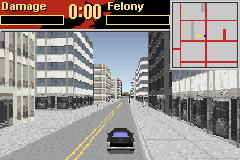
Driver 2 Advance (U)(RDG)
0 10 2
Driver 2 Advance (U)(RDG) is a classic Game Boy Advance game emulated here for instant play in your browser. It’s a racing game that combines driving action with police pursuits and open-world exploration, appealing to fans of arcade-style driving and mission-based gameplay. If you enjoyed the original console experience, this version offers a portable, accessible way to enjoy the game without needing a physical cartridge or console.
Getting Into Driver 2 Advance
Driver 2 Advance focuses on a series of missions involving racing, evading police, and completing objectives around an urban setting. The main idea is to pick a mission and then carry it out by cruising through city streets while managing time, traffic, and police chases. The game encourages trying different missions to improve your performance or unlock new challenges, making each play session a test of driving skills and strategic thinking.
Most sessions start with selecting a mission from the menu. During gameplay, you need to drive accurately, steer clear of police, and sometimes chase or escape targets. Free roam mode lets you explore the city, practice your driving, or take on side objectives. Whether you want quick bursts of play or longer sessions, the game adjusts to how much you want to explore or challenge yourself.
Standout Features
Graphically, Driver 2 Advance stays true to its console roots with detailed cityscapes, animated traffic, and smooth movements that bring the urban environment to life. The visual style emphasizes clarity and speed, with a top-down view that helps you see the streets and traffic flow clearly. As you progress, you can unlock new missions and vehicles, encouraging replay to experience everything it offers.
Replay value comes from its variety of mission types and the freedom of free roam. Completing missions opens up new challenges, and sharpening your driving skills can help you beat high scores or finish missions faster. The game rewards players who enjoy honing their techniques and exploring the city from different angles, keeping things fresh even after multiple tries.
Strategy and Tips
Getting started involves picking a mission or just exploring in free roam to get comfortable with the controls. Focus on practicing braking and accelerating to handle traffic smoothly. Watching police patrols helps you avoid getting caught during chases. Patience and careful driving often lead to better outcomes, so don’t rush through missions.
- Use the map to plan your routes around police positions.
- Practice drifting around corners to keep your speed up and stay in control.
- During pursuits, lead police into dead ends or narrow alleys to escape.
- Upgrade your vehicle when possible to boost speed, handling, and durability.
- Replaying missions and saving progress can help you improve times and scores.
Quick Questions
How do I start playing Driver 2 Advance?
The game loads instantly from this site, so just click to start. No setup or downloads needed, making it easy to jump right into the action.
What’s a common mistake for beginners?
Many new players underestimate police tactics, leading to quick captures. Learning patrol patterns and planning your escapes can help avoid that mistake.
Can I play this on a mobile device or with touch controls?
Yes, since it runs in your browser, it works well on mobile devices with touch screens, giving a portable experience similar to playing on a GBA.
This version of Driver 2 Advance offers familiar driving challenges in a portable, browser-based format. Its mix of missions, free exploration, and strategic pursuits makes it an engaging choice for fans of classic arcade racing games.
Related games: you can also try Daisenryaku (J)(Cezar) and 2 in 1 – Matchbox Missions (U)(Sir VG), or browse all other games in the Game Boy Advance category.
How to Play Driver 2 Advance (U)(RDG)?
Choose a mission or explore freely, driving through the city to complete objectives, evade police, or practice skills. Manage time, traffic, and police chases to succeed and unlock new content.
Game Controls
Arrow keys control movement; other keys handle acceleration, braking, and actions.
You may be interested in:
-
 Game Boy Advance
♥ 2
Zooo (J)(Rising Sun)
Game Boy Advance
♥ 2
Zooo (J)(Rising Sun) -
 Game Boy Advance
♥ 4
Zooo (E)(Trashman)
Game Boy Advance
♥ 4
Zooo (E)(Trashman) -
 Game Boy Advance
♥ 2
ZooCube (U)(Mode7)
Game Boy Advance
♥ 2
ZooCube (U)(Mode7) -
 Game Boy Advance
♥ 1
ZooCube (E)(Blizzard)
Game Boy Advance
♥ 1
ZooCube (E)(Blizzard) -
 Game Boy Advance
♥ 1
Zone of the Enders – The Fist of Mars (U)(Mode7)
Game Boy Advance
♥ 1
Zone of the Enders – The Fist of Mars (U)(Mode7) -
 Game Boy Advance
♥ 1
Zone of the Enders – The Fist of Mars (E)(Cezar)
Game Boy Advance
♥ 1
Zone of the Enders – The Fist of Mars (E)(Cezar) -
 Game Boy Advance
♥ 1
Zoku Bokura no Taiyou – Taiyou Shounen Django (J)(Independent)
Game Boy Advance
♥ 1
Zoku Bokura no Taiyou – Taiyou Shounen Django (J)(Independent) -
 Game Boy Advance
♥ 7
Zoku Bokura no Taiyou – Taiyou Shounen Django (J)(Caravan)
Game Boy Advance
♥ 7
Zoku Bokura no Taiyou – Taiyou Shounen Django (J)(Caravan)
Comments (0)
No comments yet. Be the first to comment!