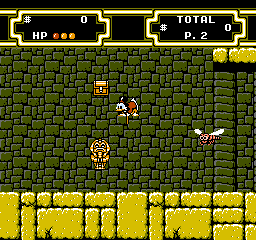
Duck Tales 2 (Japan)
0 2 1
Duck Tales 2 (Japan) is a platformer on the NES that continues the spirit of the original Disney adventure game. It features exploration, item collection, and tight jumping mechanics. Its straightforward gameplay and colorful pixel art make it a memorable part of the era’s platforming lineup. The game offers a nostalgic experience rooted in the 8-bit period, showcasing the console’s ability to create charming worlds filled with secrets and challenges.
Duck Tales 2: Gameplay Overview
Duck Tales 2 is a side-scrolling platformer where you navigate through levels full of obstacles, enemies, and hidden items. The main gameplay involves jumping, bouncing, and collecting items to progress. The controls are simple but responsive, with an emphasis on timing and precision. You control a Disney duck who can bounce on enemies, find power-ups, and explore thoroughly to uncover secrets and bonus areas.
The game encourages a careful approach to exploration, rewarding players who take time to find hidden pathways and items. Its level design balances linear progress with optional secrets, creating a sense of discovery. The difficulty is typical for NES platformers, with challenging segments and enemies that demand careful timing. Overall, the gameplay maintains a steady rhythm of platforming and item collection that keeps each session engaging and satisfying.
Modes, Levels and Progression
Duck Tales 2 features levels that are accessed in order, but with plenty of opportunities to replay levels and find hidden items or better routes. There aren’t multiple modes; it’s a single-player experience with a structured world map. Each level introduces new themes, enemies, and hazards, maintaining variety and challenge as you go along.
Progression depends on completing levels and collecting items that often unlock secrets or bonus stages. The game’s design encourages exploring every corner, as some levels hide passages and extra items needed for full completion. There aren’t branching storylines, but the level design and item placement create a layered experience that invites replaying for full completion. The length is typical for NES platformers, with a scope that rewards exploration and dedication.
Winning Strategies
Explore carefully and memorize level layouts to improve your progress. Aim to collect all items to access hidden areas and secrets.
- Perfect the bouncing mechanic to clear enemies efficiently and reach higher platforms.
- Pay attention to enemy patterns so you can avoid damage during platforming sections.
- Search every part of each level to find hidden pathways and bonus items.
- Look out for power-ups that boost your jumping or grant extra lives.
- Practice your timing for jumps and bounces to reduce damage and move smoothly through levels.
Common Questions About Duck Tales 2
How does the difficulty change as you progress?
The difficulty ramps up gradually, with levels introducing more complex enemy patterns and tighter platforming, typical of NES platformers that require patience and precision.
Are there multiple modes or just a single playthrough?
This game is designed as a single-player experience with linear levels, but replaying levels for secrets and collectibles adds depth.
How long does it usually take to finish Duck Tales 2?
Most players take about an hour to an hour and a half to complete it, depending on familiarity, with extra time spent exploring secrets.
Playing Duck Tales 2 in your browser makes it easy to enjoy this NES platformer without downloads. Its combination of exploration, precise jumping, and item collection makes it a memorable title from the NES era, offering both challenge and charm.
Related games: you can also try Castlevania II – Simon's Quest (USA) and Chester Field – Ankoku Shin heno Chousen (Japan) (Beta), or browse all other games in the NES category.
How to Play Duck Tales 2 (Japan)?
Navigate through levels by jumping, bouncing on enemies, and collecting items to uncover secrets and complete each stage. Explore carefully to find hidden areas and maximize your score.
Game Controls
Arrow keys move the character; jump and action buttons are on-screen mapped keys.
You may be interested in:
-
![Zombie Hunter (Japan) [En by KingMike v1.01]](https://www.playf2p.com/wp-content/uploads/zombie-hunter-japan-en-by-kingmike-v1-01-200x120.png) NES
♥ 2
Zombie Hunter (Japan) [En by KingMike v1.01]
NES
♥ 2
Zombie Hunter (Japan) [En by KingMike v1.01] -
 NES
♥ 1
Zombie Hunter (Japan)
NES
♥ 1
Zombie Hunter (Japan) -
 NES
♥ 1
Zoids Mokushiroku (Japan)
NES
♥ 1
Zoids Mokushiroku (Japan) -
 NES
♥ 2
Zoids 2 – Zenebas no Gyakushuu (Japan)
NES
♥ 2
Zoids 2 – Zenebas no Gyakushuu (Japan) -
 NES
♥ 1
Zoids – Chuuou Tairiku no Tatakai (Japan)
NES
♥ 1
Zoids – Chuuou Tairiku no Tatakai (Japan) -
 NES
♥ 11
Zippy Race (Japan)
NES
♥ 11
Zippy Race (Japan) -
 NES
♥ 1
Zhen Ben Xi You Ji (Asia) (Unl)
NES
♥ 1
Zhen Ben Xi You Ji (Asia) (Unl) -
 NES
♥ 1
Zenbei!! Pro Basket (Japan)
NES
♥ 1
Zenbei!! Pro Basket (Japan)
Comments (0)
No comments yet. Be the first to comment!