Dynasty Warriors DS – Fighter’s Battle (USA)
0 2 0
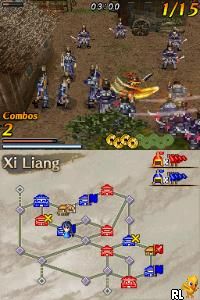
Dynasty Warriors DS – Fighter’s Battle (USA) is a classic Nintendo DS game that brings the legendary hack-and-slash action to your browser. This portable console gem is straightforward enough for newcomers but offers enough depth to keep fans engaged. Playing it online means you can jump into the chaos without any downloads or setup, making it a perfect quick-session game for fans of the genre.
What Is Dynasty Warriors DS – Fighter’s Battle?
This game is a side-scrolling beat ’em up that captures the essence of the Dynasty Warriors series, adapted for the Nintendo DS’s dual-screen setup. The core gameplay involves controlling a character to navigate through levels filled with enemies, utilizing simple combat mechanics to defeat waves of foes. It emphasizes fast-paced action, combo chaining, and clearing stages efficiently.
While it may not feature the sprawling battles of the main series, it offers a condensed, arcade-style experience that fits the handheld format. The objective remains defeating enemies and bosses across various stages, with the challenge lying in managing your attacks and avoiding damage. It’s designed to be accessible, with mechanics that are easy to learn but hard to master fully.
What Keeps You Coming Back
One of the main draws is the game’s straightforward combat and level progression. Each stage offers a different set of enemies and layouts, encouraging players to refine their timing and learn enemy patterns. The game’s quick load times and short levels make it ideal for quick play sessions or casual pickups.
Replaying levels to improve scores or unlock new characters and upgrades adds a layer of replayability. Even without complex RPG mechanics, mastering the combat flow and achieving higher ranks in each stage keeps it interesting. The game’s simple two-button controls focus on action, making it easy to pick up and enjoy multiple times.
Handy Tips
If you want to get the most out of Dynasty Warriors DS – Fighter’s Battle, keep these tips in mind:
- Time your attacks well to build combos and deal more damage.
- Use the dodge or block mechanics to avoid enemy attacks and stay in the fight longer.
- Practice clearing levels quickly to earn higher scores and unlock bonuses.
- Learn enemy attack patterns so you can anticipate and counter them effectively.
- Switch characters when possible to access different fighting styles and abilities.
- Keep an eye on your health bar and save your special moves for tougher enemies or bosses.
Player FAQ
Is Dynasty Warriors DS – Fighter’s Battle easy to pick up for new players?
Yes, the controls and mechanics are simple enough for newcomers to learn quickly, though getting good at the combat takes some practice.
Can younger players enjoy this game?
Since it involves fighting lots of enemies, it’s more suitable for older children and teens. Very young kids might find it a bit intense.
Does this game require an internet connection to play?
No, Dynasty Warriors DS – Fighter’s Battle runs offline and can be played directly in your browser without any network needed.
Playing Dynasty Warriors DS – Fighter’s Battle offers a quick, accessible way to enjoy classic handheld action. Its straightforward gameplay and replay value make it a solid choice for fans looking for a nostalgic, fast-paced brawler you can jump into right from your browser. Its simplicity and challenge keep it engaging, whether you have just a few minutes or longer to play.
Related games: you can also try Bratz Ponyz (USA) (En,Fr,Es) and Awa Tama (Japan), or browse all other games in the Nintendo DS category.
How to Play Dynasty Warriors DS – Fighter’s Battle (USA)?
Move your character, attack enemies, and avoid damage to clear levels and defeat bosses. Focus on timing attacks, dodging, and learning enemy patterns to improve your score.
Game Controls
Arrow keys for movement; action buttons mapped to keyboard keys; dodge and attack functions assigned to specific keys.
You may be interested in:
-
 Nintendo DS
♥ 1
Casper’s Scare School – Classroom Capers (USA)
Nintendo DS
♥ 1
Casper’s Scare School – Classroom Capers (USA) -
 Nintendo DS
♥ 1
Zunou Nouryoku Koujou Machine – Touch de Zunoo DS (Japan)
Nintendo DS
♥ 1
Zunou Nouryoku Koujou Machine – Touch de Zunoo DS (Japan) -
 Nintendo DS
♥ 1
Zunou ni Asekaku Game Series! Vol. 1 – Cool 104 Joker & Setline (Japan)
Nintendo DS
♥ 1
Zunou ni Asekaku Game Series! Vol. 1 – Cool 104 Joker & Setline (Japan) -
 Nintendo DS
♥ 9
Zuma’s Revenge (USA)
Nintendo DS
♥ 9
Zuma’s Revenge (USA) -
 Nintendo DS
♥ 1
Zubo (USA) (En,Fr,Es)
Nintendo DS
♥ 1
Zubo (USA) (En,Fr,Es) -
 Nintendo DS
♥ 1
Zubo (Europe) (En,Fr,De,Es,It,Nl,Sv)
Nintendo DS
♥ 1
Zubo (Europe) (En,Fr,De,Es,It,Nl,Sv) -
 Nintendo DS
♥ 1
Zorro – Quest for Justice (USA) (En,Fr,De,Es,It)
Nintendo DS
♥ 1
Zorro – Quest for Justice (USA) (En,Fr,De,Es,It) -
 Nintendo DS
♥ 1
Zorro – Quest for Justice (Europe) (En,Fr,De,Es,It)
Nintendo DS
♥ 1
Zorro – Quest for Justice (Europe) (En,Fr,De,Es,It)
Comments (0)
No comments yet. Be the first to comment!